Gutenberg: [3.7] pasting multiple paragraphs always creates Classic block...
Describe the bug
Pasting multiple paragraphs always creates Classic block.
To Reproduce
- Create a post/page with multiple paragraphs.
- Cut 2+ paragraphs
- Paste into a new position.
- An empty Classic block appears
Expected behavior
Classic block should not appear.
 GlennMartin1
All 21 comments
I was unable to reproduce the problem using the testing steps provided. I tested with Firefox 61.0.2 on macOS 10.13.6.
To confirm, you are copying content from within one Gutenberg post back into the same post in a different location, correct?
May I ask what OS and browser version you are using?
 designsimply
on 1 Sep 2018
designsimply
on 1 Sep 2018
I'm using Chrome 68.0.3440.106 on Windows 10.
Again, select two paragraphs within a page/post, copy and paste into a blank paragraph in the same page/post.
It consistently places two blank Classic blocks on the page, one before and one after the pasted text.
GlennMartin1
on 1 Sep 2018
I can reproduce. Looks like this: https://i.imgur.com/5RmbT9x.png
Create 2 Paragraphs. The select the two paragraphs, which makes them highlighted in blue. Do CTRL-C and then CTRL-V inside the new paragraph below them. It does this. I wonder if the Gutenberg markup in the HTML is throwing off the copy since it might be duplicating existing markup? This is actual text being copied:
<!-- wp:paragraph -->
<p>This is Paragraph 1.  This is Paragraph 1.   This is Paragraph 1.   This is Paragraph 1.   This is Paragraph 1.   This is Paragraph 1.   This is Paragraph 1.   This is Paragraph 1.   This is Paragraph 1.   This is Paragraph 1.   This is Paragraph 1.   This is Paragraph 1.  This is Paragraph 1.  This is Paragraph 1. </p>
<!-- /wp:paragraph -->

<!-- wp:paragraph -->
<p>This is paragraph 2.  This is paragraph 2.  This is paragraph 2.  This is paragraph 2.  This is paragraph 2.  This is paragraph 2.  This is paragraph 2.  This is paragraph 2.  This is paragraph 2.  This is paragraph 2.  This is paragraph 2.  This is paragraph 2.  This is paragraph 2.  This is paragraph 2.  This is paragraph 2.  This is paragraph 2.  This is paragraph 2. </p>
<!-- /wp:paragraph -->
By the way, using Firefox 61.0.2 in Windows 7 Pro.
 MarkRH
on 1 Sep 2018
MarkRH
on 1 Sep 2018
@MarkRH thank you tons for testing!
I re-tested and confirmed this happens with Chrome 68 on Windows 10. Here is a screenshot showing the extra classic blocks as well as a copy of the resulting markup for reference:
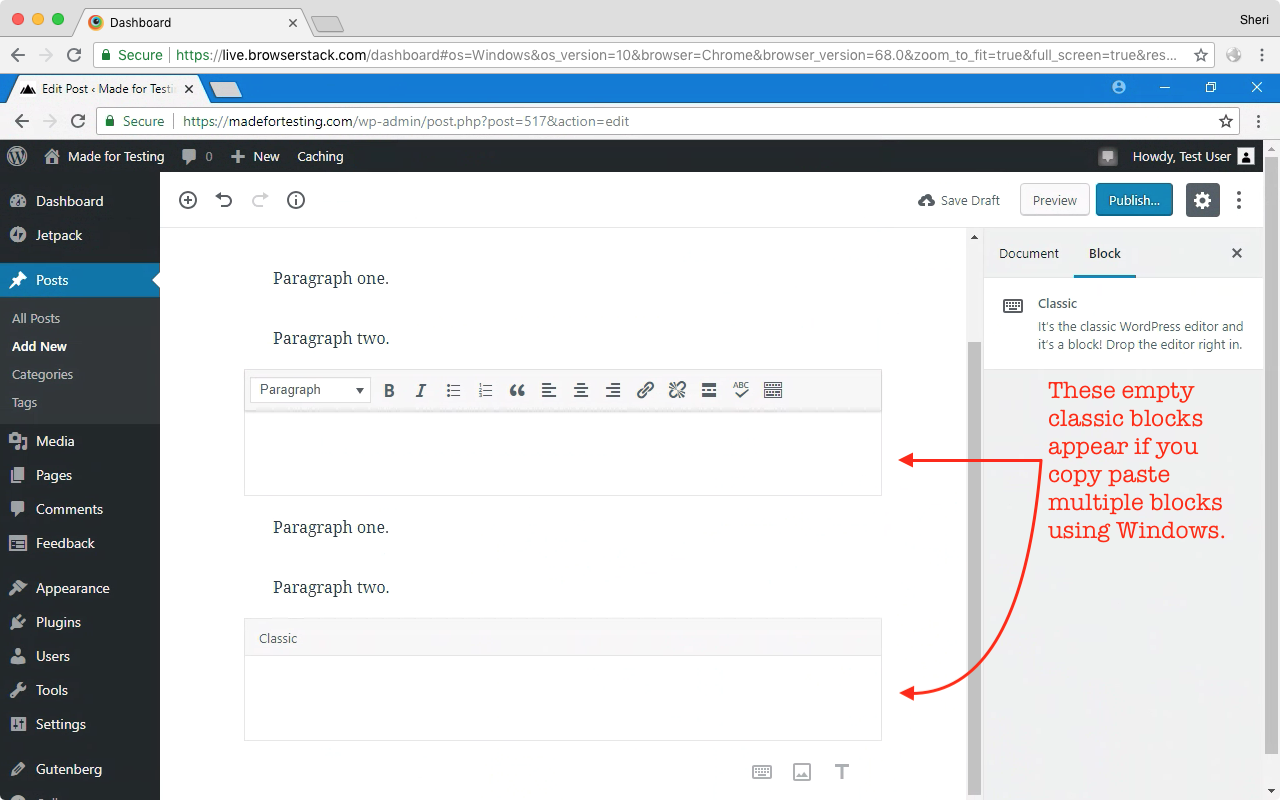
Seen at https://madefortesting.com/wp-admin/post.php?post=517&action=edit tested with WordPress 4.9.8 and Gutenberg 3.7 using Chrome 68 on Windows 10 via browserstack.com. Note: also tested and confirmed with Gutenberg 3.8.0-rc.1.
<!-- wp:paragraph -->
<p>Paragraph one.</p>
<!-- /wp:paragraph -->

<!-- wp:paragraph -->
<p>Paragraph two.</p>
<!-- /wp:paragraph -->

<p><br>
<br>
<!--StartFragment--></p>

<!-- wp:paragraph -->
<p>Paragraph one.</p>
<!-- /wp:paragraph -->

<!-- wp:paragraph -->
<p>Paragraph two.</p>
<!-- /wp:paragraph -->

<p><!--EndFragment--><br>
<br>
</p>
I'm guessing those <!--StartFragment--> and <!--EndFragment--> comments are being introduced by Windows's clipboard implementation (cf their HTML Clipboard Format), and that's what's throwing off Gutenberg's paste/convert stack.
Looping in @iseulde.
 mcsf
on 18 Sep 2018
mcsf
on 18 Sep 2018
Comments are not stripped if we detect Gutenberg comments. So somehow we need to strip them at the very start of raw handling.
 ellatrix
on 20 Sep 2018
ellatrix
on 20 Sep 2018
Persists through 4.1.1.
GlennMartin1
on 27 Oct 2018
Related issues:
copying and pasting into a Header block can result in an empty header block above the pasted header.
copying and pasting into a Quote block can result in an empty line before and after the pasted quote.
copying and pasting into a Table block can result in an empty line before the pasted content.
GlennMartin1
on 6 Nov 2018
https://github.com/WordPress/gutenberg/issues/12654 indicates the same bug observed with pasting images.
GlennMartin1
on 7 Dec 2018
Bump
 LZL0
on 13 Dec 2018
LZL0
on 13 Dec 2018
@iseulde could it be added to 4.8?
LZL0
on 18 Dec 2018
This issue persists in Gutenberg 5.3.
GlennMartin1
on 22 Mar 2019
Could someone share what is logged in the console, so I can work on a fix? I don't have Windows. :/
ellatrix
on 22 Mar 2019
Give me a few minutes, please.
LZL0
on 22 Mar 2019
LZL0
on 22 Mar 2019
This seems fixed for me.
 youknowriad
on 22 Aug 2019
youknowriad
on 22 Aug 2019
Hello @youknowriad
This is still happening to me in Wordpress 5.2.3.
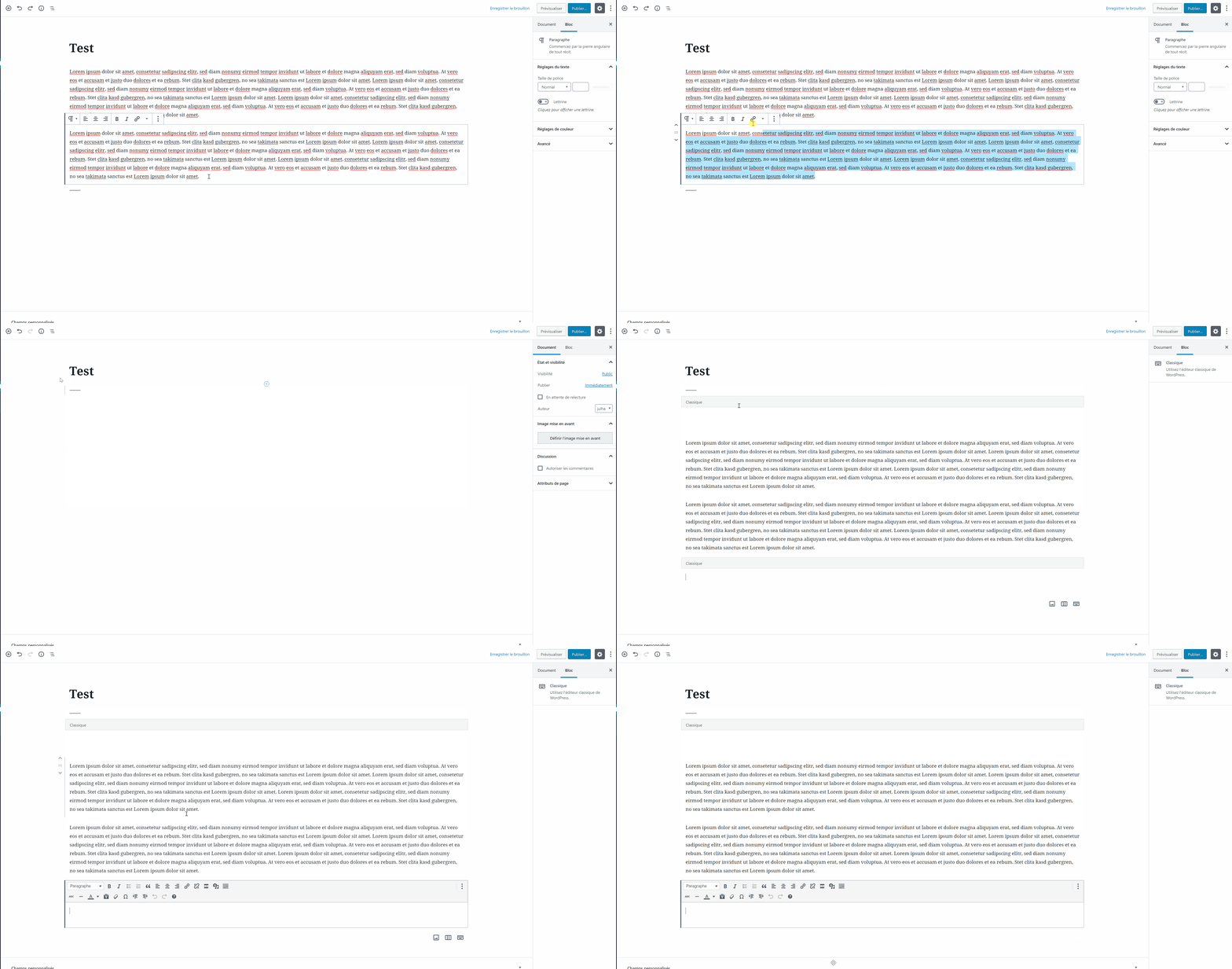
At every multiple paragraph copy/pasting, classic blocks are inserted before and after.
Tested with Chrome 77.0.3865.90
 AgamlaRage
on 1 Oct 2019
AgamlaRage
on 1 Oct 2019
@youknowriad Here is a gif
AgamlaRage
on 1 Oct 2019
Did you try with the Gutenberg plugin installed? or WP 5.3 beta2?
youknowriad
on 1 Oct 2019
@youknowriad Nop, only tested with this configuration
Wordpress 5.2.3
Chrome 77.0.3865.90
AgamlaRage
on 1 Oct 2019
I've been using with a more recent version when I closed the ticket. that said, I'd appreciate confirmation.
youknowriad
on 1 Oct 2019
Related issues
 mtias
·
83Comments
mtias
·
83Comments
 maddisondesigns
·
79Comments
maddisondesigns
·
79Comments
 tofumatt
·
86Comments
tofumatt
·
86Comments
 SchneiderSam
·
88Comments
SchneiderSam
·
88Comments
 ahmadawais
·
101Comments
ahmadawais
·
101Comments