Gutenberg: Collection of nested blocks as one block
When coding custom blocks, it would be useful to reuse existing blocks wrapped as a block collection.
E.g. creating a typical hero section block with a colored background, title, text and button, it could be put together as an all new UI. However, it could also be just a wrapper block (re)using core blocks Heading, Paragraph, Button, etc. Currently, this does not seem possible.
A mildly related concept is actually possible if you, say, use the Columns block, add some child blocks and save as shared. But: I don't see a way to do anything similar in code (and of course, in our case, we would want independent block content). Furthermore, the concept of Templates https://wordpress.org/gutenberg/handbook/templates/ seems like it tries to accomplish something similar – but they can't behave as blocks.
The best solution would be to make it possible to create block collections that appear as a single block in the Gutenberg UI.
 perandre
All 4 comments
@perandre I think this can be accomplished with templates, through the <InnerBlocks /> feature.
You can learn more about that here: https://github.com/WordPress/gutenberg/blob/master/packages/editor/src/components/inner-blocks/README.md
There's also a pretty good example in this PR: https://github.com/WordPress/gutenberg/pull/7414/files#L28
Let me know if that helps!
 chrisvanpatten
on 23 Aug 2018
chrisvanpatten
on 23 Aug 2018
This kind of sounds like a Reusable Block. A Reusable Block is a block that you can save to be re-used anywhere on your website. If you update one instance of the Reusable Block, all other instances are updated as well. You can also convert a Reusable Block to a regular block, allowing you to use Reusable Blocks as templates.
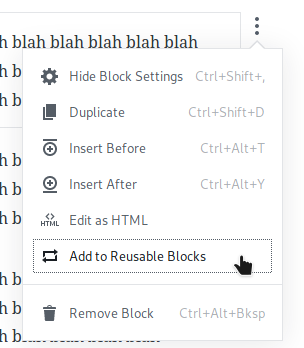

Unfortunately, Reusable Blocks have some issues with nested blocks right now, where trying to convert a Reusable Block to a regular block will cause all the nested blocks to be removed. I have reported this issue in #9278.
 ZebulanStanphill
on 23 Aug 2018
ZebulanStanphill
on 23 Aug 2018
This kind of sounds like a Reusable Block
Indeed, since shared blocks can be converted back to blocks; thanks for the reminder, @ZebulanStanphill. However, I want to solve this in code, to provide a library of nested blocks out of the box. The InnerBlocks concept seems to solve it; we will have a look and reply back. Thanks, @chrisvanpatten
perandre
on 24 Aug 2018
@perandre InnerBlocks is indeed what should help you. You can create any block to function as a template:
    edit() {
        return (
            <InnerBlocks
                template={ [
                    [ 'plugin/my-block', { color: 'rgb(123, 220, 181)' } ],
                    [ 'core/image', { id: 4778, align: 'full', url: 'http://...' } ],
                    [ 'core/heading', { level: 2, content: 'Some text here' } ],
                    [ 'core/paragraph', { customFontSize: 25, content: 'Lorem ipsum dolor sit amet, consectetur adipisicing elit, sed do eiusmod tempor incididunt ut labore et dolore magna aliqua.' } ],
                    [ 'core/paragraph', { content: 'Lorem ipsum dolor sit amet.' } ],
                    [ 'core/spacer', { height: 290 } ],
                    [ 'core/paragraph', { content: 'Thanks for visiting!' } ],
                ] }
                templateLock={ 'all' }
            />
        );
    },
 mtias
on 24 Aug 2018
mtias
on 24 Aug 2018
Related issues
 ellatrix
·
3Comments
ellatrix
·
3Comments
 wpalchemist
·
3Comments
wpalchemist
·
3Comments
 JohnPixle
·
3Comments
JohnPixle
·
3Comments
 maddisondesigns
·
3Comments
maddisondesigns
·
3Comments
 spocke
·
3Comments
spocke
·
3Comments
Most helpful comment
@perandre
InnerBlocksis indeed what should help you. You can create any block to function as a template: