Gutenberg: Copy pasting alleged heading into paragraph results in content being removed
Issue Overview
I was just writing a post on make/core and wanted to copy past a ticket number (e.g. #1234) into the current paragraph block I was writing in. When I inserted it, Gutenberg thought it's a heading and creates a new heading block. Unfortunately, this results in the content _after_ the inserted text being removed.
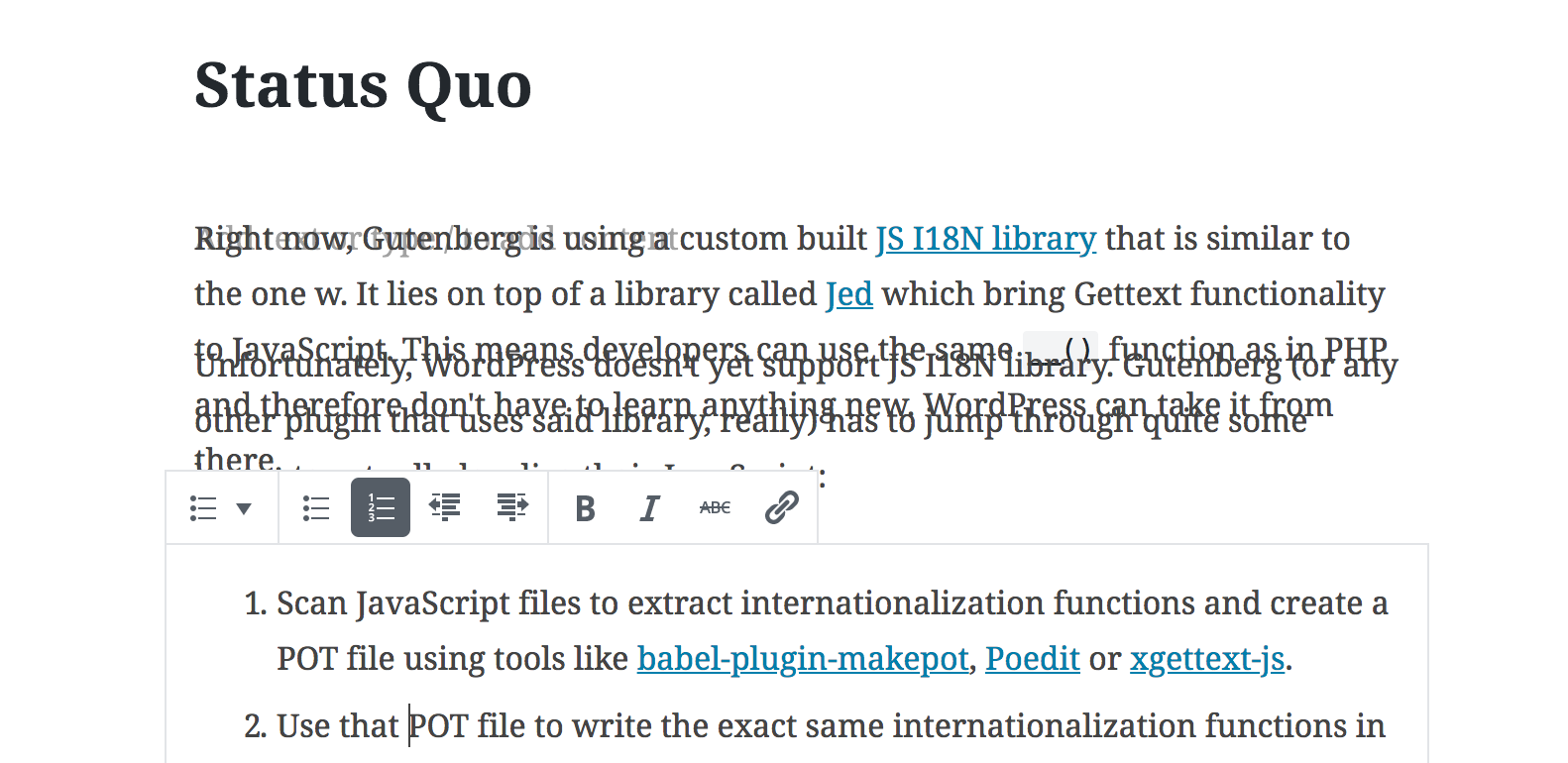
There's similarly weird behavior when pasting the ticket number at the beginning of the paragraph. A new heading is created (which makes more sense since it's at the beginning), but the following paragraphs are overlapping.
Steps to Reproduce (for bugs)
Note: I'm using latest Chrome on macOS and whichever version of Gutenberg that is installed on make/core.
Inserting in the middle:
- Write something in a paragraph block
- Paste an alleged heading (hashtag, ticket number, etc.) in the middle of the paragraph
- Notice how the paragraph is split up, a heading is created, and part of the content disappeared.
Inserting at the beginning:
- Write something in a paragraph block
- Paste an alleged heading (hashtag, ticket number, etc.) at the beginning of the paragraph
- Notice how the paragraph is split up, a heading is created, and the blocks are overlapping.
Expected Behavior
If I paste something that could be a heading (leading #) in the middle of a paragraph, I don't expect a heading to be created at all. And if that shouldn't be changed, at least my content shouldn't get lost. This seems like a fairly regular task (e.g. pasting a hashtag from twitter) and shouldn't mess with the content.
If I paste the alleged heading at the beginning of a paragraph, the following paragraphs should continue to work as usual.
Current Behavior
Content is lost and blocks in a weird state.
Screenshots / Video
Inserting in the middle:
https://cloudup.com/cmrXE8RhKYK
Inserting at the beginning:
Todos
- [ ] Tests
 swissspidy
All 16 comments
@swissspidy Is this still a problem? I think this was resolved in the last release with #10614. If it's still a problem, feel free to reopen!
 ellatrix
on 29 Oct 2018
ellatrix
on 29 Oct 2018
@iseulde I just tested this using Gutenberg 4.1.1 and the WordPress 5.0 branch and can confirm it's still a problem.
To reproduce I did the following:
- Write a paragraph. (e.g.
ABCDwill suffice) - Copy the number of this issue (
#6516) in the middle of the paragraph (AB<paste>CD) - Notice how the paragraph is split in half and
#6516turns into a H1 heading with the text6516.
So it's now one paragraph block withAB, the heading block, and another paragraph block withCD - Press Cmd+Z
- Notice how the paragraph is complete again, but the heading still remains.
There's now aABCDblock, the heading block, and aCDparagraph block - Press Cmd+Z again
- There's now only a single
ABCDparagraph block like in the beginning
So yes, this is still a problem.
Let me know if I should test with the current master of Gutenberg or something.
swissspidy
on 29 Oct 2018
Ugh, apparently the plugin was deactivated because of the DB upgrade routine in the beta and I didn't notice. 🤦♂️
Still not working properly though.
What happens now is this:
- Write a paragraph (
ABCD) - Paste issue number (
#6516) in the middle - Notice how the paragraph changes to
AB6516CDinstead ofAB#6516CD
swissspidy
on 29 Oct 2018
@swissspidy Are you sure you included the # character when copying from the source? Which browser is this? I cannot reproduce with these last steps.
ellatrix
on 29 Oct 2018
(Double clicking might not include the #.)
ellatrix
on 29 Oct 2018
I'm using Chrome 70 on macOS and 100% sure that I included the #. I even typed #123 in the browser address bar and copied it from there for pasting in the editor.
Same behavior in Safari and Firefox.
Just so I'm not testing an outdated version, #10614 is part of Gutenberg 4.1.1, right?
swissspidy
on 29 Oct 2018
Cannot reproduce: I open a new post and type "test". I copy an issue number from the title in Github and paste in in the middle of "test". The result is "te#123st".
What is logged in the console?
ellatrix
on 29 Oct 2018
WordPress 5.0 Beta 2, with or without Gutenberg 4.1.1, same issue.
In the console it logs:
index.js?ver=1540821178:50 Received HTML:


index.js?ver=1540821178:50 Received plain text:

 #1234
index.js?ver=1540821178:2 Processed HTML piece:

 <h1>1234</h1>
Resulting paragraph block is AB1234CD
swissspidy
on 31 Oct 2018
Hm... No received HTML? In that case, yes, it will see it as a plain text paste and parse any markdown. This seems expected. If the browser decides not to include any HTML, there's not much I can do. :/
ellatrix
on 31 Oct 2018
Yeah as I said I copied it from the browser address bar to make sure it's plain text. I don't wanna accidentally paste HTML into my blog post when I just want the issue reference 🙂
So... if it parses it as Markdown, why doesn't it create a heading block then? What it does now is losing part of the content I am pasting, which isn't ideal.
swissspidy
on 31 Oct 2018
Oh, so if you don't paste out of the address bar it works? Okay, you have a point: when we detect an single line, we paste as inline text, but that should also revert any markdown conversion.
ellatrix
on 31 Oct 2018
I'll work on a fix.
ellatrix
on 31 Oct 2018
What's the status of this one?
 mtias
on 15 Nov 2018
mtias
on 15 Nov 2018
Bug still occurs.
Oh, so if you don't paste out of the address bar it works?
Yes, that works.
swissspidy
on 15 Nov 2018
There's a lot on my priority list. This wasn't on it.
ellatrix
on 15 Nov 2018
This doesn't seem to happen when pasting any more, so I'll close the issue.
Feel free to reopen if I missed something though, @swissspidy.
 talldan
on 22 Apr 2020
talldan
on 22 Apr 2020
Related issues
 maddisondesigns
·
3Comments
maddisondesigns
·
3Comments
 jasmussen
·
3Comments
jasmussen
·
3Comments
jasmussen
·
3Comments
jasmussen
·
3Comments
 aaronjorbin
·
3Comments
aaronjorbin
·
3Comments
 mhenrylucero
·
3Comments
mhenrylucero
·
3Comments