Gutenberg: Add float clearing functionality to blocks
Noticed during WordCamp Rome contributor day users testing session. /cc @johnbillion
Gutenberg gives users the ability to easily float some block types (e.g. images, pull quotes) to the left or right and have the following blocks content wrap around the floated one:
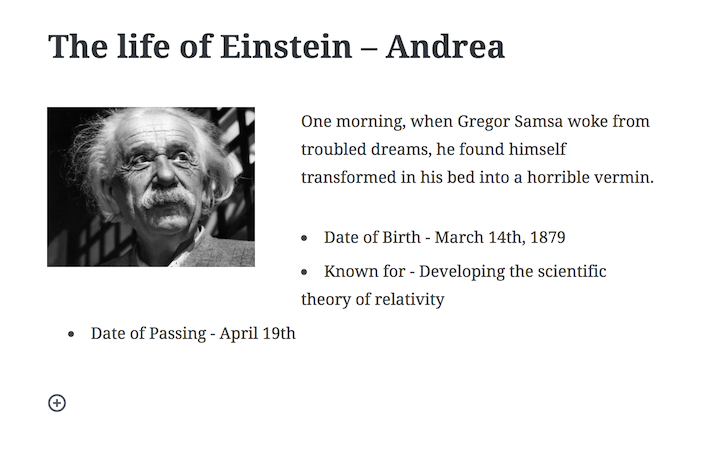
This may or may not be the desired layout. What if I want to clear the following block to make it not wrap the image? For example:

The only way I've found so far is to add new empty lines to push down the following block. Worth noting this is not new to Gutenberg, I think users do this also in the classic editor but it's an ugly practice, it produces lots of unsemantic, empty, paragraphs, it's not responsive, etc.
Gutenberg is an excellent opportunity to offer users a better option 🙂 I'd propose to introduce a simple, effective, way to "clear" a block. It should be something very intuitive, something users can understand ("clear" is too technical), and something that aims to produce better, cleaner, more semantic markup.
 afercia
All 10 comments
As a workaround, if the theme implements some form of clearfix class, the class could be added to the next block to clear the float.
Alternatively, a clearfix block could be implemented to provide Gutenberg-specific UX for this.
 danielbachhuber
on 19 Jan 2018
danielbachhuber
on 19 Jan 2018
I think this is quite an advanced feature for people to understand clearing. Do nested blocks solve this (maybe more in future)?
 karmatosed
on 7 Mar 2018
karmatosed
on 7 Mar 2018
And herein lies the rub with calling these content fragments, "blocks." This is one of the ways in which they simply do not act like blocks, in the sense that the alignment makes them open-ended and not closed.
Whole-heartedly agree with OP that Gutenberg is an excellent opportunity to address this pre-existing issue. Also agree that "Clearing" should not be the user-facing verbiage for this feature.
People understand the concept of "I want my next 'block' of content _below_ this block, not _next_ to it" even if they don't understand what 'clearing the float' and 'floats' are.
Ideas:
A "new section" button/verbiage. This automatically clears the float and places the next block of content after that.
-- could also triggered by x number of Enter/Return presses, similar to the way a paragraph is triggered by one Enter/Return press.A "block position" control to place a block next to or below the previous block (possibly only available when a float-y alignment has been selected)
 webtrainingwheels
on 18 Apr 2018
webtrainingwheels
on 18 Apr 2018
Filed against WordPress 5.0 because this needs to addressed in conjunction with #4010 and #6634
danielbachhuber
on 17 May 2018
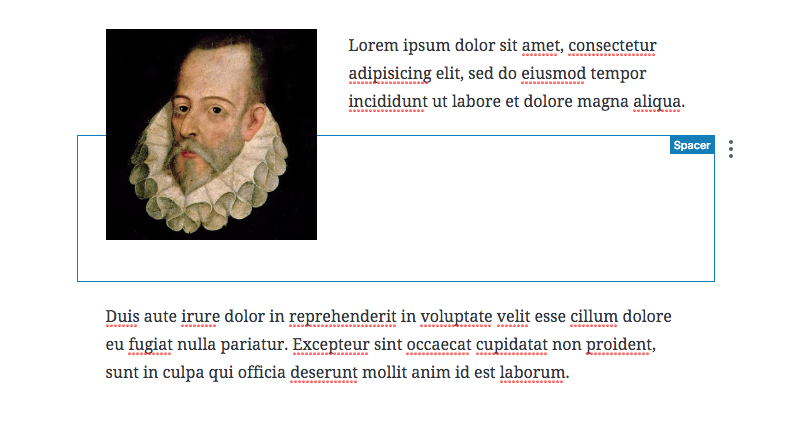
This can also be achieved with a spacer block.
 mtias
on 9 Jul 2018
mtias
on 9 Jul 2018
Hm as the Spacer uses a fixed height in pixels, it probably won't work well in a responsive layout where the text reflows and also the image can be responsive.
afercia
on 9 Jul 2018
Just my 2c here:
Though we've been using floats & clearfixes for more than a decade, they are no longer necessary and should be avoided if possible. clearfixes are more of a hack than a best practice.
The example in the OP should (ideally) not be allowed, and instead users would use the block from https://github.com/WordPress/gutenberg/pull/7414
However, if floating blocks is allowed, then we should also allow clearfix. One cannot exist without the other efficiently... If a user understands "floating", then they also understand "clearing". If we allow one, we should allow the other.
Also I think that adding a new "clearfix" block is a bit of an overkill... if floating is an option then so should clearfixes.
 aristath
on 9 Jul 2018
aristath
on 9 Jul 2018
@afercia Floats do not really work well for responsive design in the first place.
All the issues with floats make me think that perhaps #4314 is actually the right way to go after all.
 ZebulanStanphill
on 9 Aug 2018
ZebulanStanphill
on 9 Aug 2018
Could we add a "clear left & right aligned items" toggle to the Spacer block and the Separator block? Or perhaps just make those two clear floats by default?
We all know HTML. We all know this is intentional behavior in the spec, and we all know the workarounds and how to fix it. It's quite exotic behavior, and if we are to build a feature into Gutenberg that makes it easy for anyone to address the issue presented, we have to think like a user that perhaps doesn't care about webdesign at all. If you had the issue present in this ticket, what would you do?
The answer is probably insert linebreaks. Yes, this is completely anecdotal speculation, but I doubt any advanced "clear blocks" feature will be discoverable to anyone but those who already know how to address this behavior.
 jasmussen
on 26 Sep 2018
jasmussen
on 26 Sep 2018
I'm going to close this as we haven't reached a good proposal. Let's reopen when / if a design implementation becomes a bit more tangible.
mtias
on 7 Oct 2018
Related issues
 spocke
·
3Comments
spocke
·
3Comments
 davidsword
·
3Comments
davidsword
·
3Comments
 hedgefield
·
3Comments
hedgefield
·
3Comments
 pfefferle
·
3Comments
pfefferle
·
3Comments
 youknowriad
·
3Comments
youknowriad
·
3Comments
Most helpful comment
And herein lies the rub with calling these content fragments, "blocks." This is one of the ways in which they simply do not act like blocks, in the sense that the alignment makes them open-ended and not closed.
Whole-heartedly agree with OP that Gutenberg is an excellent opportunity to address this pre-existing issue. Also agree that "Clearing" should not be the user-facing verbiage for this feature.
People understand the concept of "I want my next 'block' of content _below_ this block, not _next_ to it" even if they don't understand what 'clearing the float' and 'floats' are.
Ideas:
A "new section" button/verbiage. This automatically clears the float and places the next block of content after that.
-- could also triggered by x number of Enter/Return presses, similar to the way a paragraph is triggered by one Enter/Return press.
A "block position" control to place a block next to or below the previous block (possibly only available when a float-y alignment has been selected)