Gutenberg: CFS WYSIWYG field displays differently in Gutenberg
Issue Overview
CFS (Custom Field Suite) WYSIWYG field displays differently in Gutenberg vs. Classic Editor.
Steps to Reproduce (for bugs)
- Install and activate Custom Field Suite plugin: https://wordpress.org/plugins/custom-field-suite/.
- Create a WYSIWYG field and enable for posts/pages.
Expected Behaviour
The WYSIWYG field will render with equivalent functionality in Classic Editor and Gutenberg.
Current Behaviour
The WYSIWYG field renders with TinyMCE buttons in Classic Editor and without TinyMCE buttons in Gutenberg.
_Gutenberg 1.6.0
Windows 10
Chrome 61.0.3163.100 (Official Build) (64-bit)_
Classic Editor
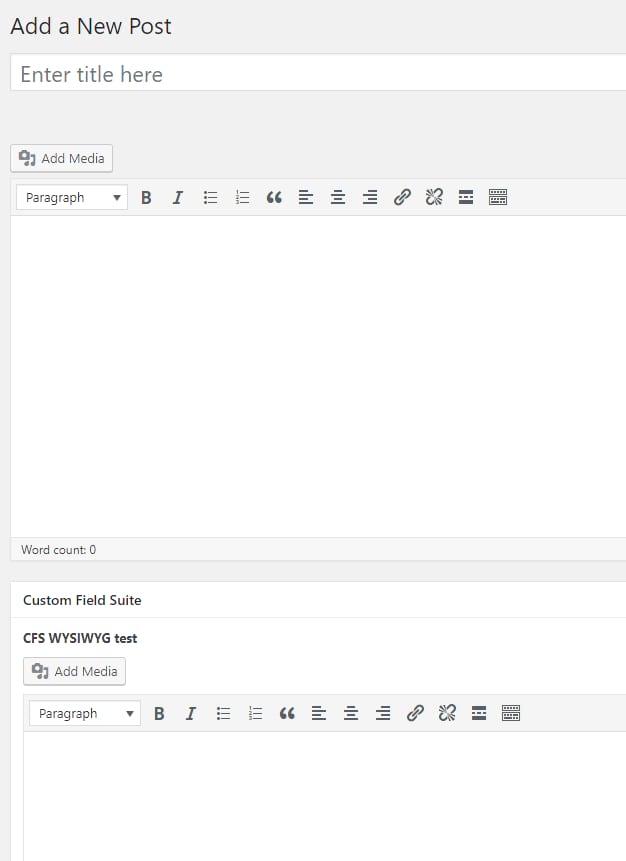
Gutenberg

 chthonic-ds
All 7 comments
Hi @chthonic-ds,
Thank you for the report. Most likely TinyMCE is not being enqueued properly or something of that nature. I will look into it. Is CFS on the WordPress.org Plugins Repository?
 BE-Webdesign
on 2 Nov 2017
BE-Webdesign
on 2 Nov 2017
Thanks @BE-Webdesign. The repository link is noted in the issue: https://wordpress.org/plugins/custom-field-suite/.
chthonic-ds
on 2 Nov 2017
This is not the issue with this plugin only. Any plugin that uses wp_editor() to embed TinyMCE editor in metaboxes is broken, sometimes completely, in some cases, only TinyMCE Visual tab is broken and Text tab shows toolbar, but no content area.
 dev4press
on 16 Nov 2017
dev4press
on 16 Nov 2017
This is the same for ACF WYSIWYG fields. It also prevents the Add media, insert images, and add forms from working in using Gravity Forms, and Unsplash Image plugin.
Unfortunately because of this issue. This plugin is unusable for me.
 adampatterson
on 17 Nov 2017
adampatterson
on 17 Nov 2017
Yep Pods is broken too. See below for an example, I had to click into Text tab since Visual tab is empty to type that text shown.

 sc0ttkclark
on 29 Nov 2017
sc0ttkclark
on 29 Nov 2017
Yep, it's for any metabox with a wp_editor() function call as said by @dev4press.
Too time consuming for me to look into the code, I don't know the tinymce part of WP, either Gutenberg at all, but it's a major issue, no doubt about that.
 nderambure
on 8 Feb 2018
nderambure
on 8 Feb 2018
I will do my best to resolve this somehow, hopefully before the end of the month.
BE-Webdesign
on 8 Feb 2018
Related issues
 mhenrylucero
·
3Comments
mhenrylucero
·
3Comments
 pfefferle
·
3Comments
pfefferle
·
3Comments
 JohnPixle
·
3Comments
JohnPixle
·
3Comments
 hedgefield
·
3Comments
hedgefield
·
3Comments
 maddisondesigns
·
3Comments
maddisondesigns
·
3Comments
Most helpful comment
I will do my best to resolve this somehow, hopefully before the end of the month.