Gutenberg-mobile: Cannot preview changes made to homepage mobile starter content generated with the homepage picker
Steps to reproduce:
- Go to My Sites > + > Create a new WordPress.com site and complete the site creation flow.
- Go to My Site > Pages > Home and select any layout from the "Choose a design" modal.
- Edit your home page content.
- Tap "Preview".
- Try editing different pages created by headstart and try previewing changes to those pages.
Result: I expected to be able to preview changes made to home page mobile starter template designs but previews just show me the original content even if I have made changes. Note: the same problem does not happen for other pages such as About or Contact. (2m32s)
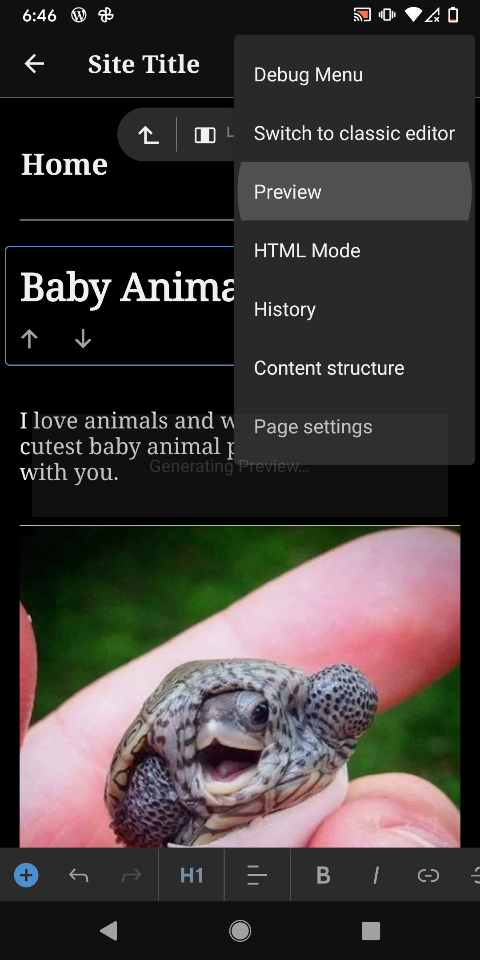
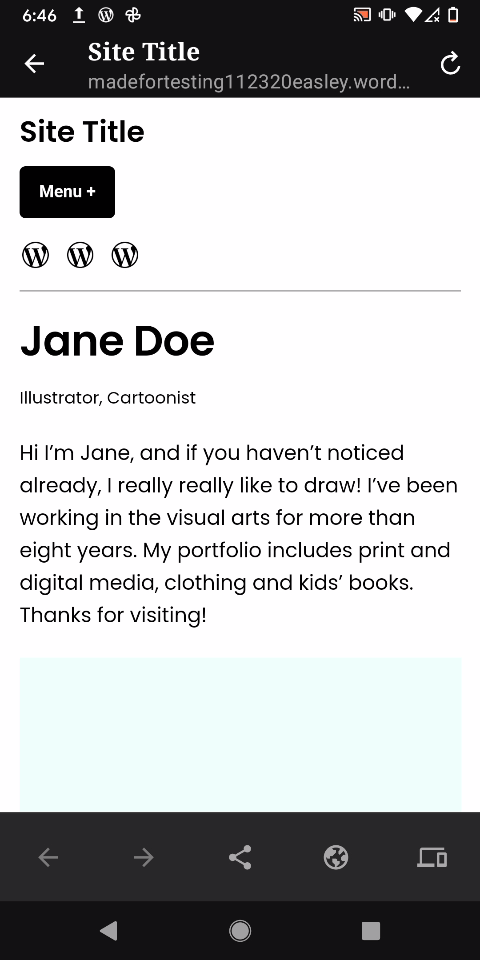
Easley theme home page template tested with WordPress-pr-13409-build-84220.apk on Pixel 3 Android 11 using madefortesting112320easley.wordpress.com logged in as user111720.
 designsimply
All 10 comments
I was able to reproduce the issue both on Android and iOS. It seems that this behaviour derives from the fact that on the site's homepage the preview parameters (preview, preview_id and preview_nonce) are ignored and the actual homepage is shown. Thus any change is visible only if the homepage has been updated.
I noticed the following:
- If you test any page with a slug in the url the preview works as expected.
e.g.https://antonistest36.wordpress.com/slug/?preview=true&preview_id=28&preview_nonce=bae072d384 - In case of the homepage no slug path is used and the preview changes are not visible
e.g.https://antonistest36.wordpress.com/?preview=true&preview_id=29&preview_nonce=896e3e8777 - If the url is manually edited adding the home slug in the path the preview mode seems to work as expected
e.g.https://antonistest36.wordpress.com/home/?preview=true&preview_id=29&preview_nonce=896e3e8777
Further investigation is needed on the server to either provide to the clients the full preview link or to handle the preview mode in the homepage.
 antonis
on 24 Nov 2020
antonis
on 24 Nov 2020
- In case of the homepage no slug path is used and the preview changes are not visible
Nice sleuthing Antonis! I've reproduced this issue as well, and afterwards confirmed that the preview URL persisted to the local database for the home page does not have the slug:
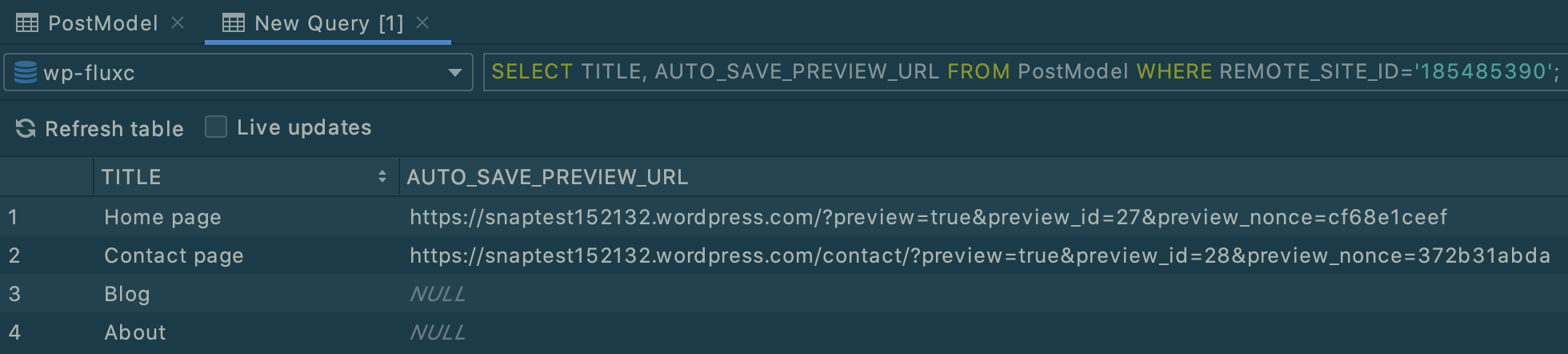
I'm not sure why the preview parameter has no effect in that case. I'm going to investigate whether we can work around this in the app, in case there is some technical blocker on the back-end. Perhaps there is a way to persist the URL with the slug when it first syncs. :thinking:
 mkevins
on 27 Nov 2020
mkevins
on 27 Nov 2020
Perhaps there is a way to persist the URL with the slug when it first syncs
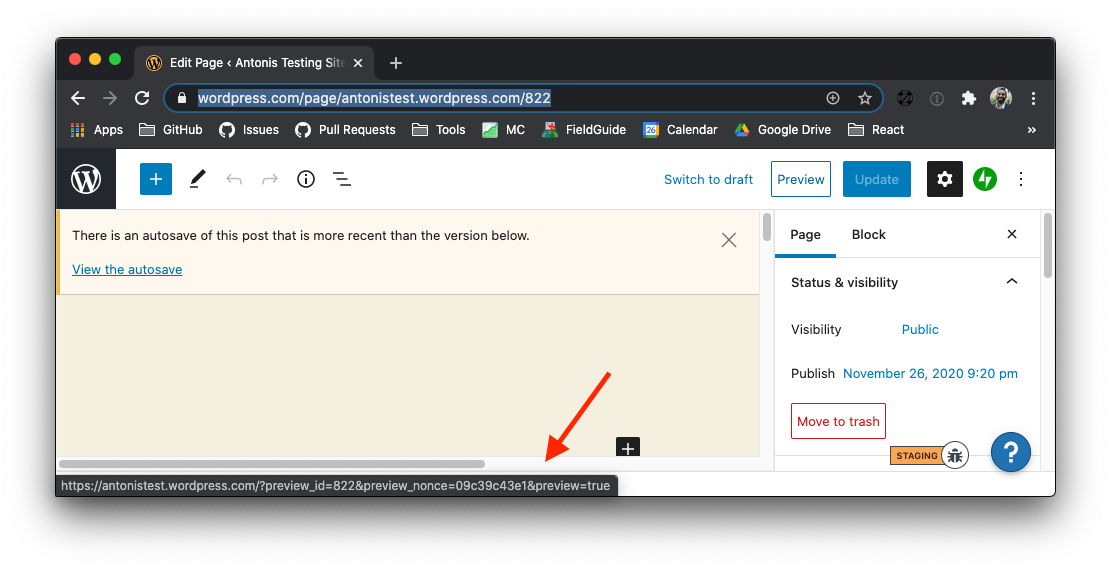
Checking the functionality on the web it seems that the preview url does not contain the slug. That means that what differentiates the behaviour between the web and mobile is the preview generation/upload process
antonis
on 27 Nov 2020
Hey @guarani, @aerych 👋
I've seen that you recently worked on the preview mechanism on iOS (nice retrospective btw). I wonder if you came across this issue or you have feedback based on your experience on how the preview mechanism works.
I've drafted a workaround for this (Android only for now) by appending the page slug to the preview url based on the observation above but I feel that this is just a hack.
antonis
on 27 Nov 2020
Hey @guarani, @aerych 👋
I've seen that you recently worked on the preview mechanism on iOS (nice retrospective btw). I wonder if you came across this issue or you have feedback based on your experience on how the preview mechanism works.
Hi @antonis! From what I read above, this issue relates to the preview failing to pick up changes to pages, and instead showing the original page. I didn't run into this issue while helping out with the preview mechanism work with @aerych — in all my tests, the post/page draft preview (which is most similar to this issue) worked well.
I'm not familiar with the slug or home parts of the URL path unfortunately, and I don't know why the preview=true is being ignored as you mentioned in https://github.com/wordpress-mobile/gutenberg-mobile/issues/2832#issuecomment-732999563.
Sorry I couldn't be of more help @antonis, maybe @aerych has more insights.
 guarani
on 30 Nov 2020
guarani
on 30 Nov 2020
Hey @antonis 👋
how the preview mechanism works
Only the gist of it. I'd need a refresher on how it all works before trying to talk too much about it. 😬 One bit I _think_ i remember correctly is that preview=true is what tells the site to show an autosave of a published post/page rather than the published content. (But I doubt my memory so take that with a grain of salt.)
I've drafted a workaround for this (Android only for now) by appending the page slug to the preview url based on the observation above but I feel that this is just a hack.
That sounds reasonable to me actually. I'm not too surprised to see different behavior when viewing the homepage via the site root, vs the page's permalink. I would guess the mechanism that loads the page from the site root skips the wordpress filter(s) or hook(s) that would show the preview content.
 aerych
on 1 Dec 2020
aerych
on 1 Dec 2020
Thank you for the for the feedback @aerych and @guarani 👍 I really appreciate this 🙇
I guess the workaround is a valid approach for now :)
antonis
on 2 Dec 2020
A server side fix has been applied
antonis
on 4 Dec 2020
Summarizing the server-side fix for future reference: The Autosave endpoint was returning an invalid preview URL. As part of the preview URL it was including:
https://{{domain}}.wordpress.com/?preview=true&preview_id={{auto_save_id}}&preview_nonce={{nonce}}
Replacing this format with solves the issue.
https://{{domain}}.wordpress.com/?preview=true&preview_id={{page_id}}&preview_nonce={{nonce}}
The change above replaces preview_id={{auto_save_id}} with preview_id={{page_id}}
 chipsnyder
on 4 Dec 2020
chipsnyder
on 4 Dec 2020
(internal reference: D53752-code)
designsimply
on 4 Dec 2020
Related issues
 pinarol
·
4Comments
pinarol
·
4Comments
 mzorz
·
4Comments
mzorz
·
3Comments
mzorz
·
4Comments
mzorz
·
3Comments
 hypest
·
4Comments
designsimply
·
4Comments
hypest
·
4Comments
designsimply
·
4Comments
Most helpful comment
Summarizing the server-side fix for future reference: The Autosave endpoint was returning an invalid preview URL. As part of the preview URL it was including:
https://{{domain}}.wordpress.com/?preview=true&preview_id={{auto_save_id}}&preview_nonce={{nonce}}Replacing this format with solves the issue.
https://{{domain}}.wordpress.com/?preview=true&preview_id={{page_id}}&preview_nonce={{nonce}}The change above replaces
preview_id={{auto_save_id}}withpreview_id={{page_id}}