Gutenberg-mobile: Gutenberg toggle should only have effect on new posts.
Existing posts should open in Gutenberg if they have block content, or Aztec otherwise.
- [x] iOS side work
- [x] Android side work
 koke
koke
All 10 comments
OK, let's clear up the design on this one.
We're looking at combining the two distinct settings currently in the App Settings (the editor selection and the Gutenberg switch) into only one and to only govern which editor to use for _new posts_, right?
We can have the new UI be a single switch/toggle (Gutenberg when ON, Aztec when OFF) or a selection. Any preference? Let's go for the simple switch?
cc @iamthomasbishop
 hypest
on 11 Feb 2019
hypest
on 11 Feb 2019
There’s some existing discussion on #567 about the copy, but yes. Only the switch should remain with Gutenberg as the ON value
koke
on 11 Feb 2019
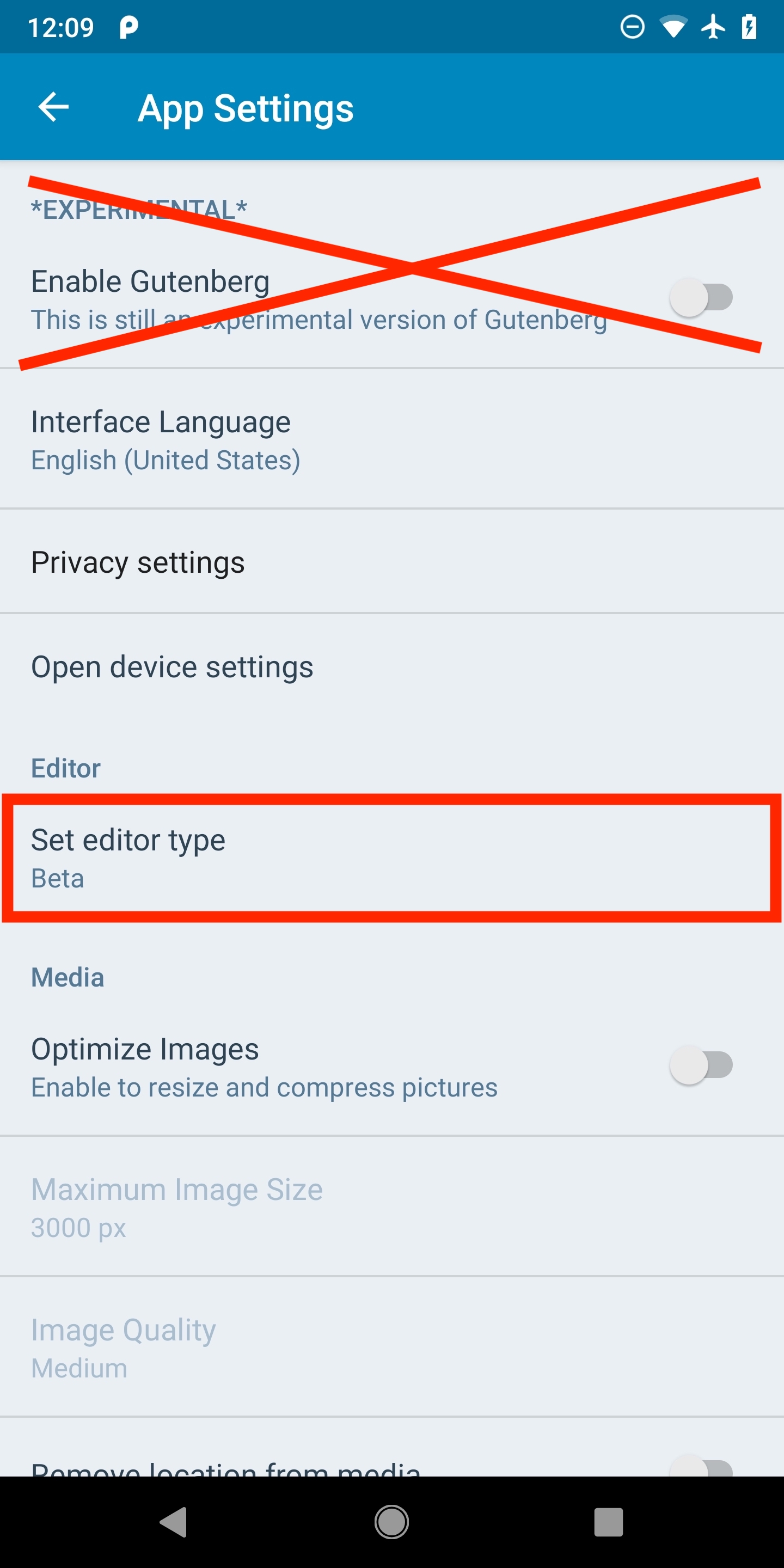
I'm planning to position/move the toggle into the place the editor selection was before:
hypest
on 11 Feb 2019
👍 makes sense. Some day we should order the sections consistently across platforms, but not today 😉
koke
on 11 Feb 2019
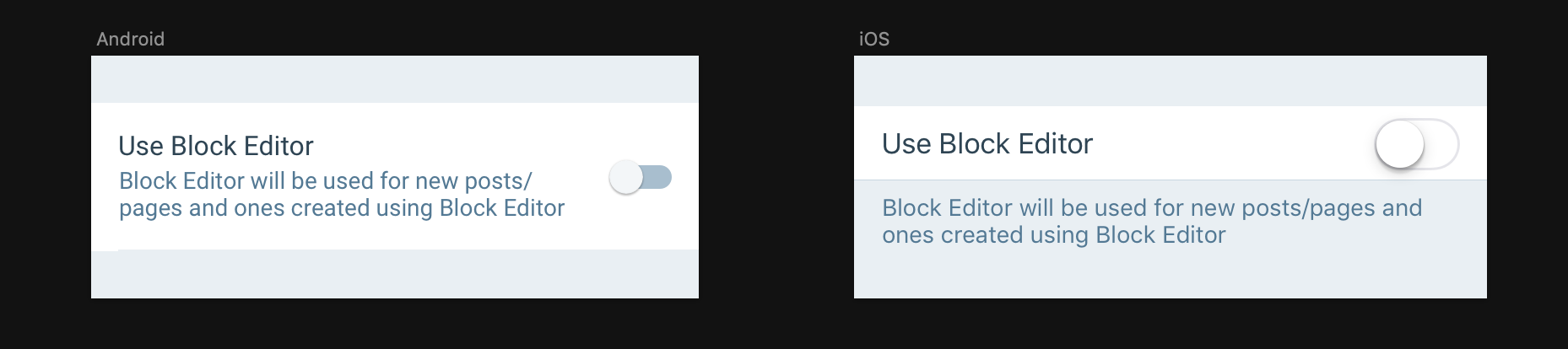
Just want to clarify and give a visual example here. Is this in-line with what we are considering?
 iamthomasbishop
on 11 Feb 2019
iamthomasbishop
on 11 Feb 2019
Haven't added the second line in the PR I have already open but, happy to add one.
hypest
on 11 Feb 2019
I thought we were going to use something like "Use Block Editor for New Posts" and use the explanation to showcase that they can still "Switch to Classic" from any post
koke
on 11 Feb 2019
I thought we were going to use something like "Use Block Editor for New Posts"
I started there and used "Use Block Editor for New Posts/Pages", but that was too long for the label, and considering it applies to both post types, I removed the "for new..." bit. If we can bump the label to two lines then that's solved.
use the explanation to showcase that they can still "Switch to Classic" from any post
Same concern re: length, but if we feel it's worth having a 4-line descriptor there then wfm.
iamthomasbishop
on 11 Feb 2019
OK, that makes sense. I'd tweak the wording of the explanation a bit, I find the current one a bit hard to parse, and I would skip mentioning existing posts:
"Edit new posts and pages with the block editor"
BTW, title case looks fine in the label but odd in the explanation, but I've always found title case to an odd style choice in English 😁 Everything I'm finding so far has "Block Editor" in titles but "block editor" in regular text (example).
koke
on 12 Feb 2019
"Edit new posts and pages with the block editor"
Sounds good to me
BTW, title case looks fine in the label but odd in the explanation
Agree, I meant only title case in the cell title – normal case in the explanation. I'd flag the explanation for copy review, because I'm not 100% sure on the "Block Editor" vs "block editor" – I would assume the former because it's a noun, but I'm by no means an English major 😄
iamthomasbishop
on 12 Feb 2019
Related issues
 designsimply
·
3Comments
designsimply
·
3Comments
 pinarol
·
4Comments
pinarol
·
4Comments
 wptester9845
·
4Comments
wptester9845
·
4Comments
 etoledom
·
4Comments
etoledom
·
4Comments
etoledom
·
4Comments
etoledom
·
4Comments
Most helpful comment
👍 makes sense. Some day we should order the sections consistently across platforms, but not today 😉