Guake: Some characters are invisible with cascadia-code font
Be sure to check the existing issues (both open and closed!), and make sure you are running the latest version of Guake.
For how to run the latest Guake in your computer, please refer to Install from source.
Describe the bug
- Download Cascadia-code font from official repository:
https://github.com/microsoft/cascadia-code/releases - Install it
- Set it as font used within guake
Expected behavior

Actual behavior
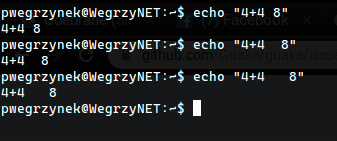
To Reproduce
Just type inside guake:
pwegrzynek@WegrzyNET:~$ echo "4+4=8"
4+4=8
pwegrzynek@WegrzyNET:~$ echo "4+4==8"
4+4==8
pwegrzynek@WegrzyNET:~$ echo "4+4===8"
4+4===8
pwegrzynek@WegrzyNET:~$
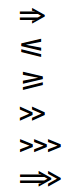
It seems that whenever Cascadia has the ability to join two or more chars, does not display anything, or display it wrong
For example:
Please run $ guake --support, and paste the results here. Don't put backticks (`) around it! The output already contains Markdown formatting. And make sure you run the command OUTSIDE the Guake.
pwegrzynek@WegrzyNET:~$ guake --support
[WARN] Unable to load the library libutempter !
[WARN] The
[WARN] libutempter.so.0: nie można otworzyć pliku obiektu dzielonego: Nie ma takiego pliku ani katalogu
Usage: main.py [options]
main.py: error: no such option: --support
 KerbenII
All 2 comments
VTE does not support ligatures, so you won't get those long or triple equal signs. Instead, you should get two or three separate = signs next to each other.
There used to be a bug as you describe, empty or incorrect glyphs showing up where the font defines a ligature. This was fixed in VTE version 0.52. Please make sure your Guake uses VTE 0.52 or newer.
 egmontkob
on 20 Sep 2019
egmontkob
on 20 Sep 2019
Any plans for ligature support in Guake?
 fifn2
on 16 Nov 2019
fifn2
on 16 Nov 2019
Related issues
 MohammedAl-Mahdawi
·
4Comments
MohammedAl-Mahdawi
·
4Comments
 KronwarsCZ
·
5Comments
KronwarsCZ
·
5Comments
 igorog
·
3Comments
igorog
·
3Comments
 machineghost
·
6Comments
machineghost
·
6Comments
 azzar1
·
5Comments
azzar1
·
5Comments
Most helpful comment
Any plans for ligature support in Guake?