Grapesjs: [BUG]: Some form components not working well with Preset Webpage Plugin
Hi, I've noticed that some form components (like checkbox, radio and select) are not working when gjs is initialized with the Preset Webpage Plugin like in the example below:
You can confirm this issue with the online Webpage Demo too https://grapesjs.com/demo.html
Expected Behavior: can select all of them normally (only in preview mode)
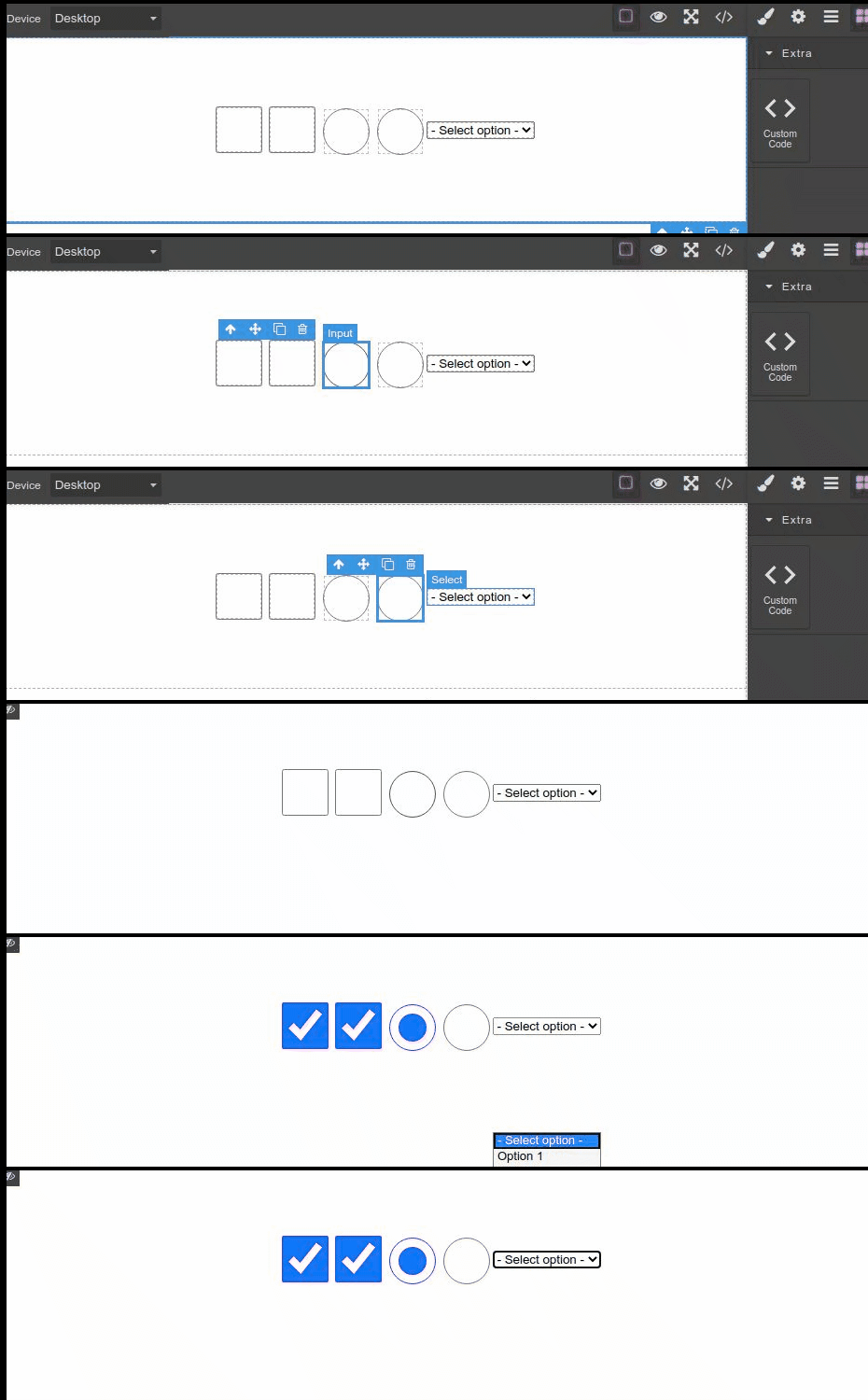
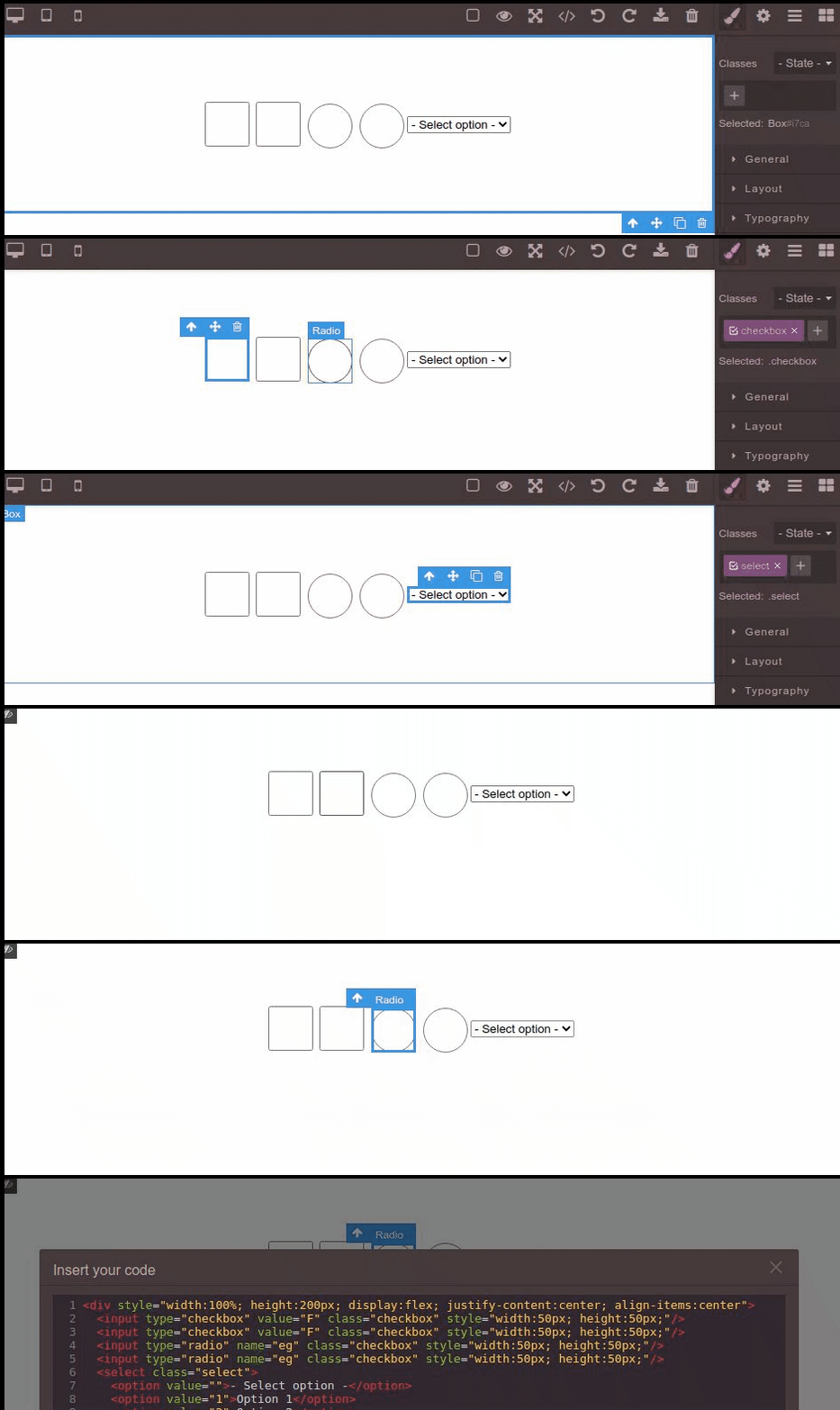
Current Behavior: can't select anything (not even in preview mode)
BTW: when I click in the select it shows the options far from its parent (in the first gif) but this is due to this gif when recording it because actually it shows right below the select as the normal behavior, so just ignore that.
 RJCAM
RJCAM
All 8 comments
I think it's just because the webpage preset uses an old version of plugin-forms, so it should be updated
 artf
on 7 Jul 2020
artf
on 7 Jul 2020
@artf I tried the grapes-plugin-forms itself (that is more updated throughout your repository), still not works, I even update all the grapes-plugin-forms dependencies to the latest ones and it still have the same behavior
RJCAM
on 7 Jul 2020
in that case, what were you using in the Expected Behavior gif?
artf
on 10 Jul 2020
In those gifs I'm using the same version directly from the cdn with only custom code plugin:
In the first one:
<script src="https://unpkg.com/grapesjs"></script>
In the second one (grapesjs-preset-webpage - 0.1.11):
<script src="https://unpkg.com/grapesjs"></script>
<script src="dist/grapesjs-preset-webpage.min.js"></script>
So, basically, this is what I'm using, just the basic:
Codepen GrapesJS Demo
RJCAM
on 10 Jul 2020
Ah ok, now I got it. Yeah, forms plugin avoids some default input behavior, so it's intended. I agree that in the preview mode those behaviors could be re-enabled but I think that part might be integrated as a plugin (eg. by using event listeners on the preview command)
artf
on 14 Jul 2020
Hum...ok, I'll try to do that, thanks for the help :+1:
RJCAM
on 14 Jul 2020
Hi @artf , so I've tried to create a listenner like you suggest, the thing is, the editor wont listen those changes after initialize and somehow selecting a checkbox/radio input makes the editor put the style="display: none" to them hiding from the user.
So, I've searched in the forms plugin and I find the code that's preventing the default behavior in those components:
grapesjs-plugin-forms-master > src > components.js
Line 278 (for select component):
...
    view: preventDefaultClick(),
...
Line 309 (for checkbox and radio components):
...
    view: defaultView.extend({
        events: {
            'click': 'handleClick',
        },

        handleClick(e) {
            e.preventDefault();
        },

        init() {
            this.listenTo(this.model, 'change:attributes:checked', this.handleChecked);
        },

        handleChecked() {
            this.el.checked = !!this.model.get('attributes').checked;
        },
    }),
...
As you say, the editor prevents the default behavior of those components, so this issue can be resolved changing the view property value on both lines to the default behavior, like this:
...
    view: defaultView,
...
After rebuild the plugin the behavior works as expected, so problem resolved.
I just want to ask if you think that this changes may cause any other issue that I'm not seeing right now, otherwise I keep the changes.
RJCAM
on 15 Jul 2020
After rebuild the plugin the behavior works as expected, so problem resolved.
Maybe there is a reason why I've done that?! 😅
Via plugin, you can simply extend those components and override handleClick function with your logic, where you prevent only if the editor is not in the preview (editor.Commands.isActive('preview'))
artf
on 21 Jul 2020
Related issues
 FlashPapa
·
3Comments
FlashPapa
·
3Comments
 Geczy
·
3Comments
Geczy
·
3Comments
 alibouaziz
·
3Comments
alibouaziz
·
3Comments
 desilvaNSP
·
3Comments
desilvaNSP
·
3Comments
 krunal039
·
3Comments
krunal039
·
3Comments