Grafana-zabbix: Error after upgrading Grafana to 4.6.0
I'm submitting a ...
- [x] Bug report
- [ ] Feature requestdd
- [ ] Question / Support request
Software Versions
| Grafana | Zabbix | Grafana-Zabbix Plugin |
| ------- | ------ | --------------------- |
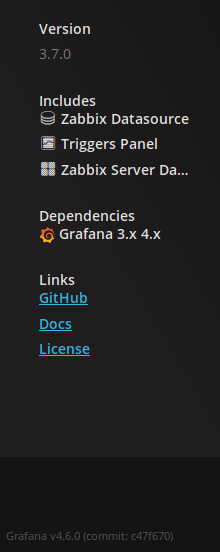
| 4.6.0 | 3.4.2 | 3.7.0 |
What did you do?
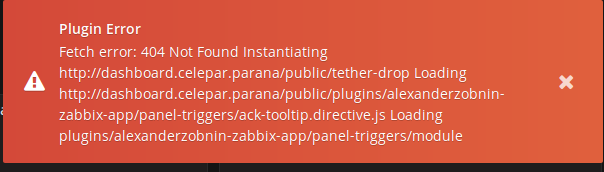
After upgrading Grafana from version 4.4.3 to 4.6.0, Triggers stats stopped working. If dashboard have triggers is resulting these errors:
_Plugin Error
Fetch error: 404 Not Found
Instantiating http://[domain]/public/tether-drop
Loading http://[domain]/public/plugins/alexanderzobnin-zabbix-app/panel-triggers/ack-tooltip.directive.js
Loading plugins/alexanderzobnin-zabbix-app/panel-triggers/module_
After remove Triggers stats from dashboard the error is gone.
What happened instead?
 felipemvieira
All 6 comments
This should be fixed in plugin version 3.7.0. Have you updated? Can you re-check it?
 alexanderzobnin
on 26 Oct 2017
alexanderzobnin
on 26 Oct 2017
Yes, I updated the plugin and restarted the server before open the the bug
report.
For while I removed the trigger panel from dashboards that we use more
often.
Em 26 de out de 2017 4:05 PM, "Alexander Zobnin" notifications@github.com
escreveu:
This should be fixed in plugin version 3.7.0. Have you updated? Can you
re-check it?—
You are receiving this because you authored the thread.
Reply to this email directly, view it on GitHub
https://github.com/alexanderzobnin/grafana-zabbix/issues/475#issuecomment-339749944,
or mute the thread
https://github.com/notifications/unsubscribe-auth/AMXu5yDp4O5gf1eStjkrsVVzkemnS5hNks5swMnNgaJpZM4QH1f4
.
felipemvieira
on 26 Oct 2017
can you show your /var/lib/grafana/plugins/alexanderzobnin-zabbix-app/dist/panel-triggers/ack-tooltip.directive.js file?
It should be like this
'use strict';

System.register(['angular', 'jquery'], function (_export, _context) {
  "use strict";

  var angular, $, Drop;
  return {
    setters: [function (_angular) {
      angular = _angular.default;
    }, function (_jquery) {
      $ = _jquery.default;
    }],
    execute: function () {

      System.config({
        paths: {
          tether: System.getConfig().baseURL + "plugins/alexanderzobnin-zabbix-app/vendor/npm/tether.min.js"
        }
      });

      Drop = void 0;

      System.amdRequire(["plugins/alexanderzobnin-zabbix-app/vendor/npm/drop.min.js"], function (drop) {
        Drop = drop;
      });

      /** @ngInject */
      angular.module('grafana.directives').directive('ackTooltip', function ($sanitize, $compile) {
Or maybe it's a cache-related problem. Try to flush your browser cache.
alexanderzobnin
on 26 Oct 2017
Omg! So sorry! My mistake. After flush the browser cache now it is OK!
Thank you!
felipemvieira
on 26 Oct 2017
Ok, cool!
alexanderzobnin
on 26 Oct 2017
Related issues
alexanderzobnin
·
4Comments
 xiaoxue999
·
3Comments
xiaoxue999
·
3Comments
 ufoloko
·
7Comments
ufoloko
·
7Comments
 gustavoyanes
·
7Comments
gustavoyanes
·
7Comments
 dataniard
·
6Comments
dataniard
·
6Comments
Most helpful comment
Or maybe it's a cache-related problem. Try to flush your browser cache.