Google-maps-react: There's no property 'style' to set the width and height of the map
There's no property 'style' to set the width and height of the map, so there's a compilation error when trying to do something like:
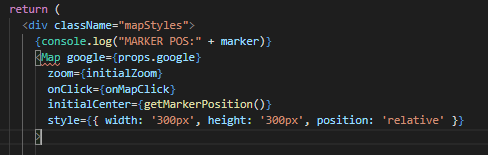
So, map is always 100% and doesn't fit to the size I expect.
All examples refer to the 'style' property. Does it existed in previous versions? Is there a way to fix this with the latest version?
 carmen79
All 4 comments
I have the same problem with that, there's no way to set the style of the map? In the meantime, I changed directly the google-maps-react code to fit what I want, but that's not a solution
 jorgeruizqui
on 16 Aug 2019
jorgeruizqui
on 16 Aug 2019
use containerStyle instead
 anselm94
on 7 Sep 2019
anselm94
on 7 Sep 2019
@anselm94 Thank you so much, I was going nuts trying to figure this out lol
 mikemeyer30
on 13 Nov 2019
mikemeyer30
on 13 Nov 2019
Create a variable with all the styles needed. like so:
const mapStyles={
    position: "relative",
    width: "300px",
    height: "300px"
};
then use it inside style = {mapStyles} it should appear as you want.
But make sure to declare the variable before export class ...... extends React.Component {
 dohahelmy
on 5 Dec 2019
dohahelmy
on 5 Dec 2019
Related issues
 colshacol
·
4Comments
colshacol
·
4Comments
 cernoel
·
3Comments
cernoel
·
3Comments
 kkinaman
·
3Comments
kkinaman
·
3Comments
 mruoss
·
5Comments
mruoss
·
5Comments
 rullymartanto
·
5Comments
rullymartanto
·
5Comments
Most helpful comment
use
containerStyleinstead