Google-maps-react: Google maps api error when opening InfoWindow
I'm trying to get an InfoWindow to open when I click the corresponding Marker, just like the example, but when the state is changed from false to true, I get this error from what appears to be a Google Maps API source file.
Anyone seen this?
I'm on google-maps-react v2.0.2
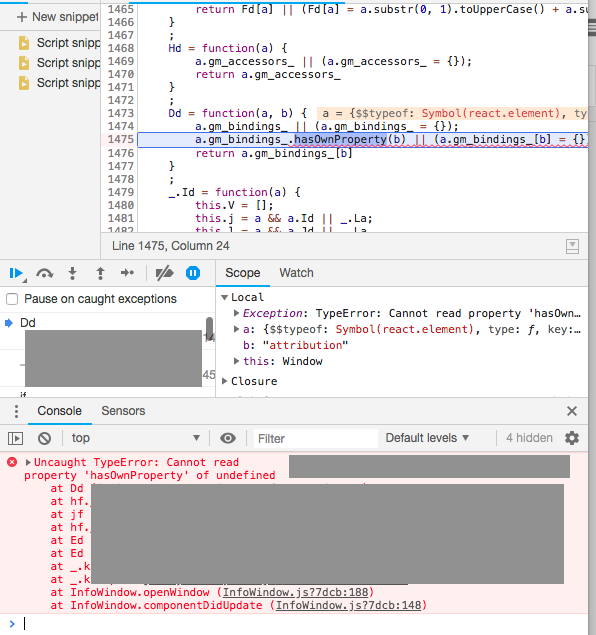
Not sure why line 1474 of their code isn't catching this
~a appears to refer to the map prop of InfoWindow, which I've confirmed does exist and does have propertygm_bindings_ when it was rendered~
Update: a is the Marker (the element that was clicked), which does not have this gm_bindings_ property, but -L 1474 should catch that...
For reference, this is all I'm trying to render:
...
const marker = <Marker onClick={this.onMarkerClick}></Marker>;
return (
      <Map
        google={google}
        initialCenter={{
          lat: mapCentroid.latitude,
          lng: mapCentroid.longitude,
        }}
        zoom={mapZoom}
        mapTypeId="google.maps.MapTypeId.ROADMAP"
        gestureHandling="greedy"
        styles={mapStyles}>
        { marker }
        <InfoWindow marker={marker} visible={this.state.showInfoMarkers}>
          <div>hello world</div>
        </InfoWindow>
      </Map>
    );
 kkinaman
All 3 comments
Update: This error only occurs when passing a marker prop to InfoWindow ^
Opens just fine when using the position prop (though the InfoWindow renders on top of the marker when given the same position as the Marker, as expected. A bit inconvenient to have to manually offset the InfoWindow's position).

kkinaman
on 8 Dec 2018
I am facing the same problem
 AhmedMohamedG
on 8 Jan 2019
AhmedMohamedG
on 8 Jan 2019
I ended up using the position and pixelOffset attributes on InfoWindow, instead of marker.
<InfoWindow
    position={<position of the corresponding marker>}
    pixelOffset={new google.maps.Size(0, -30)}
    ...
    >
Related issues
 S-Nakib
·
3Comments
S-Nakib
·
3Comments
 cernoel
·
3Comments
cernoel
·
3Comments
 Vijayan-Murugan
·
4Comments
Vijayan-Murugan
·
4Comments
 lishi500
·
4Comments
lishi500
·
4Comments
 antonk52
·
5Comments
antonk52
·
5Comments
Most helpful comment
I ended up using the
positionandpixelOffsetattributes on InfoWindow, instead ofmarker.