Google-api-javascript-client: New cross-site cookie not 'SameSite' warning in Chrome
Hello,
I am wondering if anyone else has run into the following warning related to cross-site cookies with the latest version of Chrome. Per the documentation, Chrome version 80 will only deliver cookies set correctly. Is this something that I can fix in my application or something that we need for Google to fix?
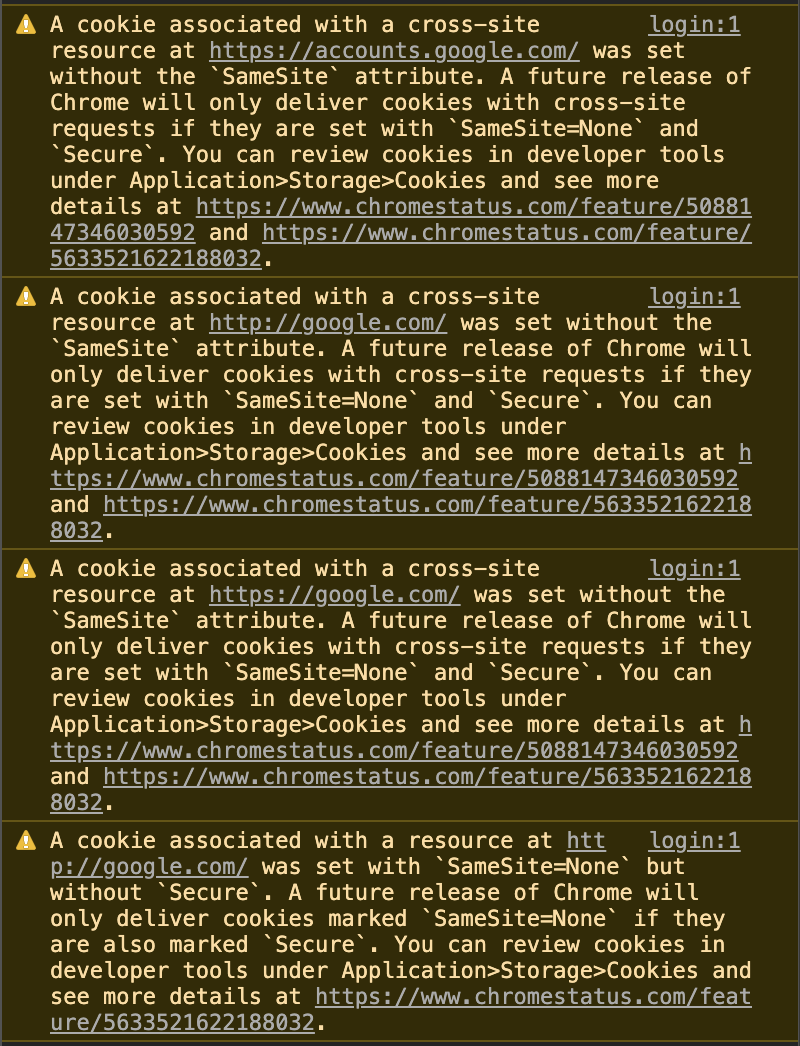
A cookie associated with a cross-site resource at https://accounts.google.com/ was set without the
SameSiteattribute. A future release of Chrome will only deliver cookies with cross-site requests if they are set withSameSite=NoneandSecure. You can review cookies in developer tools under Application>Storage>Cookies and see more details at https://www.chromestatus.com/feature/5088147346030592 and https://www.chromestatus.com/feature/5633521622188032
To reproduce above warning, go to google's example sign-in website in chrome 77+ and view the logs the console: https://developers.google.com/identity/sign-in/web/sign-in
 znanfelt
All 79 comments
Same problem even by adding res.header("Set-Cookie", "HttpOnly;Secure;SameSite=None"); to my server it seems something similar needs to be added on Google's where they are serving https://apis.google.com/js/api.js
Using:
Chrome Version 77.0.3865.90 on MacOS Mojave
 paulzmuda
on 14 Oct 2019
paulzmuda
on 14 Oct 2019
Same problem and also signIn method on auth instance from gapi.auth2.getAuthInstance() has stopped working once I enabled this flag in current version of Chrome (Win10, 77.0.3865.120). Can anything be done about this or is this something that should be fixed on Google side?
 Jswk1
on 16 Oct 2019
Jswk1
on 16 Oct 2019
Guys, do anyone has any update on this? With chrome 78 signIn suddenly stopped working, I can't really ask users to go into chrome://flags and disable something.
Also, I read the chromestatus links again, and I still think this should be enabled by default only in chrome 80, what happened?
 steveetm
on 25 Oct 2019
steveetm
on 25 Oct 2019
cc @grant @bochunz
 borgstrom
on 26 Oct 2019
borgstrom
on 26 Oct 2019
Will look into this Monday and report a bug to the team when I can reproduce. 🙂
EDIT: Added internal bug b/143761058 and reported to the team. I will update this GitHub issue if there are updates.
 grant
on 26 Oct 2019
grant
on 26 Oct 2019
If you interested in a production site which is affected for sure, go to wish.com and try to login with google. Again, it is working fine if you disable those flags.
steveetm
on 28 Oct 2019
Sorry for being hasty there, but I can't believe it is affecting only us. Any update?
steveetm
on 28 Oct 2019
@grant said he will report this bug to the team. It might not last long before it's getting fixed...
I found many apps having the same problem, but it concerns only a minority of users using the last version of chrome (cf canary deployment).
 nathgilson
on 28 Oct 2019
nathgilson
on 28 Oct 2019
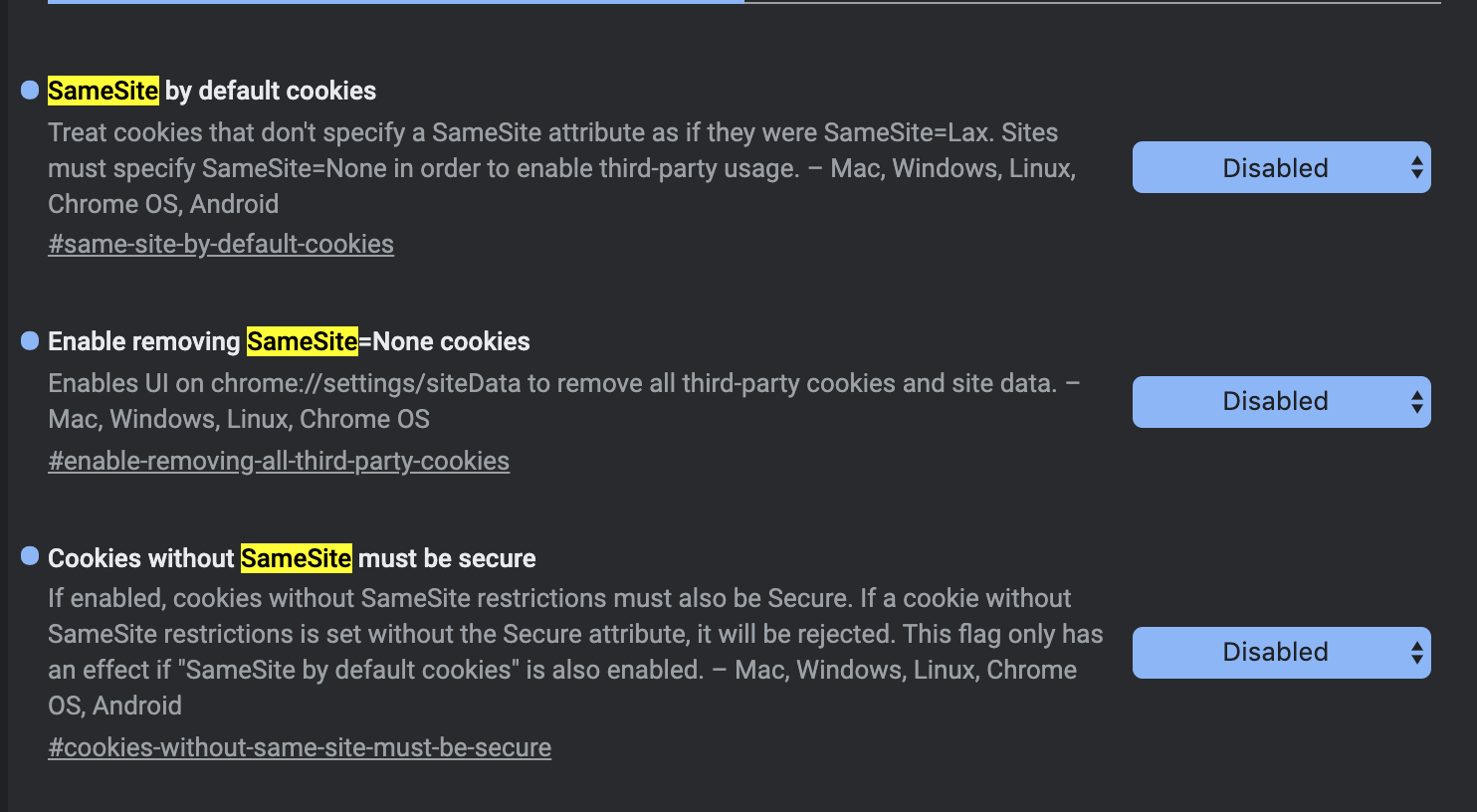
@grant when disabling the following flags on chrome the login works
 MathiasGilson
on 30 Oct 2019
MathiasGilson
on 30 Oct 2019
For me it was enough to disable 'SameSite by default cookies'.
Do you guys know if this is a bug in this lib, or Chrome 78 accidentally enabled this flag 2 releases earlier?
steveetm
on 30 Oct 2019
After successfully integrating Google Calendar API using gapi library yesterday, I saw my Chrome was out of date.
After updating to v78, the integration stopped working - Sign in popup showed, I could 'sign in' but after the popup closed, nothing happened in the app. No errors though!
3 hours into figuring out what I changed in my codebase, I came across this thread - turns out the 3 flags set to disabled make it work fine again.
Of course, there are warnings about it in the console, but they mention it's due to be changed in FUTURE RELEASE.
I believe this was shipped accidently in v78, however the warnings are not errors because they are yet to be updated as it was meant to ship in later version.
 WJakub
on 1 Nov 2019
WJakub
on 1 Nov 2019
@grant did you have time to look at it?
Your help would be really appreciated on this one 🤗
MathiasGilson
on 2 Nov 2019
As I am still not sure whose fault is this and what is the exact issue I really don't want to rant or anything, but we decided to remove google login at this point. Don't get me wrong, it was planned to do something about the warning, but as this was only a warning to get ready this was totally unexpected. 19 days passed since the original report, you could easily say that forget this method, or something, but this lack of information is totally disappointing.
steveetm
on 4 Nov 2019
I assure you this is being looked at. There were updates today internally.
I updated that comment 3 days ago before the weekend. I've increased the priority of the internal issue.
grant
on 4 Nov 2019
This is also affecting our login for beta channel users. When can we expect Google services to be compatible with Chrome changes?
 jamesgraham
on 18 Nov 2019
jamesgraham
on 18 Nov 2019
The team wanted me to give this update:
- SameSite Updates: https://www.chromium.org/updates/same-site
- This has the status and roadmap of the
SameSiteattribute.
- This has the status and roadmap of the
- Google is going to show a warning message to users to ask them to either move to Chrome Stable or turn off the flags.
grant
on 21 Nov 2019
@grant I am on chrome stable, I have that flag turned on by default on chrome stable, never ever installed canary/chromium or any dev version, and this stuff is broken since chrome 78 _stable_.
steveetm
on 21 Nov 2019
@steveetm That doesn't sound possible based on the timeline of when we enabled things. Are you running Chrome with --enable-experimental-web-platform-features? That would include the SameSite features in 78, though we removed them from that flag in 80.
 chlily1
on 21 Nov 2019
chlily1
on 21 Nov 2019
@chlily1 it is possible, but hard to tell as when I ran into this problem manually switched flags to see if anything helps. But also got reports from end-users. What is sure for me it _was_ working with Chrome 77 stable and got broken with Chrome 78, without change any flags between the update. Even if it is related with experimental-web-platform-features I think Chrome shouldn't tell me a warning that it will be enabled in the _future_ when that flags is enabled(due a bug or planned change). It should throw warning it is enabled _now_ because SameSite setting is defaults to true. But in that case this is a bug in Chrome.
Anyways, your response makes sense and I have no more questions about this, but I still feel there were some kind of chaos as it required more than a month to figure out exactly what is going on.
steveetm
on 22 Nov 2019
@steveetm I understand your frustration, and we've heard that feedback from others too.
We have recently updated the console messages to differentiate between warnings and actual blocking, by either saying "A future release of Chrome will..." or "It has been blocked because..." depending on the feature state. That is available in Chrome 80, and has been backported to Chrome 78, so you should see the new phrasing if your version is at least 78.0.3904.108.
chlily1
on 22 Nov 2019
I think this conversation lost track of the original issue reported. Google API assets, in how they are served by Google, are not in compliant with Google Chrome present (warning) or future (blocking). Users on stable un-tampered versions of Chrome are being warned by Google about something Google is doing.
Is it agreed that we're waiting for googleapis.com / accounts.google.com to begin serving SameSite cookies?
paulzmuda
on 22 Nov 2019
We are now 10 days away from stable.
Is there an update or should we start preparing for mayhem?
jamesgraham
on 27 Nov 2019
We are now 10 days away from stable.
Is there an update or should we start preparing for mayhem?
No mayhem. Chrome 79 stable will still have this feature disabled by default. Chrome 80 will have it enabled by default. Chrome 80 will be released around Feb 4.
References:
https://www.chromium.org/updates/same-site
https://chromestatus.com/features/schedule
Specifically, pay attention to the launch timeline (i.e., the three date bullet points) on https://www.chromium.org/updates/same-site . Notice that stable users are unaffected until Feb 4, 2020.
 briangithex
on 27 Nov 2019
briangithex
on 27 Nov 2019
Ah, the main point to note is this got enabled even in 78 stable mostly due to:
* Unless you have explicitly activated them via chrome://flags, or unless you are running Chrome with the --enable-experimental-web-platform-features flag.
"Experimental Web Platform features" flag being enabled. In that case, I don't think this change is impacting our customers (unless they tamper with the flags) that much as us devs.
 twistedfork88
on 7 Dec 2019
twistedfork88
on 7 Dec 2019
Hi all,
Are there any lasting concerns that I should communicate to the team? The team has mentioned that this issue should be resolved as of now.
grant
on 11 Dec 2019
@grant nope just waiting for Chrome 80 to start blocking Google API.
paulzmuda
on 11 Dec 2019
@grant still not working for me on Chrome MacOS 79.0.3945.79 (Official Build) (64-bit)
but canary is working on Chrome MacOS 81.0.3992.4 (Official Build) canary (64-bit)
MathiasGilson
on 12 Dec 2019
@MathiasGilson can you check if experimental web platform features or the samesite flags are on for you ?? Ideally things should work. If so, kindly turn it off
twistedfork88
on 12 Dec 2019
@grant resolved as in Google has started setting their cookies with SameSite=None?
Because if i enable the same-site-by-default-cookies flag it doesn't work for me on the Beta or Dev build.
Code
<!-- head -->
<script src="https://apis.google.com/js/api.js"></script>
gapi.load('client:auth2', () => {
  gapi.auth2.init({
    client_id: 'my-client.apps.googleusercontent.com',
    scope: 'openid profile email',
  }).then((auth) => {
    console.log(auth.currentUser.get());
    auth.currentUser.listen(console.log);
  });
});

document.getElementById('signInBtn').addEventListener('click', () => {
  gapi.auth2.getAuthInstance().signIn();
});
chrome://flags
chrome://flags/#same-site-by-default-cookies set to enabled
chrome://version
Google Chrome | 80.0.3987.7 (Official Build) dev (64-bit)
Revision | 15ef26f2578ff39e9e4bf70a7cbd7de387781267-refs/branch-heads/3987@{#38}
OS | Linux
JavaScript | V8 8.0.426.4
Flash | 32.0.0.303 /home/daniel/.config/google-chrome-unstable/PepperFlash/32.0.0.303/libpepflashplayer.so
User Agent | Mozilla/5.0 (X11; Linux x86_64) AppleWebKit/537.36 (KHTML, like Gecko) Chrome/80.0.3987.7 Safari/537.36
Command Line | /usr/bin/google-chrome-unstable --disable-webrtc-apm-in-audio-service --enable-audio-service-sandbox --flag-switches-begin --enable-features=SameSiteByDefaultCookies --flag-switches-end --enable-audio-service-sandbox
Console log
:8085:1 A cookie associated with a cross-site resource at http://google.com/ was set without the `SameSite` attribute. It has been blocked, as Chrome now only delivers cookies with cross-site requests if they are set with `SameSite=None` and `Secure`. You can review cookies in developer tools under Application>Storage>Cookies and see more details at https://www.chromestatus.com/feature/5088147346030592 and https://www.chromestatus.com/feature/5633521622188032.
:8085:1 A cookie associated with a cross-site resource at https://google.com/ was set without the `SameSite` attribute. It has been blocked, as Chrome now only delivers cookies with cross-site requests if they are set with `SameSite=None` and `Secure`. You can review cookies in developer tools under Application>Storage>Cookies and see more details at https://www.chromestatus.com/feature/5088147346030592 and https://www.chromestatus.com/feature/5633521622188032.
:8085:1 A cookie associated with a cross-site resource at https://accounts.google.com/ was set without the `SameSite` attribute. It has been blocked, as Chrome now only delivers cookies with cross-site requests if they are set with `SameSite=None` and `Secure`. You can review cookies in developer tools under Application>Storage>Cookies and see more details at https://www.chromestatus.com/feature/5088147346030592 and https://www.chromestatus.com/feature/5633521622188032.
 danielx
on 12 Dec 2019
danielx
on 12 Dec 2019
@MathiasGilson can you check if experimental web platform features or the samesite flags are on for you ?? Ideally things should work. If so, kindly turn it off
Good catch @twistedfork88 I had the Experimental Web Platform features flag enabled
It's now working perfectly thanks
MathiasGilson
on 13 Dec 2019
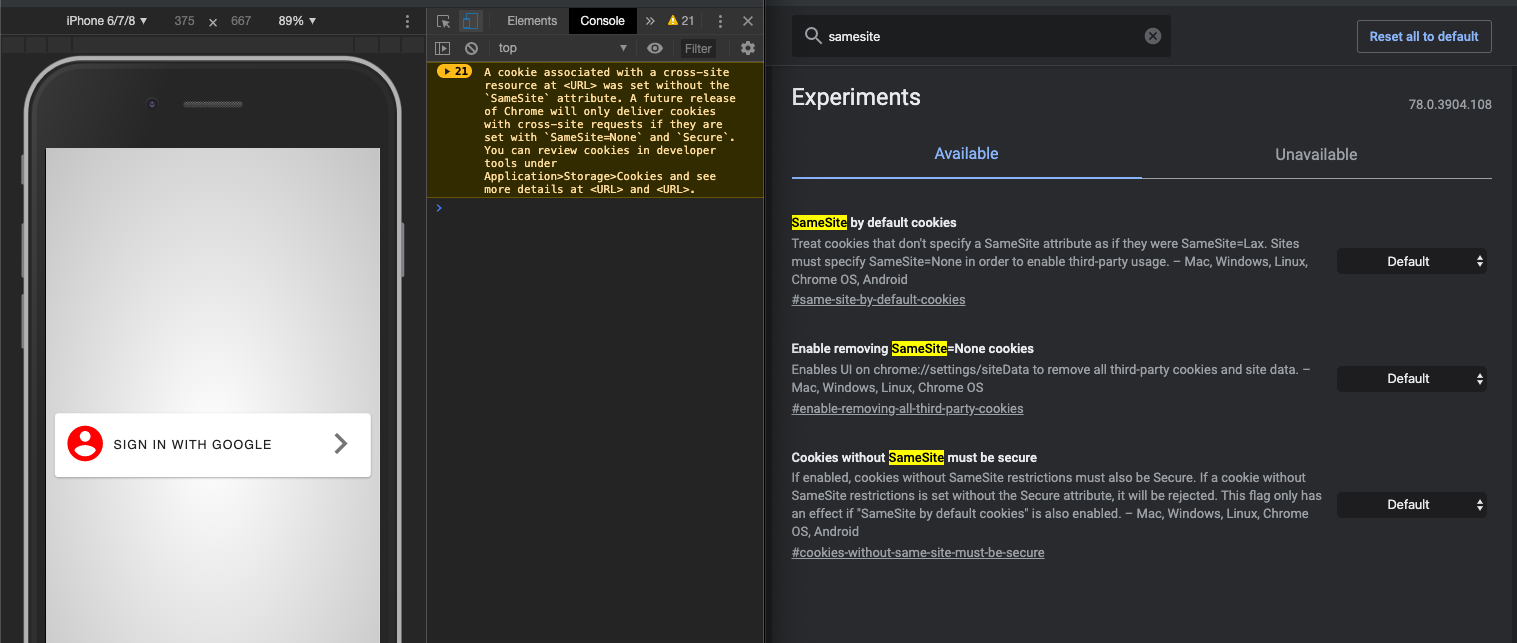
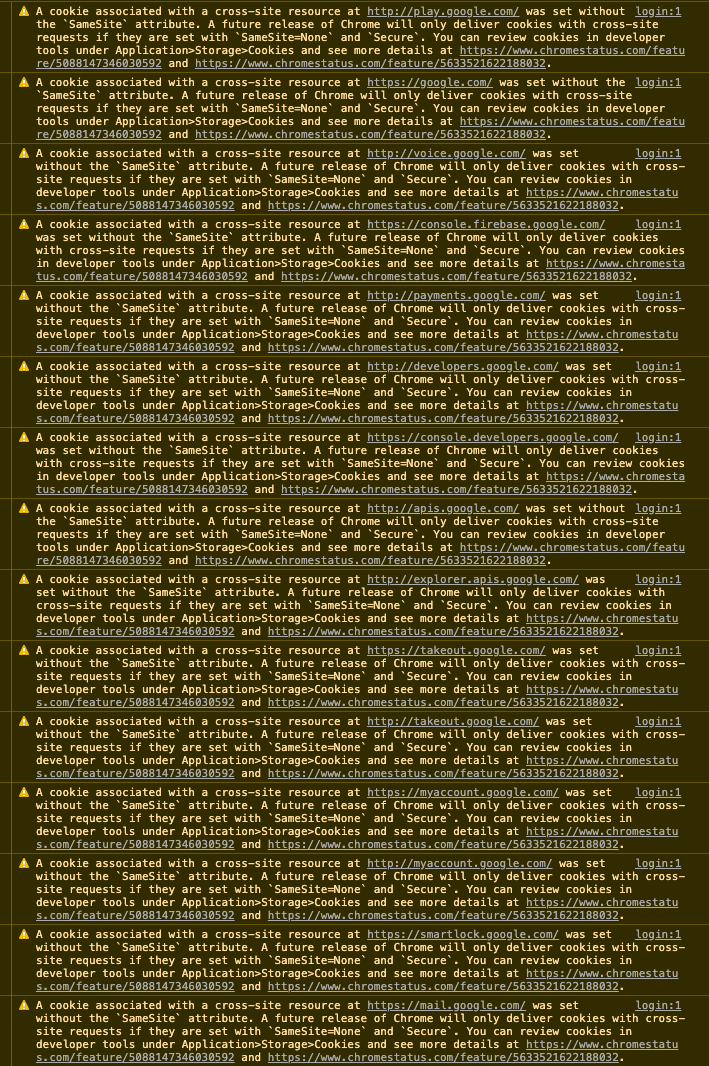
Side-by-side, two chrome browsers, on the right showing samesite settings at default. On the left, barebones web-app with only one external source and it is google api. This is google complaining about google. Chrome Version 78.0.3904.108 on Mac OS Catalina.
Below, expanded detail view of the warnings. Some of these might also be extensions - but still everything is showing google.com as the source of invalid cookies.
paulzmuda
on 14 Dec 2019
@paulzmuda I can see warnings even with SameSite flag set to disabled. But can you confirm if your current setting works ? Do ensure that "Experimental web platform features" is set to disabled.
More here: https://www.chromium.org/updates/same-site
twistedfork88
on 14 Dec 2019
It is perfectly possible that Google fixed Google Login by only specifying the SameSite attribute for the specific cookies which were necessary for Google Login to function.
Seeing a stream of SameSite warnings does not tell us that Google Login has user-facing errors.
briangithex
on 16 Dec 2019
We're also experiencing problems with client side google auth/api in Chrome when same-site-by-default-cookies and cookies-without-same-site-must-be-secure are enabled.
Some of our users on Chrome beta are reporting our app not working, and we have traced the problem to what we think is not getting signed correctly via our client side calls to gapi.auth2.getAuthInstance().signIn() on browsers with the new SameSite cookie behaviour.
On some Chrome beta instances, all Chrome Canary instances, as well as any Chrome instances if we enable the same-site-by-default-cookies and cookies-without-same-site-must-be-secure flags, this manifests as the client side oauth popup opening and closing by itself and throwing an error that we are having trouble understanding.
Here is a screenshot of the error object we caught off of the signIn call:
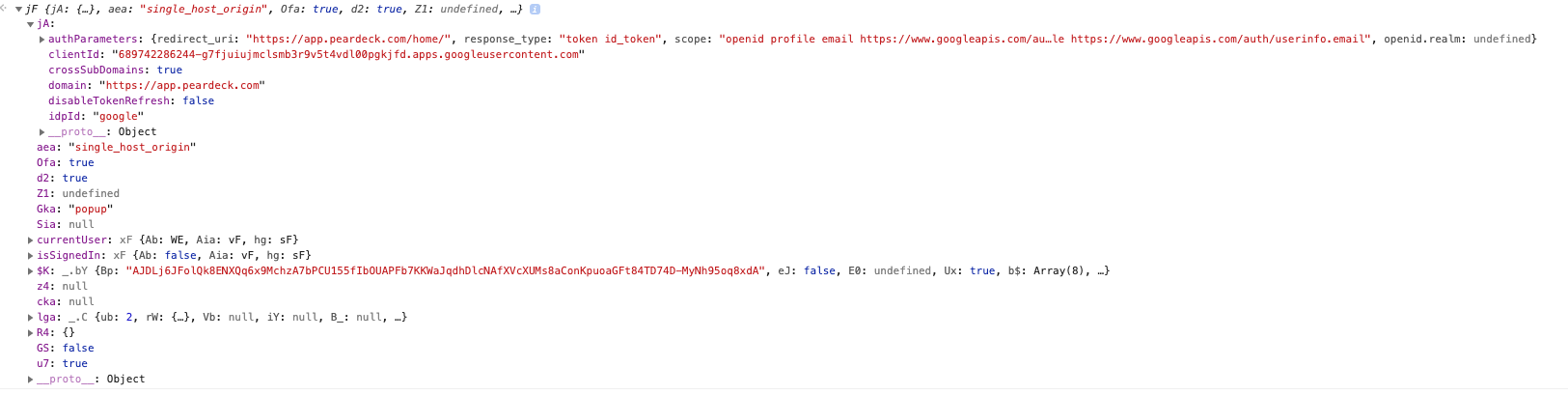
We are also seeing google cookies being blocked when we observe this:

 hansent
on 20 Dec 2019
hansent
on 20 Dec 2019
Digging through chromium issues unveiled this ray of hope:
https://bugs.chromium.org/p/chromium/issues/detail?id=1019168#c26
Seems like google client side sign in broken on beta versions of chrome is a known issue that will be resolved in January.
 LakeGH
on 20 Dec 2019
LakeGH
on 20 Dec 2019
Anyone updates on when or how this will be fixed?
I'm seeing a proportion of our users unable to login with the same issue, e.g., https://github.com/google/google-api-javascript-client/issues/561#issuecomment-567986771
Thank you!!
 ramonjd
on 5 Feb 2020
ramonjd
on 5 Feb 2020
Hello.
Chrome 80 has been oficially released for stable and I'm not noticing any problems with gapi.auth2.getAuthInstance().signIn(). I guess it was fixed but could we get an official confirmation?
Jswk1
on 6 Feb 2020
The official Launch Timeline shows that it isn't scheduled to be rolled out to Stable until the week of Feb 17.
You should always test your site by directly enabling the features.
chlily1
on 6 Feb 2020
I managed to make my site work on Canary 82.0.4054.2 after manually deleting all the accounts.google.com cookies in the dev tools
To reproduce go on dev tools > Application > Cookies
select accounts.google.com and click the "clear all" button
I hope that my users won't have to do the same to make it work.
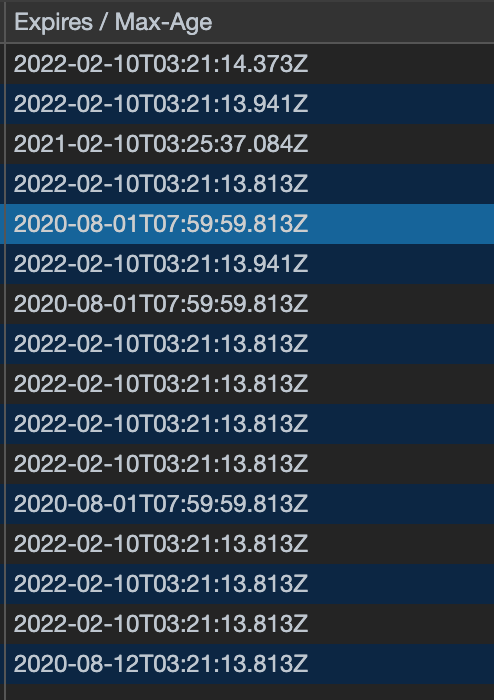
Google seems to have updated their cookie to contain the new "Secure" and "Same-Site=None" flags but the browser cache them for 6 months and up to 2 years as you can see below.
How will Google force refresh the old cookies that don't have the new flags ?
MathiasGilson
on 11 Feb 2020
@Jswk1 I'm currently having issues with Chrome 80 and gapi.auth2.getAuthInstance().signIn()
The auth window opens, but returns a Logged Out message.
Clearing cookies for https://accounts.google.com doesn't seem to make any difference.
 joemidi
on 14 Feb 2020
joemidi
on 14 Feb 2020
I'm also seeing this problem in Chrome 80.0.3987.106 with all cookies cleared for https://accounts.google.com
I have DISABLED SameSite by default cookies, Enable removing SameSite=None cookies, Cookies without SameSite must be secure. The problem is reproducible with these DISABLED but also reproducible with these ENABLED.
My site works fine in Safari and also Chrome/Android.
To reproduce:
- I display the signin button with a callback
on_google_signin
<div class="g-signin2 d-inline-block mt-5 mb-3" data-onsuccess="on_google_signin"></div>
- I click on the Sign in button
- This should display the Google account chooser.
a. The first time (no cookies), I'm prompted by the Google account chooser, select an account, and log in. New cookies are generated.
b. The second time (with newly created cookies) the account chooser window quickly appears and then disappears. I never get the chance to log in.
With both 3a and 3b, I see this"user_logged_out"event sent as the Account chooser window closes:
MessageEvent {isTrusted: true, data: "{"id":"619-12xxxx.65xxxxxxxxx",
                         "result":{"error":"user_logged_out"},
                         "rpcToken":"797xxx86.xxxxxx"}",
                         origin: "https://accounts.google.com", lastEventId: "", source: global, …}
My callback on_google_signin is never invoked.
You can reproduce this yourself logging in at https://www.helperbees.org/login#admin
This is hosted with Github Pages, and you can view source here
 straz
on 16 Feb 2020
straz
on 16 Feb 2020
We're seeing big issues with this also :(
Sign-in doesn't work on our site at all using Chrome unless you try in an incognito window.
This is especially impacting us as the use case for our web-app is as an accompaniment to our Google Chrome Extension.
Is there no quick-fix for this we can set that will solve this for our users trying to sign in?
 rubengmurray
on 20 Mar 2020
rubengmurray
on 20 Mar 2020
@straz I tried your test website on Chrome 80 and it looks like I am not able to sign in in the begining, but was able to sign in after a page refresh.
And I also tried deleting the __Secure-XXX cookies, which I tell from the names that they were added for the Secure/SameSite=None purpose. After deleting those cookies and refreshed the page, it appears I was signed out. But clicking on the sign in button recovered the __Secure-XXX cookies and I am signed back in.
 wasyyyy
on 24 Mar 2020
wasyyyy
on 24 Mar 2020
@rubengmurray do you have a link to your website? Would you be able to sign in with a page refresh?
wasyyyy
on 24 Mar 2020
Hi @wasyyyy,
Unfortunately a page refresh didn't work... but I stumbled into something curious
https://footnoteapp.com didn't work
https://www.footnoteapp.com _did_ work
To that end I've just worked my way around this issue by adding a basic forward into the <head> section of the index.html in our create-react-app
<script>
    const apexUrl = 'footnoteapp.com';
    const forwardUrl = 'www.footnoteapp.com';
    if (window.location.host === apexUrl) {
      window.location.host = forwardUrl;
    }
</script>
This has solved our login problem (!).
Any others experiencing the same issue with the apex domain and ok on www?
@hansent @ramonjd
rubengmurray
on 4 Apr 2020
Still not completely fixed. Even deleting all google related cookies you still get at least 3 with the SameSite warning as of 15/04/2020 coming purely from the sign in with google.
 evanherc
on 15 Apr 2020
evanherc
on 15 Apr 2020
Still not completely fixed. Even deleting all google related cookies you still get at least 3 with the SameSite warning as of 15/04/2020 coming purely from the sign in with google.
The presence of the warnings does not necessarily mean anything is wrong. (The cookies could be intentionally left without a SameSite attribute, for compatibility with browsers with different defaults.)
chlily1
on 15 Apr 2020
I have been able to fix this problem by disabling the Privacy Badger extension.
straz
on 3 May 2020
Not fixed afaik. The warnings are still there. Chrome version 84.0.4147.89 (Official Build) (64-bit)

Update: I'm lucky enough to control my own server, so refactored the code to execute google authentication using OpenID Connect. Bye bye cookies. Even the user profile image returns (third party) cookies, so this also is handled by my server.
 KooiInc
on 27 Jul 2020
KooiInc
on 27 Jul 2020
Any fix workaround on this, we are planning to implement similar approach for Google Signin
 kalemayur8
on 28 Jul 2020
kalemayur8
on 28 Jul 2020
It seems that is "normal" and nothing it's possible to do. Google decided have 2 settings: one's OK and another is KO. Please check the news at https://blog.chromium.org/2020/02/samesite-cookie-changes-in-february.html
Google explains it in this way: An exception is the case where a service issues a pair of redundant cookies: One cookie with the new settings, and one cookie with the legacy settings for incompatible clients. In that case, you may see a warning triggered by the legacy cookie even though the service is working as intended. This approach is described here.
Google Cookies: Some Google services will use the approach described above, issuing a cookie with the new settings and a cookie with legacy settings. For this reason, you might see the Developer Tools console warning for Google cookies even though the Google service is working as intended.
 dcUPF
on 29 Jul 2020
dcUPF
on 29 Jul 2020
How can I fix these Same Site issues? This makes using Material components from a CDN or any CDN for that matter a non-starter even if the resource comes from google.com as shown below.
Name | Domain & Path
-- | --
_ga | .unpkg.com/
HSID | .google.com/
SSID | .google.com/
APISID | .google.com/
SAPISID | .google.com/
OGPC | .google.com/
SID | .google.com/
SIDCC | .google.com/
_ga | www.google.com/
 writerdanhardy
on 6 Aug 2020
writerdanhardy
on 6 Aug 2020
Hi! I have a same issue. Chrome blocked google login API.
I got these warning messages:
Indicate whether to send a cookie in a cross-site request by specifying its SameSite attribute
Because a cookie's SameSite attribute was not set or is invalid, it defaults to SameSite=Lax, which prevents the cookie from being sent in a cross-site request. This behavior protects user data from accidentally leaking to third parties and cross-site request forgery.

Resolve this issue by updating the attributes of the cookie:
Specify SameSite=None and Secure if the cookie should be sent in cross-site requests. This enables third-party use.
Specify SameSite=Strict or SameSite=Lax if the cookie should not be sent in cross-site requests

Affected resources:
Name | Domain & Path
HSID | .google.com/
SSID | .google.com/
APISID | .google.com/
SAPISID | .google.com/
SID | .google.com/
SIDCC | .google.com/
How can I fix?!
Thank you.
 buglavecz
on 7 Aug 2020
buglavecz
on 7 Aug 2020
More crap from google, the worst-run company in the universe.
 khanks
on 10 Aug 2020
khanks
on 10 Aug 2020
@grant @dcUPF even with the reassurance that nothing is going to break, having a warning in the developer console that we are supposed to just ignore is not an acceptable developer experience. It just makes everybody worry and waste time and energy and CO2.
And as others have said, Google's browser flagging a Google API as unsafe is slightly embarrassing.
 foucdeg
on 15 Aug 2020
foucdeg
on 15 Aug 2020
It is absolutely unbelievable that this issue has gone so long ignored by the Google Team.
When can we expect a fix? Suggesting users configure their browsers a certain way is NOT an acceptable solution or recommendation, I feel like this goes without saying.
 seavor
on 18 Aug 2020
seavor
on 18 Aug 2020
If you have used other Google products, you know that they really do not
care that much.
On Tue, Aug 18, 2020, 3:18 PM Jeremy Letto notifications@github.com wrote:
It is absolutely unbelievable that this issue has gone so long ignored by
the Google Team.When can we expect a fix? Suggesting users configure their browsers a
certain way is NOT an acceptable solution or recommendation, I feel like
this goes without saying.—
You are receiving this because you commented.
Reply to this email directly, view it on GitHub
https://github.com/google/google-api-javascript-client/issues/561#issuecomment-675691708,
or unsubscribe
https://github.com/notifications/unsubscribe-auth/AAG67TNRU3E2IZNQ55AP6ZLSBLO2TANCNFSM4I5HDGLA
.
khanks
on 18 Aug 2020
I completely agree - we have an angular app using using googles api.js in the dist build, and the developer console on Chrome 84 is complaining about:
CONSENT | .google.com/
_ga | .apis.google.com/
OGPC | .google.com/
OGP | .google.com/
SID | .google.com/
HSID | .google.com/
SSID | .google.com/
APISID | .google.com/
SAPISID | .google.com/
SIDCC | .google.com/

api.js?onload=__iframefcb997292
pretty amazing to have their flagship browser complaining about their own api's.
Can we set something in our apps or is the problem in api.js?
 jzburns
on 26 Aug 2020
jzburns
on 26 Aug 2020
Rollout of actively rejecting these cookies is approaching 100%. This needs fixing now, please.
 nicklanng
on 1 Sep 2020
nicklanng
on 1 Sep 2020
Hi,
These warnings should be harmless and the older cookies are there for backwards compatibility reasons as mentioned above.
 sergentj
on 1 Sep 2020
sergentj
on 1 Sep 2020
@sergentj unnecessary warnings aren't harmless to developer experience.
foucdeg
on 3 Sep 2020
Sounds like we have the same issue, the google translate API is causing issues in dev tools in regards to cookie security, but I can't seem to figure out a way to configure the cookie to satisfy Chrome's standards.
I'll be watching this issue and hoping that the translate API gets updated so we aren't ignoring the errors that dev tools reports.
 cspowell1225
on 9 Sep 2020
cspowell1225
on 9 Sep 2020
I was going to upvote the reply that said Chrome is actively rejecting these cookies, because it definitely is (depending on how chrome://flags is configured, anyway -- I had to disable samesite cookies for it to ignore it).
 netsider
on 9 Sep 2020
netsider
on 9 Sep 2020
any of you have any news of this problem? how much longer do we have to wait?
 juanpablocs
on 11 Sep 2020
juanpablocs
on 11 Sep 2020
Disabling samesite cookies is not really going to help those of us who have client users scattered all over the place, is it? I don't control the browser or settings for users. Besides, my site doesn't, on it's own, even use 'cookies' -- I don't use or allow a Google or Facebook login (or any other type of 3rd-party login) to my site. I'm unsure why anyone would use that anyway, but that's another topic for another thread. So this thing is completely ridiculous as far as my site is concerned. Just venting ...
khanks
on 13 Sep 2020
All the comments are quite interesting. I have a GAS web app and it doesn't run in Chrome! that's hilarious! Also, I wonder why the thread is closed when the issue has not been resolved... my app works fine in Firefox but for how long? this is quite frustrating...
 CarlosGongoraInterlink
on 23 Sep 2020
CarlosGongoraInterlink
on 23 Sep 2020
This error now appears in Firefox 80.0.1.
 arvindpdmn
on 24 Sep 2020
arvindpdmn
on 24 Sep 2020
Any update on this? I'm unable to use authentication because of this error.
 omri-trem
on 29 Sep 2020
omri-trem
on 29 Sep 2020
I have an issue with the setting cookie too.
So we have rails api + react app on FE. I'm setting cookie on the backend with httpOnly: true and secure so cookie has to be written on backend app cookie storage but it is not. Even when I disable all 3 flags that are mentioned above, it doesn't work. Any thoughts?
 zauzaj
on 30 Sep 2020
zauzaj
on 30 Sep 2020
Seems to still be broken in Chrome 85 on Android. Disabling "SameSite by default Cookies" fixes the issue.
Is there any expectation that this will work, or is there an alternative to gapi that is more actively maintained?
 NAllred91
on 4 Oct 2020
NAllred91
on 4 Oct 2020
Somehow after uninstalling and reinstalling Chrome I now have version 80, and everything works as expected.. Don't know how to update again to 85 to confirm its still broken for me.
NAllred91
on 4 Oct 2020
Sad that is issue is marked closed...!! Why is it closed. So many issues with samesite=none in spite of marking secure.
 Nagendracv
on 16 Oct 2020
Nagendracv
on 16 Oct 2020
I am having the same problem. I do not understand why it is rejecting these cookies when I am putting these options with express.js
I have scoured the internet and I do not understand why this is happening. Can someone explain why the HttpOnly cookie is being rejected?
server.js
res.cookie('token', token,   {
    domain: 'https://127.0.0.1:3000',
    path : "/endpoint",
    maxAge : 24 * 60 * 60 * 7, // 7 days
    httpOnly: true,
    secure: true,
    sameSite : "none"
});
And this is the Response Header that is being set
Chrome Network Tab Headers
Set-Cookie: token="somestring"; Max-Age=604; Domain=https://127.0.0.1:3000; Path=/endpoint; Expires=Sat, 24 Oct 2020 03:56:54 GMT; HttpOnly; Secure; SameSite=None
And this is the error code that I am getting
Chrome Network Tab Exclamation Point Error
this set cookie was blocked because its domain attribute was invalid with regards to the current host url
 ChannelJuanNews
on 24 Oct 2020
ChannelJuanNews
on 24 Oct 2020
I was finally able to get this to work by omitting the Domain attribute using Express.js and Node.
It is also noteworthy that I am serving the website on https://127.0.0.1:3000 and I have enabled self-signed certificates so chrome won't throw an SSL error. (e.g. I am developing over https locally)
 res.cookie('token', token,   {
    path : "/api/v1/auth/fb/callback",
    maxAge : 24 * 60 * 60 * 7, // 7 days
    httpOnly: true,
    secure: true,
    sameSite : "none"
});
This is the response Header for the Set-Cookie Attribute
Set-Cookie: token=somestring; Max-Age=604; Path=/endpoint/of/request; Expires=Mon, 26 Oct 2020 18:29:32 GMT; HttpOnly; Secure; SameSite=None
Shout out to Lily Chen @ chromium for helping me solve this issue. I really appreciate it.
ChannelJuanNews
on 26 Oct 2020
Wow this is 12 November 2020 and I am facing the same issue with React JS react-google-login library. I am using Microsoft Edge and the warning seems to persist. Here is my code:
<GoogleLogin
                                        clientId ={jsonData.clientId}
                                        buttonText = {"Login"}
                                        onSuccess = {(response) => this.responseGoogle(response,this.props)}
                                        onFailure = {this.responseGoogle}
                                        cookiePolicy = {"single_host_origin"}
                                        isSignedIn = {true}
                                />
Does anyone got some solution for the same? Is it fine to ignore this warning? Will it affect my production website in any way?
Here is the warning message I get:
Because a cookie's SameSite attribute was not set or is invalid, it defaults to SameSite=Lax, which prevents the cookie from being sent in a cross-site request. This behavior protects user data from accidentally leaking to third parties and cross-site request forgery.

Resolve this issue by updating the attributes of the cookie:
Specify SameSite=None and Secure if the cookie should be sent in cross-site requests. This enables third-party use.
Specify SameSite=Strict or SameSite=Lax if the cookie should not be sent in cross-site requests
 sedhha
on 12 Nov 2020
sedhha
on 12 Nov 2020
Hi,
My understanding is that it's a known issue that some Google Accounts cookies (e.g. SID) generate this warning, but it's safely ignorable. They are emitting the old-style cookies still for backwards compatibility reasons which are too complex to go into here. They also issue newer cookies which have the proper SameSite attributes.
If other cookies that aren't from Google Accounts in your application generate this warning it might be more serious.
sergentj
on 12 Nov 2020
For us, the issue got resolved by removing the samesite requirement for
cookies. We never actually needed to set it as we did not have multiple
domains. However when this attribute was introduced, things worked only
when we set it. Now everything seems to work fine in browser.
On Thu, Nov 12, 2020 at 10:52 PM Jonathan Sergent notifications@github.com
wrote:
Hi,
My understanding is that it's a known issue that some Google Accounts
cookies (e.g. SID) generate this warning, but it's safely ignorable. They
are emitting the old-style cookies still for backwards compatibility
reasons which are too complex to go into here. They also issue newer
cookies which have the proper SameSite attributes.If other cookies that aren't from Google Accounts in your application
generate this warning it might be more serious.—
You are receiving this because you commented.
Reply to this email directly, view it on GitHub
https://github.com/google/google-api-javascript-client/issues/561#issuecomment-726219526,
or unsubscribe
https://github.com/notifications/unsubscribe-auth/AESI6BAC3O6YMQCWCE7JVHLSPQKVBANCNFSM4I5HDGLA
.
Nagendracv
on 13 Nov 2020
@sedhha did you solve it? I have the same issue and apparently it blocks sign in from working
 akdu12
on 26 Nov 2020
akdu12
on 26 Nov 2020
@akdu12 unfortunately no. For now, I am just ignoring it... as everyone said but not sure what will be it's impact.
sedhha
on 28 Nov 2020
Related issues
 nmquaan-bigbom
·
7Comments
nmquaan-bigbom
·
7Comments
 wzup
·
4Comments
wzup
·
4Comments
 futuro
·
7Comments
futuro
·
7Comments
 indapublic
·
6Comments
indapublic
·
6Comments
 wonderfly
·
3Comments
wonderfly
·
3Comments
Most helpful comment
I think this conversation lost track of the original issue reported. Google API assets, in how they are served by Google, are not in compliant with Google Chrome present (warning) or future (blocking). Users on stable un-tampered versions of Chrome are being warned by Google about something Google is doing.
Is it agreed that we're waiting for googleapis.com / accounts.google.com to begin serving
SameSitecookies?