Google-api-javascript-client: Google Picker and Google Sign In together
Hello.
Tried to implement google picker for my react app. First, I'm loading script and initialising google api
loadScript('//apis.google.com/js/api.js', () => {
    window.gapi.load('picker', () => {
    })
    window.gapi.load(
        'client:auth2',
        () => {
            window.gapi.auth.authorize(
                {
                    client_id: googlePickerCredentials.clientId,
                    scope: googlePickerCredentials.scope,
                    immediate: true
                },
                authResult => {
                    console.warn(authResult)
                }
            )
        },
        10
    )
})
First: It's working like a charm if user already logged in google. If user not logged, I see some strange requests.

Why?
Second: I need to sign in user if user not logged, so I'm using code from your authSample.
gapi.auth2.getAuthInstance().signIn();
It's weird, but gapi.auth2.getAuthInstance() returns always null
I found signIn function inside window.gapi.auth, but when I'm tried to run it
window.gapi.auth.signIn({
    client_id: googlePickerCredentials.clientId,
    cookiepolicy: 'single_host_origin',
    callback: result => {
        console.warn(result)
    }
})
I receive error in console
Missing required parameter 'client_id'
Tried to use code from sample again
gapi.client.init({
    apiKey: googlePickerCredentials.developerKey,
    clientId: googlePickerCredentials.clientId,
    scope: googlePickerCredentials.scope
}).then(function () {
    console.warn('init finish');
});
but it not helps. btw, I never passed inside then section in that case
 indapublic
All 6 comments
@indapublic you are mixing several APIs together. If you want One-Off authorization so the user can use the Drive picker, use gapi.auth2.authorize this way:
loadScript('//apis.google.com/js/api.js', () => {
    window.gapi.load('picker', () => {
    })
    window.gapi.load(
        'client:auth2',
        () => {
            window.gapi.auth2.authorize(
                {
                    client_id: googlePickerCredentials.clientId,
                    scope: googlePickerCredentials.scope,
                    prompt: 'none'
                },
                authResult => {
                    console.warn(authResult)
                }
            )
        },
        10
    )
})
if the user hasn't previously granted the scopes, you have to show a button that the user can click which will trigger such call:
window.gapi.auth2.authorize(
  {
    client_id: googlePickerCredentials.clientId,
    scope: googlePickerCredentials.scope
  }, callback);
Do not use gapi.auth.authorize it is deprecated. The errors shown in the console can be ignored.
 TMSCH
on 15 Feb 2018
TMSCH
on 15 Feb 2018
Oh, thank you for explanation. Closing topic. Have a nice day.
indapublic
on 16 Feb 2018
Change code to
window.gapi.auth2.authorize(
    {
        client_id: googlePickerCredentials.clientId,
        scope: googlePickerCredentials.scope,
        prompt: 'none'
    },
    authResult => {
    }
)
And receive error
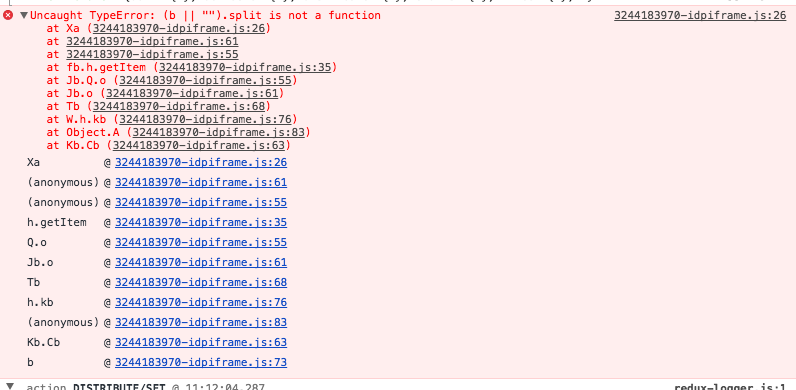
With or without prompt - no difference. Will inspect this later
indapublic
on 16 Feb 2018
@indapublic make sure that the scope parameter is a space delimited string, and not an array.
TMSCH
on 16 Feb 2018
Yep, it was a reason. Thank you. Works like a charm
indapublic
on 17 Feb 2018
It'd be great if the example on the picker doc's could be updated to show this technique:
https://developers.google.com/picker/docs/
The first example doesn't take into account the fact that the user may or may not be logged in (there's a bug with using just the code on this page in Safari and Chrome where you have to click the button twice as the popup incorrectly detects that it was closed by the browser the first time. Perhaps the popup closes itself too quickly? Your workaround above fixes this problem.
The second example uses the deprecated API, so no wonder people are getting confused between the two since they both appear on the same page. :)
 brendon
on 30 Aug 2018
brendon
on 30 Aug 2018
Related issues
 wzup
·
4Comments
wzup
·
4Comments
 caesarsol
·
6Comments
caesarsol
·
6Comments
 jeremyroelfs
·
8Comments
jeremyroelfs
·
8Comments
 blmiles
·
5Comments
blmiles
·
5Comments
 wonderfly
·
5Comments
wonderfly
·
5Comments
Most helpful comment
It'd be great if the example on the picker doc's could be updated to show this technique:
https://developers.google.com/picker/docs/
The first example doesn't take into account the fact that the user may or may not be logged in (there's a bug with using just the code on this page in Safari and Chrome where you have to click the button twice as the popup incorrectly detects that it was closed by the browser the first time. Perhaps the popup closes itself too quickly? Your workaround above fixes this problem.
The second example uses the deprecated API, so no wonder people are getting confused between the two since they both appear on the same page. :)