Godotsteam: Overlay not working on OSX Catalina ( 10.15 )
I have an issue with the overlay for my project, and I believe it has something to do with this:

This is from the overlay documentation on Steam's website : https://partner.steamgames.com/doc/features/overlay How would you solve this? Where can you access the build configuration?
 Zeolow
All 32 comments
I'm not very familiar with the workings of OSX and it's requirements but will read through the Steam documentation about this and hopefully have an answer very soon.
 Gramps
on 16 Nov 2020
Gramps
on 16 Nov 2020
Thank you!!!
mån 16 nov. 2020 kl. 17:36 skrev GP Garcia notifications@github.com:
I'm not very familiar with the workings of OSX and it's requirements but
will read through the Steam documentation about this and hopefully have an
answer very soon.—
You are receiving this because you authored the thread.
Reply to this email directly, view it on GitHub
https://github.com/Gramps/GodotSteam/issues/156#issuecomment-728176761,
or unsubscribe
https://github.com/notifications/unsubscribe-auth/AMLEOOKCDLW4YYULU34357DSQFIHZANCNFSM4TXL4UFQ
.
Zeolow
on 16 Nov 2020
OK, if I'm understanding this correctly, the entitlements thing is a plist file inside the game's app folders. According to the Steamworks documentation, you would want your entitlements file to look something like this:
<?xml version="1.0" encoding="UTF-8"?>
<!DOCTYPE plist PUBLIC "-//Apple//DTD PLIST 1.0//EN" "http://www.apple.com/DTDs/PropertyList-1.0.dtd">
<plist version="1.0">
<dict>
    <key>com.apple.security.cs.disable-library-validation</key>
    <true/>
    <key>com.apple.security.cs.allow-dyld-environment-variables</key>
    <true/>
</dict>
</plist>
I believe it should be saved as _entitlements.plist_ and, from what I gather from other sources, it should sit in your game's app zip Content/MacOS/ folder. That location may or may not be correct and I have no way of testing any of this.
Gramps
on 16 Nov 2020
@Zeolow For Coaguco's own games on OSX Catalina, the steam overlay just works, without them being signed or having entitlements, since I can't reproduce the issue on my own system it's difficult to figure out how to solve the issue.
If you can provide us with more details, please do.
You could also send us an executable for your game, I can see if the issue occurs on my system as well that way, and if it does look further.
 SapphireMH
on 16 Nov 2020
SapphireMH
on 16 Nov 2020
Might be something like the Linux issue where it only affects certain systems. Hard to say. That being said, @Zeolow, try the method I described and let me know if that works. You can also try sending a test copy of your executable to @thisismike97 for him to test it out to see if it may be due to something else.
Also, yes, what version of Mac were you running where it didn't work? That would probably be helpful. Also, did you compile the editor yourself or did you use one of the pre-compiled ones?
Gramps
on 16 Nov 2020
Okay so maybe the issue only exists on my end then. I've tried multiple things now and it seems the world is stacked against me with problems right now XD this might be a lenghty one...
- First problem: Export:
I am following the p2p networking tutorial from the documentation page (https://www.youtube.com/watch?v=si50G3S1XGU). I have not yet completed it, but running it in the Godot editor, so far everything except the overlay is working (steam initialized properly and I was able to get my username and host a p2p lobby). I then tried to export the project to mac osx with the Mac OSX 3.2.3 export template to see if that would help. I added the libsteam_api and steam_appid to the MacOS folder as instructed in the documentation but it still gave me this error:
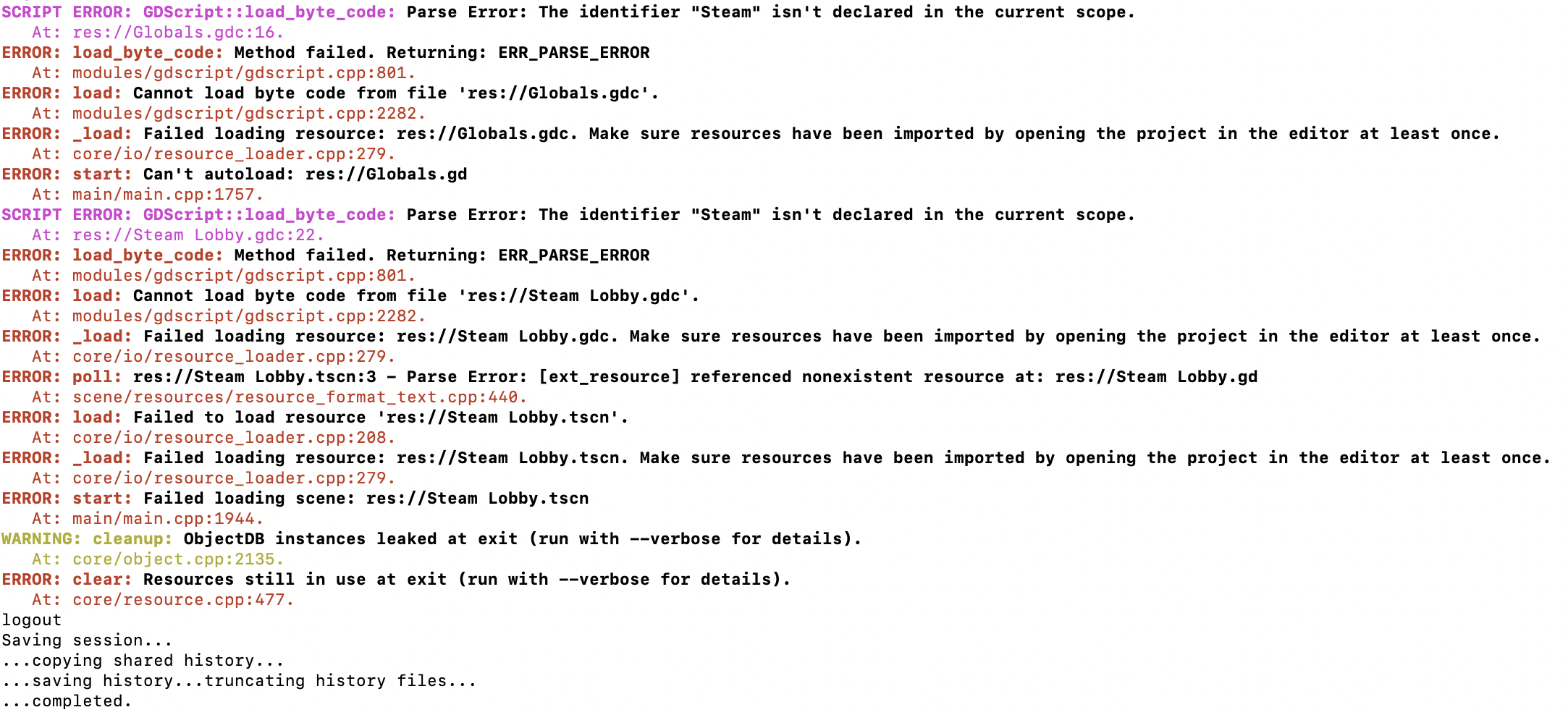
Is there something special you need to do when exporting the game with GodotSteam that I am missing maybe?
here's my .app file if that helps:
steam_lobby_tutorial.zip
- Second problem: Example project
I figured I'd try with the Godot Steam Example Project from the GodotSteam documentation (https://gramps.github.io/GodotSteam/) to see if the issue was only with my project. However the overlay does not work there either and it gives me an error with the steam init function "Failed to initialize Steam. Steamworks Active Shutting down..." I have steam running and if i disable the "get_tree().quit()" right below this print I can get it to run kind of (achievements work but when I try to get my profile icon it crashes).
- Third problem: Prebuilt editor not unzipping.
So with all these issues I assumed something was wrong with the editor that I compiled, and thought I might try with one of the prebuilt ones, but alas, twas to no avail! I downloaded the osx-323.zip version and unzipping gave me the following error:
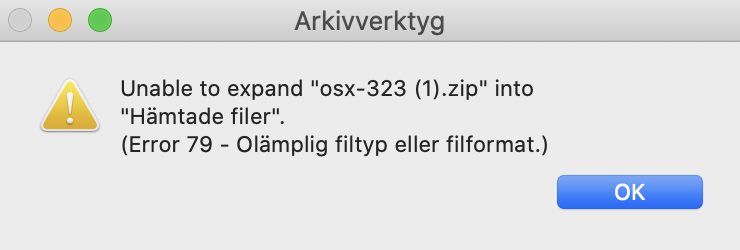 (swedish translates to ERROR 79 "Inappropriate File Type or Format") I tried unzipping in the terminal which gave me the following error:
 I'm really a tech noob so I don't really know what this means or how to solve it (tried looking up online but could not find a good answer).
- Fourth problem: Spilled coffee
ugh dammit (unrelated issue)
Also note: I could not find any document called entitlements.plist anywhere in the game I exported;(.
Oh and I'm using macOS Catalina 10.15.7
Really appreciate the help! Thanks in advance!!
Zeolow
on 17 Nov 2020
@Zeolow The zip file is indeed busted, our bad.
See if this one works?
https://drive.google.com/file/d/14QIU-i1zGbrsdk5RFVCM7Os1rllBuuAW/view?usp=sharing
SapphireMH
on 17 Nov 2020
Hmm, that very first line Parse error: The identifier "Steam" isn't declared in the current scope would indicate that Steamworks is missing from the editor or template. Are you using the default Godot OSX template or the one from this repo? Also are you specifying the right file when exporting?
As for the example project, it needs to be fixed. I don't believe I updated the Steam initialization process to match the current one... which I should fix today!
Yep, the original OSX zip (and may others) were corrupted. I have since repackaged everything and uploaded them again. It should be good to go. The one Mike linked should work too as it's the same thing.
Haha, wearing a towel always helps with spilled beverages.
I believe you have to create the entitlements.plist from scratch in a text editor and just name it as such. It may not actually be necessary from what I hear, but it can't hurt, right?
Gramps
on 17 Nov 2020
Ah I used the default Godot OSX template, must be that! Will try with the repo one in just a moment. The new pre-compiled editor works, however only if I unzip with the unarchiver and not with the standard built in archive tool. This might be an issue to look into for further people downloading, but it works fine for me at least:) But yeah sadly the overlay still isn't working even with the new editor, tried adding the .plist file in the editor MacOS folder but that didn't seem to make a change, will try exporting the project with the new template and adding the entitlements there. I'll update when I'm done with that!
Zeolow
on 18 Nov 2020
Also the template that came with the prebuilt editor seems to be damaged 😬
Zeolow
on 18 Nov 2020
Also the template that came with the prebuilt editor seems to be damaged 😬
The export template zip for osx? I may have to remake it then.
But yeah sadly the overlay still isn't working even with the new editor
Maybe the overlay does not work when starting your game through the editor, I have not tested this, but when launching our games through steam the overlay works as intended.
Unfortunately I have some issues with my setup, it no longer boots since yesterday, so I won't be able to investigate further just yet.
SapphireMH
on 18 Nov 2020
Oh I haven't tried this, I'll do that asap, although I might need the template to work first, but maybe I misinterpreted the whole export template thing, thought it was a template project. Am I supposed to be able to open the file or can I only do that through Godot in some way

this is what it looks like for me, and it says it cannot be opened when I try to do that.
No worries take your time!:)
Zeolow
on 18 Nov 2020
Also the file has the .app extension, shouldn't it be .tpz if it's a Godot Export Template, or am I missing something?
Zeolow
on 18 Nov 2020
@Zeolow Within the editor.app, when you go to export your project, it asks for the template in .zip format
So do not actually unpack osx_template.zip file, leave it as a zip :p
SapphireMH
on 18 Nov 2020
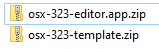
Unzip the top one to get the editor.app
Leave the second one as it is
SapphireMH
on 18 Nov 2020
oh shit my bad xD Added it to the export setting but still getting this error though:
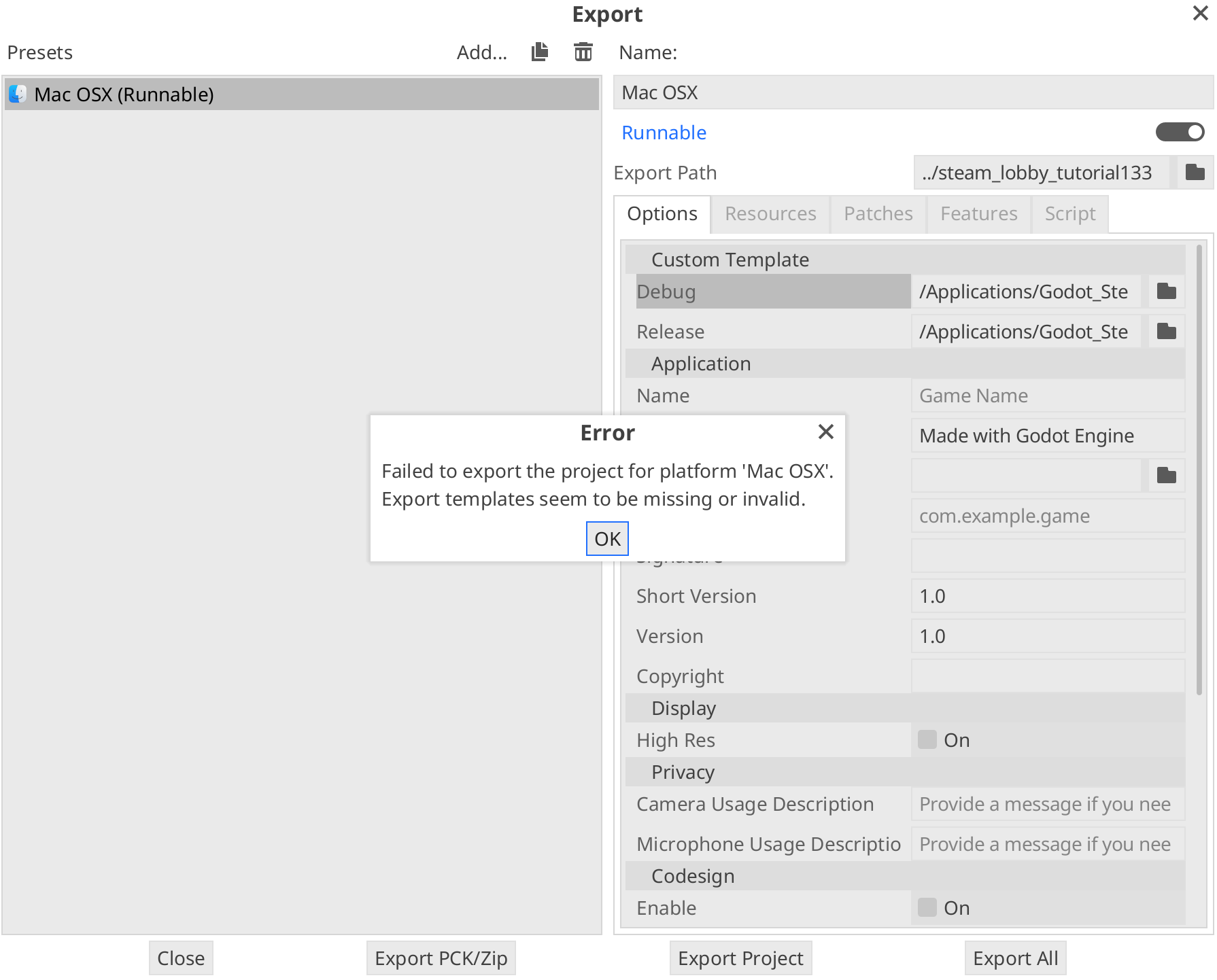
Did I do something wrong? Where do I put the template.zip file? (right now I put it in the Custom Template tab of the export settings)
Zeolow
on 18 Nov 2020
@Zeolow Man, the zip files are still corrupted for you? Looks like it's time for me to abandon Windows and it's cesspool of updates. You don't necessarily need to open the template but it should be a .zip file, not app.
As for the .tpz, that is how the Godot developers package a bunch of different templates into one which gets loaded into the editor. That is not how I usually recommend doing it with the GodotSteam templates.
Also in your screenshot, the debug field under "Custom Template" should be blank. This is probably what is causing it to fail. In the release field is where you place the pre-compiled OSX template from the release section.
I'm not sure if it is the same on OSX as it is Windows and Linux, but the next screen after this make sure "debugging" is turned off or it will fail.
To answer both of you, the overlay should work when running a game from the editor. The overlay should work in any scenario when the game runs.
Gramps
on 18 Nov 2020
Oh the .app thing I solved, it just turned into an .app when I extracted the .zip file before I knew not to extract it! Yeah I tried with only the release tab, and this did not give me any export errors like shown on the image, but it didn't solve the issues I was getting with opening the exported .app. I'm no longer where I have my computer, but I'll double check this again tomorrow to see if there are any other errors when trying to open the file exported with the template. But yeah the overlay problem still persists, the .plist might still be a possible solution but I haven't had the ability to check since I can't get it to export. Sent the project to a friend along with the prebuilt godot_editor as well to see if the problem was only on my computer (he also has a mac) but he had the same problem and could not open the overlay. Will do some more testing tomorrow!
Zeolow
on 18 Nov 2020
You mean you are getting an error when trying to run the exported game? I have absolutely not idea how OSX runs applications; it's whole app folder thing is foreign to me.
As for the overlay issue, I'm not sure. There was something similar with Linux at one point but it wasn't really the module so much as a configuration setting, if I remember.
Let us know how the testing goes!
Gramps
on 18 Nov 2020
Yeah when I try to open the exported game it just closes instantly without any errors, and when I open the executable inside of the .app folder with the terminal the errors that I posted above are printed.
On another note I just opened my test game with the same editor build on my windows computer and that works! I guess this was a bit expected but it at least rules out the possibility that my project just had some dum dum code that was causing the error :) Probably something to do with mac security then, hopefully the .plist thing which I can properly try when I manage to export the game!
Zeolow
on 18 Nov 2020
That terminal error you were showing before means there is no access to Steamworks or the module. Basically GodotSteam is not present. Also some things to remember when exporting: https://gramps.github.io/GodotSteam/tutorials-mac-export.html
Definitely something odd going on, not sure what we're missing.
Gramps
on 18 Nov 2020
Yeah I'm pretty sure I followed all of those steps, but I'll have to double check and try again when I'm back at the office tomorrow!
Zeolow
on 18 Nov 2020
Okay I've tried exporting it now with everything setup as instructed and I am still getting the same error ;(. Is there something else I can try? Can the export settings be done manually?
Zeolow
on 19 Nov 2020
Hmm, well like I said, that error shows that GodotSteam is not present as it doesn't understand the Steam identifier.
There were similar issues, on Windows, to yours currently: https://github.com/Gramps/GodotSteam/issues/111 and https://github.com/Gramps/GodotSteam/issues/92
In both cases it came to the template being applied incorrectly, or being the wrong template all together. So as long as in your Custom Template section during export you have nothing in the Debug field and the GodotSteam template in the Release field, debugging turned off on the last screen, and (possibly) any default Godot templates removed from the editor, you should be fine.
Also I'm not sure what you mean by "export settings done manually".
Gramps
on 19 Nov 2020
Sorry for the late reply was away from the office during the weekend. The export works!! I was a big dum dum, somehow missed the part where you have to turn off "export with debug" and this was causing the issue. The overlay sadly did not work with the entitlements added, but it works when I open the game through steam which is fine for me (doesn't have to work in the editor as long as I can test it somehow). Thank you both for the amazing support and thank you so much for creating this amazing module!! I'll make sure me and my small little team all subscribe to the patreon:) Keep up the good work!
Zeolow
on 23 Nov 2020
😳😳😳😳
Zeolow
on 23 Nov 2020
@Zeolow I'm very glad to hear you got it all sorted out, it's a little unfortunate the steam overlay does not work within the editor, but since we can't reproduce the problem we also can't find a solution, sadly.
If we can help you out in any other way be sure to let us know!
We have a Discord server where GodotSteam and it's uses can be discussed with us and other developers here:
https://discord.gg/RtGgxSM
Can this issue be closed?
SapphireMH
on 23 Nov 2020
yes!
Thank you!
Zeolow
on 23 Nov 2020
@Zeolow That's OK about the late reply, I usually take the weekends off! Glad to hear the export worked. As you noticed, there are few minor things to get hung up on. I am finishing up a new tutorial for the GodotSteam documentation that covers everything about exporting and shipping a game using GodotSteam.
That's weird that the overlay still didn't work outside of the Steam client even with the entitlement file. Out of curiosity, where did you place the file? Even though the issue is closed, I'd still like to try to figure that out.
And welcome! And thank you for your support! If you hit any more snags please let us know!
Gramps
on 23 Nov 2020
Also, once your game is on Steam, if you'd like, I can add it to the list of games using GodotSteam in the documentation.
Gramps
on 23 Nov 2020
Yes that would be awesome! :) Will make sure to send it when it is on
Steam!! I tried both putting the entitlements file in the MacOS folder next
to the excecutable (together with the appid and steamlib), and adding it
through the entitlements tab in the editor export window, neither seemed to
do anything;(
mån 23 nov. 2020 kl. 16:51 skrev GP Garcia notifications@github.com:
Also, once your game is on Steam, if you'd like, I can add it to the list
of games using GodotSteam in the documentation.—
You are receiving this because you were mentioned.
Reply to this email directly, view it on GitHub
https://github.com/Gramps/GodotSteam/issues/156#issuecomment-732246574,
or unsubscribe
https://github.com/notifications/unsubscribe-auth/AMLEOOMIIPE3O7K5LLZTMGDSRKAHLANCNFSM4TXL4UFQ
.
Zeolow
on 23 Nov 2020
Looking forward to it, sir!
Hmm, I guess I'll look more into the entitlement thing and see if there is something we are missing. Thanks for the info!
Gramps
on 23 Nov 2020
Related issues
 hadber
·
7Comments
hadber
·
7Comments
 LikeLakers2
·
3Comments
LikeLakers2
·
3Comments
 mthnzbk
·
7Comments
mthnzbk
·
7Comments
 Frostings
·
3Comments
Frostings
·
3Comments
 MichaelBelousov
·
11Comments
MichaelBelousov
·
11Comments
Most helpful comment
@Zeolow The zip file is indeed busted, our bad.
See if this one works?
https://drive.google.com/file/d/14QIU-i1zGbrsdk5RFVCM7Os1rllBuuAW/view?usp=sharing