Godotsteam: Charset for Russian language
Hi, I have a question like this.
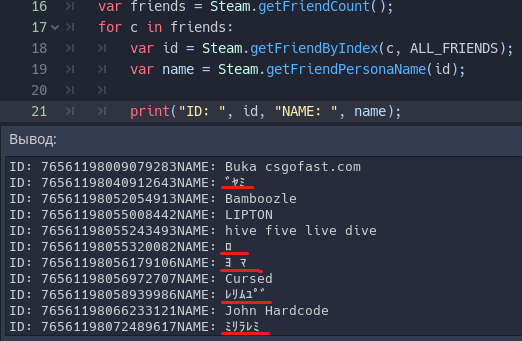
How can I display the names of the players if they are in Russian language?
Inexplicable characters are now displayed instead of names.
Can I use UTF-8 somehow or what should I do?
Thank you in advance!
 chrom007
All 29 comments
Hey there! Hmm, according to the Steam documentation it should return "_the current users persona name in UTF-8 format._" So I would think that it would be readable. I've not seen it give weird responses like that before though.
Try printing the name with: name.to_utf8( ) Let me know if that makes it readable.
 Gramps
on 23 Sep 2019
Gramps
on 23 Sep 2019
Not working :c
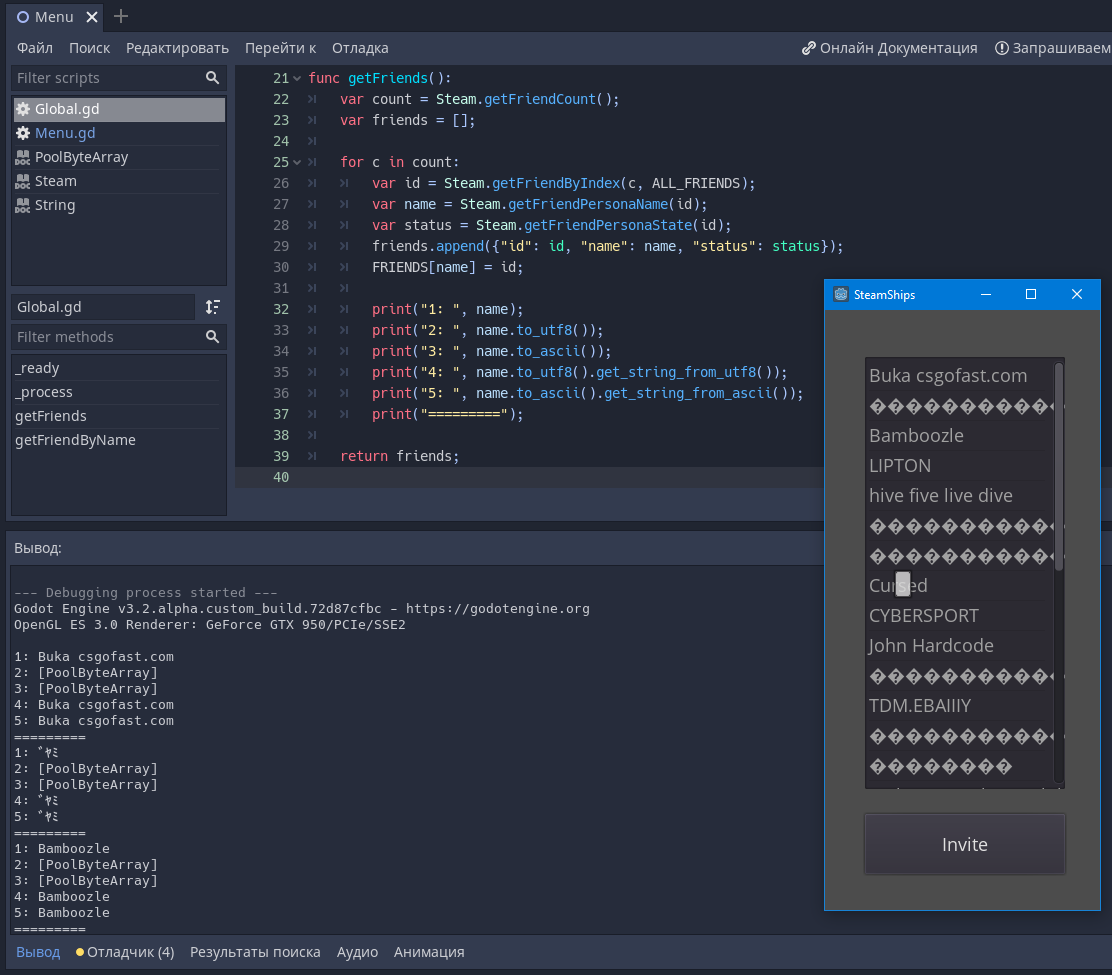
The to_utf8() function returns a PoolByteArray. I try to translate it back into text, but nothing changes ...
P.S. I also tried changing the font in game (OpenSans international) :)
chrom007
on 23 Sep 2019
Hmm, I am sure that I've used getFriendPersonaName() as well and I was able to display Russian names
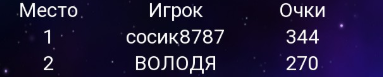
The source code is here:
https://github.com/Antokolos/know-everything-os/blob/master/godotsteam.gd
Maybe the problem is with font? Some fonts does not display Russian characters properly. Try the one from our game to be sure:
https://github.com/Antokolos/know-everything-os/blob/master/assets/fonts/roboto.regular.ttf
 Antokolos
on 23 Sep 2019
Antokolos
on 23 Sep 2019
@Antokolos thanks for helping, but I don’t know, nothing helps me ... You can send me your builded Godot engine, maybe the problem is in it and my build system. I can’t even imagine what could be the problem ...
UPD: Ahh, I see you are not using the assembled Godot + Steam, but a separate library. I will try according to your method now 😃
chrom007
on 23 Sep 2019
Yes, correct, I use GDNative libraries, they are in the following folder
https://github.com/Antokolos/know-everything-os/tree/master/lib/godotsteam
but it looks like that you've already found it :)
Antokolos
on 23 Sep 2019
@Gramps test on you this please: Steam.getFriendPersonaName(76561198134269316) on Godot3 + GodotSteam. This is my friend with Russian nickname
chrom007
on 23 Sep 2019
@chrom007 Yeah, as I was falling asleep last night I realized my suggested code would not work.
@Antokolos Hmm, after testing it, he is right. I get just ????????????? ????? sent back through the console. If I print it to a label with your font I get the same thing. Not sure why that is. Gonna test some more stuff and see if I can't get it to respond.
UPDATE 1: It also seems to be true of some other characters. I tried some friends' usernames and get ?? instead of certain characters.
UPDATE 2: I looked up the user ID you sent and copied the name from Firefox then pasted it into the label in my test project. It worked fine but does not work when sent back through GodotSteam. Not sure why this is the case yet but digging into it.
Gramps
on 24 Sep 2019
@Gramps GDNativeSteam lib is perfect working, all nicknames is displayed. I think its bug in C# or C++ code, but I don’t know where he is. I will also try to fix this, although I am not very strong in C++
All hope for you :D
chrom007
on 24 Sep 2019
That's odd. I presume the code in the GDNative version is the same as the module version; in fact, after reviewing the two, it is identical. So that's extra strange.
UPDATE 1: Having it print inside the C++ code before sending it over to GDScript also displays some weird text and not the player's name. Not sure why, perhaps something with the compiling process?
UPDATE 2: So this is interesting, I use this code:
var TEST_NAME = "Древний Укр"
print("Name: "+str(TEST_NAME))
And it does this in console print:
Russian name: Древний Укр
Russian name: ??????? ???
Note that the output in Godot itself prints correctly but the console prints incorrectly.
Gramps
on 24 Sep 2019
@Antokolos What version of C++ are you compiling the GDNative version with?
Gramps
on 24 Sep 2019
On Windows I've built it using Visual Studio 2015, on Linux it was clang++ (because I've compiled it with use_llvm=yes)

clang++ -v
clang version 6.0.0-1ubuntu2 (tags/RELEASE_600/final)
Target: x86_64-pc-linux-gnu
Thread model: posix
InstalledDir: /usr/bin
Found candidate GCC installation: /usr/bin/../lib/gcc/x86_64-linux-gnu/4.9
Found candidate GCC installation: /usr/bin/../lib/gcc/x86_64-linux-gnu/4.9.3
Found candidate GCC installation: /usr/bin/../lib/gcc/x86_64-linux-gnu/5
Found candidate GCC installation: /usr/bin/../lib/gcc/x86_64-linux-gnu/5.5.0
Found candidate GCC installation: /usr/bin/../lib/gcc/x86_64-linux-gnu/6
Found candidate GCC installation: /usr/bin/../lib/gcc/x86_64-linux-gnu/6.5.0
Found candidate GCC installation: /usr/bin/../lib/gcc/x86_64-linux-gnu/7
Found candidate GCC installation: /usr/bin/../lib/gcc/x86_64-linux-gnu/7.4.0
Found candidate GCC installation: /usr/bin/../lib/gcc/x86_64-linux-gnu/8
Found candidate GCC installation: /usr/lib/gcc/x86_64-linux-gnu/4.9
Found candidate GCC installation: /usr/lib/gcc/x86_64-linux-gnu/4.9.3
Found candidate GCC installation: /usr/lib/gcc/x86_64-linux-gnu/5
Found candidate GCC installation: /usr/lib/gcc/x86_64-linux-gnu/5.5.0
Found candidate GCC installation: /usr/lib/gcc/x86_64-linux-gnu/6
Found candidate GCC installation: /usr/lib/gcc/x86_64-linux-gnu/6.5.0
Found candidate GCC installation: /usr/lib/gcc/x86_64-linux-gnu/7
Found candidate GCC installation: /usr/lib/gcc/x86_64-linux-gnu/7.4.0
Found candidate GCC installation: /usr/lib/gcc/x86_64-linux-gnu/8
Selected GCC installation: /usr/bin/../lib/gcc/x86_64-linux-gnu/7.4.0
Candidate multilib: .;@m64
Candidate multilib: 32;@m32
Candidate multilib: x32;@mx32
Selected multilib: .;@m64
Hmm, it's an older version than I am using. I think I have Visual Studio 2017 but using the command line tools. I haven't tested this out on Linux yet; maybe it is working there. I don't really see why this isn't working.
Gramps
on 25 Sep 2019
@Gramps is there any progress?
Or does anyone have any thoughts on this?
chrom007
on 27 Sep 2019
I have not yet. I tried modifying the C++ code on the Windows side and recompiling but it never comes out any differently. Not sure why the GDNative one would respond differently even though it has the same code base as the module.
I was going to try Linux later this afternoon and see if something there is different. Should have a response later in the day.
Gramps
on 27 Sep 2019
OK, so this is really strange. On my Linux build printing a name from getFriendPersonaName shows no special characters at all. It seems it automatically strips them out. The Steam ID you gave me just returns an empty string. I used some with friends I have and it just took out any special characters except things like [ { . - > and such.
I'm not sure what the difference between the Linux and Window builds are since they use the same code base. On Linux I use GCC 8 and Windows uses who knows what.
Gramps
on 27 Sep 2019
@Gramps at first it was the same on my Windows, but after that (I don’t remember why) special characters were written. So I think this is not due to the OS
Is it possible to run your library without Godot, and try to display information about the nickname, what will it give out? I think we need to check it first, if everything is fine there, then is it a matter of Godot?
chrom007
on 27 Sep 2019
There is sort of a way to do it... but it will still need to display through Godot's console. Basically you have it print the response before passing it back with either sprintf or printf. I did try this in Windows and it gave me a different output than what Godot got but they were still both wrong. When I copied the text exactly from Steam itself, with special characters, Godot was able to print if fine with no issues.
I am going to do some game dev for a bit then I'll get back to messing with it on Linux and see what else I can find out!
Gramps
on 27 Sep 2019
;(
chrom007
on 11 Oct 2019
Haven't had much luck on the Linux front since last time. Not really sure what is going on. Did you compile it yourself or did you use the pre-compiles? I wonder if it is some locale thing. I don't imagine it's the actual codebase but maybe something with the way it is compiled.
Gramps
on 13 Oct 2019
I tried ready-made compiled solutions and compiled several times myself, but nothing worked.
chrom007
on 14 Oct 2019
Hmm, well it must be something. The code is correct and the same as @Antokolos GDNative scripting so I'm not sure where the problem actually lies. My Godot seems to print Cyrillic characters fine but names from the getFriendPersonaName() are missing certain special characters and Cyrillic characters.
At this point I will have to enlist outside help. I'll ask around to see if I can get some answers!
Gramps
on 14 Oct 2019
Still searching for some solution. Gonna try some things I've read and see if that helps!
Gramps
on 12 Nov 2019
With Godot 3.2 there still seems to be no change and I have found nothing about character sets that helps. My only assumption is there is something during compilation that is wrong, as there is no real issue with the Steamworks functions.
I hate this issue being in limbo for so long but still haven't found a solution.
Gramps
on 5 Feb 2020
I'm crying. in the same way that I have not tried, everything is unsuccessful ...
chrom007
on 14 Feb 2020
Yeah, it is a strange issue. I presume the problem lies somewhere in the compiling as the function the GDNative and module version us is exactly the same, so the code itself shouldn't be the issue. Especially since this seems like some kind of Unicode problem.
Gramps
on 14 Feb 2020
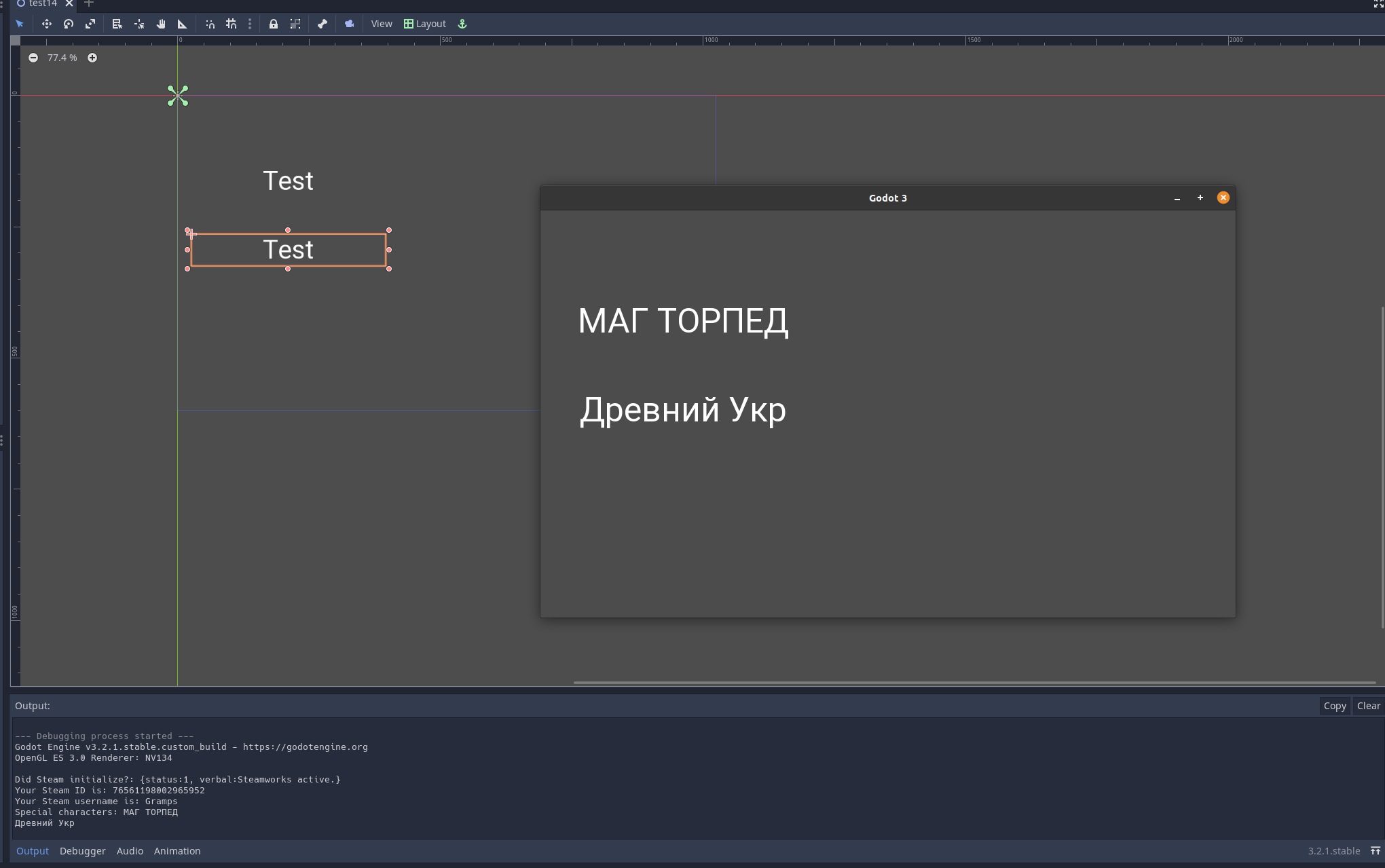
Holy crap! After almost a year later I think I have solved the problem. For whatever reason the string passed back is not wide enough to support Unicode 16, or so it seems. If pass it to wchar_t first then return it to our Godot string, it will print the Cyrillic characters fine.
Current / non-working code for Cyrillic is just passing the response along to string:
return SteamFriends()->GetFriendPersonaName(userID);
Creating a wchar_t variable first, then passing the response to it, then passing that to string:
wchar_t *username = new wchar_t[256];
mbstowcs(username, SteamFriends()->GetFriendPersonaName(userID), 256);
return username;
It seems like a really hack-y way to solve this problem but it did in fact work. I presume there is a more elegant solution to this but this is the only thing I have found so far that actually does work.
Gramps
on 16 Jul 2020
@Gramps Oh my God! 😂
I kept waiting and finally it happened! I hope this will be included in your next library update.
I think the entire Russian-speaking community is very grateful to you and this fix!
Thank you for continuing to support all questions and errors even after a year ❤
chrom007
on 16 Jul 2020
Hey there! Welcome! I'm glad it finally got fixed after all this time. It will definitely be in the next update. I'm guessing I may need to implement this everywhere a username is acquired.
Gramps
on 16 Jul 2020
OK, newest version of GodotSteam is up with the fix for Cyrillic characters! Uploading pre-compiles too. Let me know if you find any functions I may have missed!
Gramps
on 17 Aug 2020
Related issues
 yuyubibibobibo
·
6Comments
yuyubibibobibo
·
6Comments
 avencherus
·
9Comments
avencherus
·
9Comments
 MichaelBelousov
·
11Comments
MichaelBelousov
·
5Comments
MichaelBelousov
·
11Comments
MichaelBelousov
·
5Comments
 yeonghoey
·
4Comments
yeonghoey
·
4Comments
Most helpful comment
Holy crap! After almost a year later I think I have solved the problem. For whatever reason the string passed back is not wide enough to support Unicode 16, or so it seems. If pass it to wchar_t first then return it to our Godot string, it will print the Cyrillic characters fine.
Current / non-working code for Cyrillic is just passing the response along to string:
return SteamFriends()->GetFriendPersonaName(userID);Creating a wchar_t variable first, then passing the response to it, then passing that to string:
It seems like a really hack-y way to solve this problem but it did in fact work. I presume there is a more elegant solution to this but this is the only thing I have found so far that actually does work.