Godot: PhysicalSkyMaterial is black (but ProceduralSky displays normally)
Godot version:
Current Master: a17fba3f21241beb68127d30b8d07db267e65e35
OS/device including version:
Windows 10, Vulkan, iGPU intel 10th gen ( intel hd graphics ):
i5-1035G1 CPU @ 1.00GHz, 1.19GHz
Issue description:
The sky is black from the default PhysicalSkyMaterial, I was expecting the sky to look like a sky.
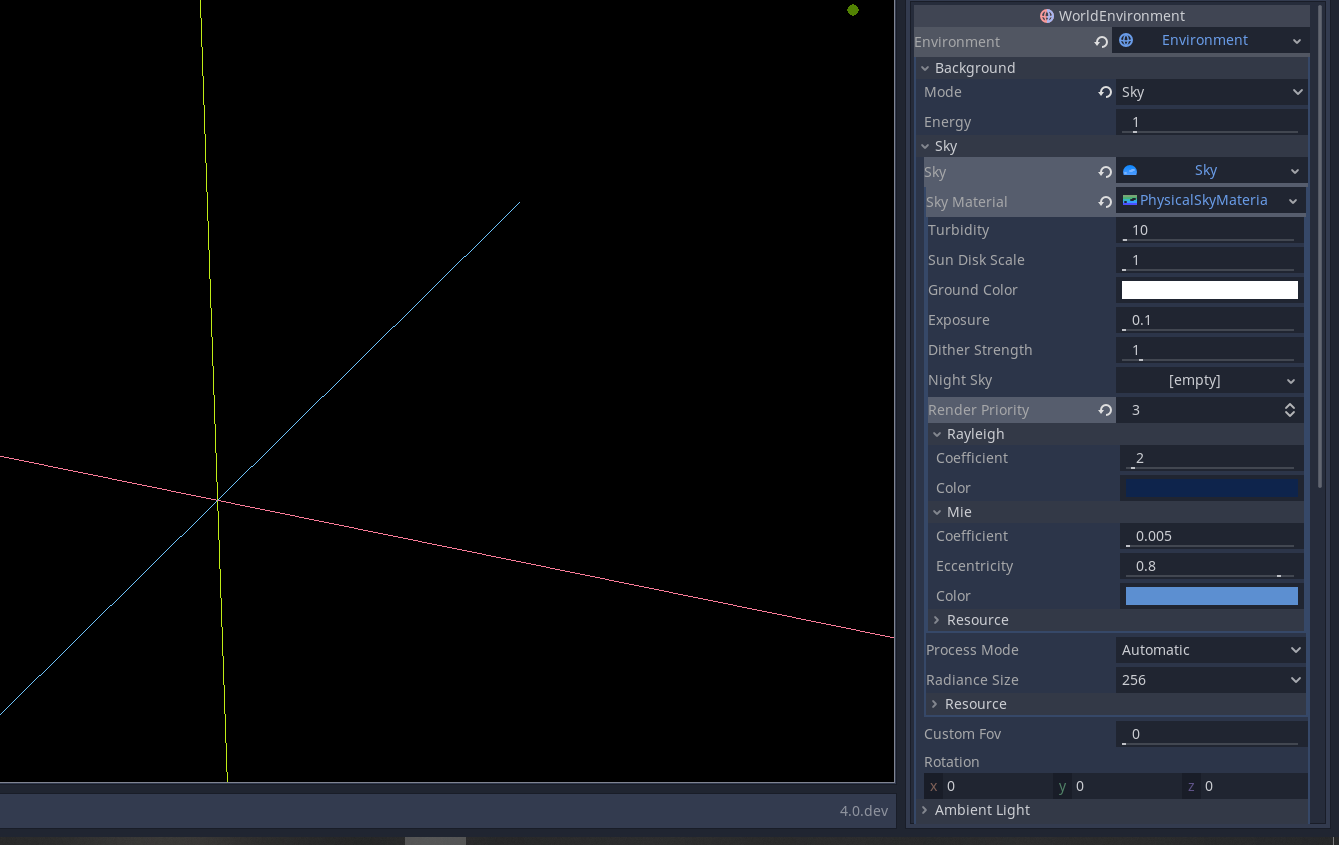
Steps to reproduce:
Create a WorldEnvironment node, add a sky as the background, then add a PhysicalSkyMaterial.
Minimal reproduction project:
no-sky.zip
 creikey
All 7 comments
I can confirm this on commit https://github.com/godotengine/godot/commit/25d18e34916ab4a2a5a1281b42549b11cdc8d29c with a GeForce GTX 1080 (NVIDIA 440.100) on Fedora 31.
ProceduralSky doesn't suffer from this issue and displays normally.
 Calinou
on 17 Aug 2020
Calinou
on 17 Aug 2020
PhysicalSkyMaterial is a sky material based on the physical interactions of light in the atmosphere. Without a sun, there can be no atmospheric scattering. Therefore, if there is no DirectionalLight in the scene, the sky is black (if you had a night_sky texture set, you would see the stars).
When I initially added the PhysicalSkyMaterial, I was worried this would be confusing for users. Although it makes sense (no sun = no sunlight => only see stars), I can understand why it could be confusing for users.
Earlier I considered 2 solutions, but neither was satisfactory:
1. detect when there are no DirectionalLights in the scene and then add a default sun
This worked well, but it forces a specific behaviour that users may not want (e.g. users may just hide the directional light altogether at nightime as an optimization)
2. show an editor warning when the PhysicalSkyMaterial is added without a DirectionalLight
Similar to the above, this would be fine, but it is troublesome for users that legitimately want a PhysicalSkyMaterial without sunlight.
So, all that is to say, I am open to discussing usability improvements. Clearly this behaviour is confusing, but I don't see any solution that I am happy with.
 clayjohn
on 17 Aug 2020
clayjohn
on 17 Aug 2020
if there is no DirectionalLight in the scene, the sky is black (if you had a night_sky texture set, you would see the stars)
Could be posible/doable to create a default "procedural night shader" to replace que absence of night_sky texture?
If this was posible, the absence of DirectionalLight would be more clear (and at least it would not feel like a bug).
And yes, I was one of those that thought that the blackness was a bug...
 soloparatolos
on 19 Aug 2020
soloparatolos
on 19 Aug 2020
@soloparatolos it's a good idea. I initially had a procedural night sky built in. The issue with it is that procedural stars are very hard to get right for all screen resolutions. So either you end up with something that looks pretty and stylized or you do something that looks realistic-ish, but is slow. At the end of the day, I couldn't make something that was general purpose enough to include in the engine.
clayjohn
on 19 Aug 2020
Alternatively make PhysicalSkyMaterial have a "sun" property that points to the DirectionalLight3D it will use as the sun (or an array if multiple suns are supported in the future). This would make it a bit more obvious that it needs a DirectionalLight3D to have a sun. It also fixes the current problem that, if there is more than one DirectionalLight3D in the scene, PhysicalSkyMaterial only ever seems to use the one higher in the scene tree for the sun's position.
 name-here
on 20 Aug 2020
name-here
on 20 Aug 2020
@name-here I like that. It also solves another problem I've been tossing around about how to properly support a moon.
I have no idea how we could make it work though. The light is read directly from the shader. The material has no access to it.
clayjohn
on 20 Aug 2020
This will be solved by https://github.com/godotengine/godot-proposals/issues/1599
clayjohn
on 22 Oct 2020
Related issues
 SleepProgger
·
3Comments
SleepProgger
·
3Comments
 ndee85
·
3Comments
ndee85
·
3Comments
 mooseyfaith
·
3Comments
mooseyfaith
·
3Comments
 ducdetronquito
·
3Comments
ducdetronquito
·
3Comments
 Zylann
·
3Comments
Zylann
·
3Comments
Most helpful comment
PhysicalSkyMaterial is a sky material based on the physical interactions of light in the atmosphere. Without a sun, there can be no atmospheric scattering. Therefore, if there is no DirectionalLight in the scene, the sky is black (if you had a night_sky texture set, you would see the stars).
When I initially added the PhysicalSkyMaterial, I was worried this would be confusing for users. Although it makes sense (no sun = no sunlight => only see stars), I can understand why it could be confusing for users.
Earlier I considered 2 solutions, but neither was satisfactory:
1. detect when there are no DirectionalLights in the scene and then add a default sun
This worked well, but it forces a specific behaviour that users may not want (e.g. users may just hide the directional light altogether at nightime as an optimization)
2. show an editor warning when the PhysicalSkyMaterial is added without a DirectionalLight
Similar to the above, this would be fine, but it is troublesome for users that legitimately want a PhysicalSkyMaterial without sunlight.
So, all that is to say, I am open to discussing usability improvements. Clearly this behaviour is confusing, but I don't see any solution that I am happy with.