Godot: Don't allow exporting a project if no main scene is defined
Godot version:
godot 3.2.2-stable
OS/device including version:
Windows, gles2
Issue description:
When exporting a game with no selected main scene, exported game crashes on start
Steps to reproduce:
Not select a main scene and then export to windows
Minimal reproduction project:
 LoneDespair
All 9 comments
What would be the expected behavior in this case?
 bojidar-bg
on 30 Jun 2020
bojidar-bg
on 30 Jun 2020
IMHO not let you export, with a popup saying you don't have a main scene set.
 Zireael07
on 30 Jun 2020
Zireael07
on 30 Jun 2020
When exporting a game with no selected main scene, exported game crashes on start
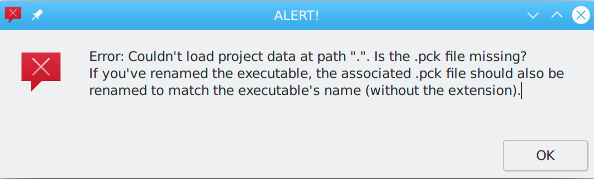
Does it crash, or does it fail to start and give an error? It should be the latter, which is not a bug (while an engine crash would be).
 akien-mga
on 30 Jun 2020
akien-mga
on 30 Jun 2020
Good catch. What @Zireael07 said is what I thought it already did O_o
 girng
on 30 Jun 2020
girng
on 30 Jun 2020
@akien-mga it just crashes with no popup error
LoneDespair
on 30 Jun 2020
Right, the above popup is when there's no .pck.
I would expect it to print an error if run in a terminal and terminate gracefully, not crash though.
akien-mga
on 30 Jun 2020
@LoneDespair Try starting the project from a command prompt. (On Windows, you'll need to export a debug build instead of a release build to see any kind of output.)
 Calinou
on 30 Jun 2020
Calinou
on 30 Jun 2020
@Calinou this was tested on a debug build
Although the terminal included in debug export seems to say something but the game crashes so fast, it's unreadable
tho this might be a issue for platforms with no terminal included in debug, eg mobile
LoneDespair
on 30 Jun 2020
Although the terminal included in debug export seems to say something but the game crashes so fast, it's unreadable
This is why you can open a command prompt and start the binary there to read the output :slightly_smiling_face:
Godot doesn't bundle its own command prompt system (unlike a few other engines out there). It's just that debug Windows builds are compiled as console applications, causing Windows to open a command prompt automatically as long as the process is running.
Calinou
on 30 Jun 2020
Related issues
 ducdetronquito
·
3Comments
ducdetronquito
·
3Comments
 mefihl
·
3Comments
mefihl
·
3Comments
 gonzo191
·
3Comments
gonzo191
·
3Comments
 n-pigeon
·
3Comments
n-pigeon
·
3Comments
 mooseyfaith
·
3Comments
mooseyfaith
·
3Comments
Most helpful comment
IMHO not let you export, with a popup saying you don't have a main scene set.