Godot: Audio files too small will loop indefinitely when played
Platform: Windows v3.2.1 stable-official
Steps to reproduce: I simply imported an audio sample with total size <0,15s, set it to not loop, force 8-bit. Whenever AudioStreamPlayer.play() was called it would loop indefinitely, even after calling stop().
 pedrozaalex
All 6 comments
Can you provide a minimal project that can reproduce the issue?
 akien-mga
on 24 Jun 2020
akien-mga
on 24 Jun 2020
@akien-mga
Can you provide a minimal project that can reproduce the issue?
For sure my man.
gd_sound_test.zip
Steps I took in order to reproduce:
- New project, default settings, nothing changed
- New Node Main
- Add child node AudioStreamPlayer
- Put the
4359__noisecollector__pongblipf4.wavfile into res:// - Reimport the file above making sure Edit -> Loop is set to off in the import tab
- Attached a new script to node AudioStreamPlayer with a call to
play()on_ready() - Run
pedrozaalex
on 24 Jun 2020
Thanks.
I checked the project and it turns out that it's not a bug: WAV files have metadata to hardcore loop points, and 4359__noisecollector__pongblipf4.wav has such a loop point defined. You can check it with LoopAuditioneer:
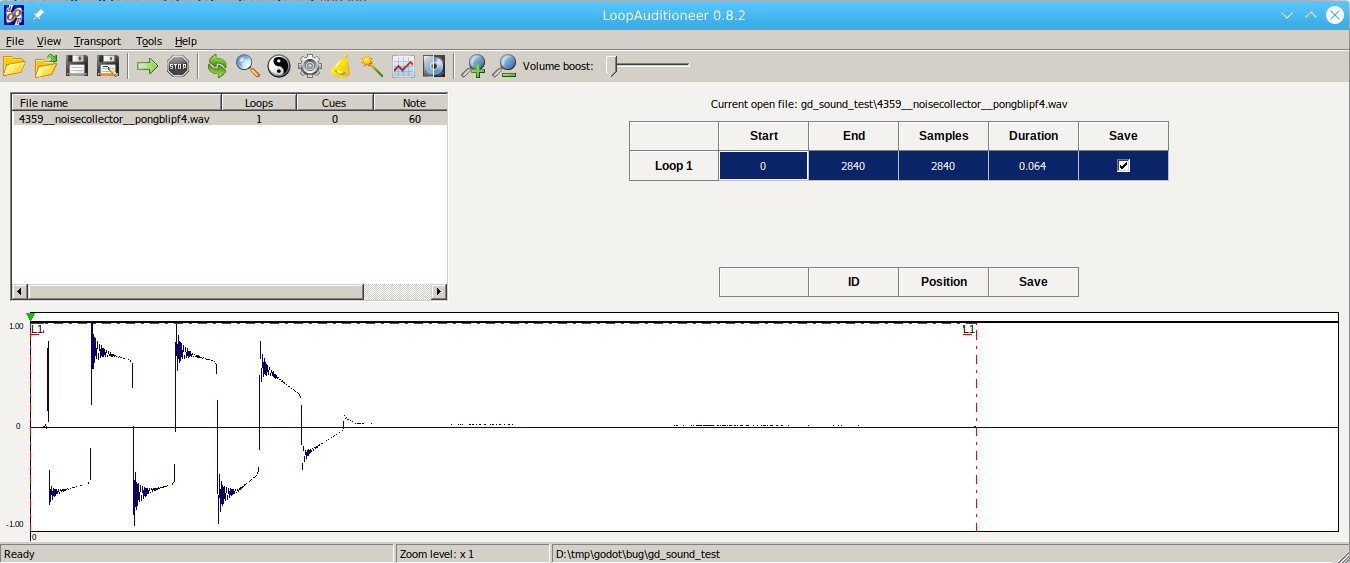
Godot's WAV importer respects this metadata and will thus set loop information for the WAV file on import as encoded in the file.
The edit/loop import option is actually not a toggle to disable the use of this metadata, but instead it's used to force a WAV file without loop points to be imported with loop.
You can see that your AudioStreamSample is imported with non-default values for Loop Mode and Loop End, taken from the WAV loop points metadata:
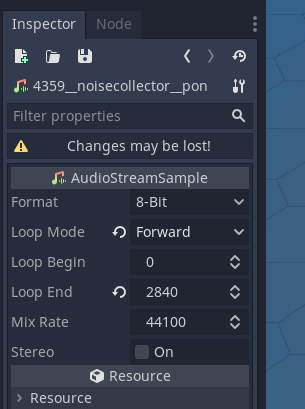
As the screenshot shows it, changes made here will not be kept as it's an imported resource, but you can save it as a custom .tres resource:
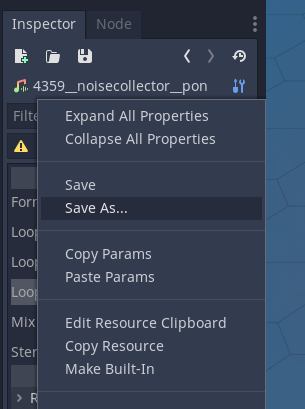
And then you can change the values and use this new resource as your stream in AudioStreamPlayer. Alternatively, you can remove the hardcoded loop point from the WAV file.
akien-mga
on 24 Jun 2020
Thanks a lot man. I read the following in the docs:
Keep in mind Ogg Vorbis files don’t contain looping information. If looping an Ogg Vorbis file is desired, it must be set up using the import options
And for some reason I inferred that it also applied to WAV files. My mistake lol.
Thank you again for your time and have a great day 😄
pedrozaalex
on 24 Jun 2020
I'll add something about WAV files holding looping metadata which Godot honours, as it's not obvious.
akien-mga
on 24 Jun 2020
I created a draft PR here.
pedrozaalex
on 24 Jun 2020
Related issues
 ndee85
·
3Comments
ndee85
·
3Comments
 testman42
·
3Comments
testman42
·
3Comments
 n-pigeon
·
3Comments
n-pigeon
·
3Comments
 mooseyfaith
·
3Comments
mooseyfaith
·
3Comments
 timoschwarzer
·
3Comments
timoschwarzer
·
3Comments
Most helpful comment
I'll add something about WAV files holding looping metadata which Godot honours, as it's not obvious.