Godot: Low processor usage mode on HTML5 exports
Godot version:
v.3.2.1
OS/device including version:
Brave on Mac
Safari on Mac
Issue description:
In playing around with Godot I created a test app that is essentially just a series of UI controls and deployed it to the web. In trying to reduce battery usage I came across the "low processor usage mode", which sounded like a good candidate. In testing it, however, it seems to result in more work being done when enabled than when it's disabled. It almost looks like the complete opposite to what I think I'd expect.
Some example profiles I've saved - these can be imported into the performance tab of developer tools for Brave (and presumably anything chrome-y): Archive.zip
Screenshots
Brave - Enabled

Safari - Enabled

Brave - Disabled
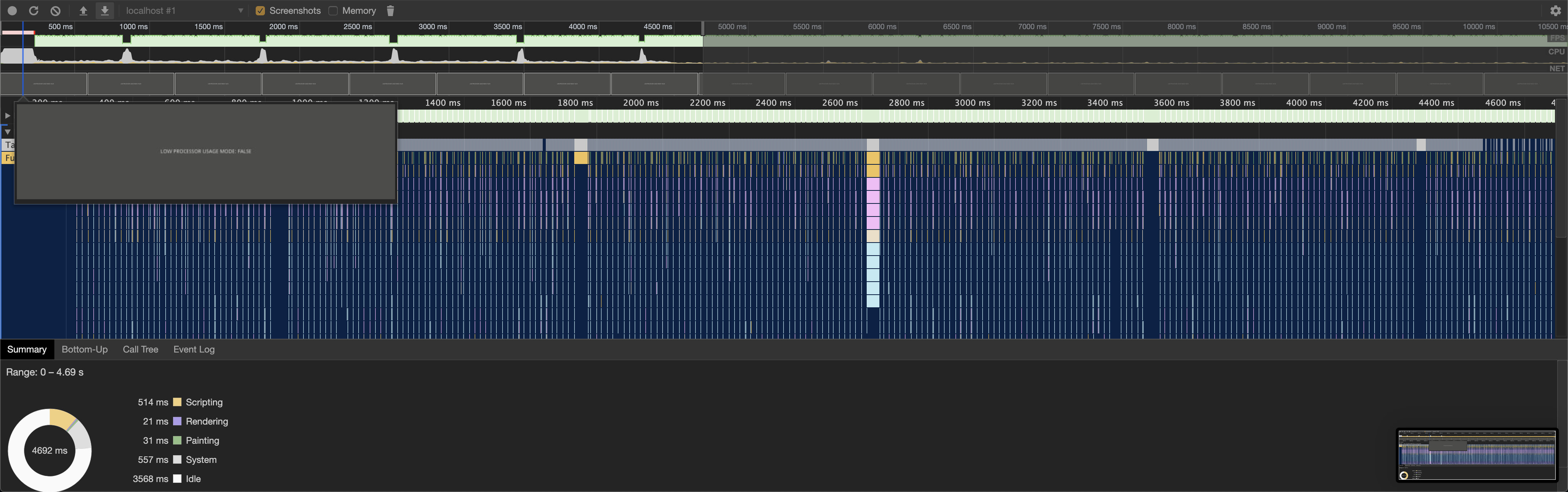
Safari - Disabled

Steps to reproduce:
- Clone the project below.
- Run it as an HTML5 export with low processor usage mode disabled via project settings.
- Go to performance tab of developer tools and profile for 30 seconds.
- Enable low processor usage mode and re-run as an HTML5 export.
- Go to performance tab of developer tools and profile for 30 seconds again.
- Compare and see the (significantly) higher scripting usage with low processor mode enabled.
Minimal reproduction project:
https://github.com/samuelhwilliams/test-low-processor-usage
 samuelhwilliams
All 9 comments
Here on Firefox 75 on Fedora 31 (NVIDIA), low-processor usage mode is causing the entire viewport to flicker into a black screen on every redraw, but I can also reproduce this on other websites like https://keithclark.co.uk/labs/css-fps/. This is probably a browser/OS-specific issue though.
You can test GDScript Online which has low-processor mode enabled.
 Calinou
on 10 May 2020
Calinou
on 10 May 2020
Here on Firefox 75 on Fedora 31 (NVIDIA), low-processor usage mode is causing the entire viewport to flicker into a black screen on every redraw,
Flickering on low processor usage is something I encountered too (seems to be Firefox only). Enabling offscreen frame buffer fixes it (though causing other issues on canvas resize).
You can try out this branch (3.2), which enables it, and should decrease rendering time.
Regarding the script time, @samuelhwilliams try setting OS.low_processor_usage_mode_sleep_usec = 0. (I don't really know why that option exists @reduz ?)
 Faless
on 10 May 2020
Faless
on 10 May 2020
@Faless That option exists so you can limit the FPS while low processor mode is enabled. That said, I question its usefulness since it sleeps by a constant duration, which is bad for smoothness. See #36052.
We should probably remove it entirely in favor of using both Low Processor Usage Mode and Force Fps at the same time. Maybe we should rename Low Processor Mode to somethng like "Redraw On Changes Only" too.
Calinou
on 10 May 2020
@Calinou I see, well, then we should probably disable it altogether in HTML5. We are running our main loop in requestAnimationFrame, which is always vsynced. So we can't really have different target FPSes, we could drop iterations maybe, but the delay trick will never work on HTML5.
We could even have the main loop run in a timer if a user disable vsync (which is unlikely something the user wants in HTML5 versions, or in general), but sill, that delay will never work, in that case the timer timeout should be set accordingly to the target FPS.
Maybe we should just override OS::get_low_processor_usage_mode_sleep_usec in the JS platform to always return 0?
Faless
on 10 May 2020
@Faless Sounds good to me, although we should still keep low-processor usage mode available in the HTML5 platform. It's a must-have for non-game applications or turn-based games :slightly_smiling_face:
Calinou
on 10 May 2020
With Force FPS set to 15 (and low processor usage mode enabled) I seem to get an event higher CPU usage? From the stock project I shared, here's a Safari/Mac screenshot

@Faless similarly with setting sleep_usec, though I don't have a screenshot for that right now - sorry.
The main project I've been working on where I came across this problem is indeed a non-game application that will often be used on mobile so I'm keen to understand how best to minimise battery usage :)
P.S. I didn't say this yet - sorry - but great work on Godot. 👍
samuelhwilliams
on 10 May 2020
@samuelhwilliams thanks for reporting this too.
You should not enable force_fps in HTML5. It has the same problem, meaning it uses a dealy_usec to reach that FPS target.
That simply can't work in browsers, as blocking the thread results in high script/CPU usage.
As I mentioned above (in a cryptic way I admit) that should be implemented with skipping iteration in animation frames.
Faless
on 11 May 2020
@Faless Thanks
You should not enable force_fps in HTML5. It has the same problem, meaning it uses a dealy_usec to reach that FPS target.
Ok, your suggestion that these should just be ignored for HTML5 platform then probably sounds reasonable.
Just for the sake of my clarity - is the take-away from this that there's not really anything more to be done to minimise CPU usage/battery consumption for HTML5 at the moment - or is there other stuff I can do? (Or should be able to do, pending bug fixes/planned features). Obviously just looking at a screen that says "low processor usage mode: false" seems like it should be able to use less than 10% CPU at all times - but I'm also aware there's clearly an overhead for running this via Godot. I don't know what that minimum overhead is though, so I'm just asking out of ignorance really.
samuelhwilliams
on 11 May 2020
@samuelhwilliams well, there isn't much you can do right now to lower CPU usage in HTML5 platforms right now.
There are a few outstanding bugs/improvements that we will have to work on:
- My branch: https://github.com/Faless/godot/tree/js/swap_buffer already enables offscreen rendering and only redraw when changes are made to the scene, but will probably only affect GPU time (you can already try that, compiling the export template for that branch, setting
low_processor_usage = true,OS.get_low_processor_usage_mode_sleep_usec = 0, andEngine.target_fps = 0). - We should disable
get_low_processor_usage_mode_sleep_usecaltogether at least for HTML5 platform (potentially in that same branch). - We should devise a way to implement
target_fpscorrectly in the HTML5 platform, probably by skippingrequestAnimationFramesaccordingly.
Faless
on 11 May 2020
Related issues
 willnationsdev
·
93Comments
willnationsdev
·
93Comments
 NullNeska
·
191Comments
NullNeska
·
191Comments
 Angluca
·
100Comments
Angluca
·
100Comments
 nicklunt
·
107Comments
nicklunt
·
107Comments
 ghost
·
161Comments
ghost
·
161Comments
Most helpful comment
@samuelhwilliams well, there isn't much you can do right now to lower CPU usage in HTML5 platforms right now.
There are a few outstanding bugs/improvements that we will have to work on:
low_processor_usage = true,OS.get_low_processor_usage_mode_sleep_usec = 0, andEngine.target_fps = 0).get_low_processor_usage_mode_sleep_usecaltogether at least for HTML5 platform (potentially in that same branch).target_fpscorrectly in the HTML5 platform, probably by skippingrequestAnimationFramesaccordingly.