Godot version:
3.2
Issue description:
When you select Change Type in scene tree, you always see this
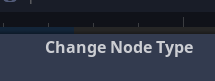
But the format for this string is Change %s Type. It's filled incorrectly.
 KoBeWi
All 6 comments
The %s part shows the base type of the available types. It shows "Node" when using scene tree's Change Type, and shows "Object" when using Visual Script editor's Change Base Type.
(It means something like: I want to change the type of this Node object from Label to AnimationPlayer.)
 timothyqiu
on 6 Mar 2020
timothyqiu
on 6 Mar 2020
Maybe we could change the string so it says Change Node "MyLabel"'s type (if the node is named MyLabel). This would be more explicit.
 Calinou
on 6 Mar 2020
Calinou
on 6 Mar 2020
@Calinou Sounds good. I'll start working on it.
 theoway
on 18 Mar 2020
theoway
on 18 Mar 2020
@KoBeWi @timothyqiu @Calinou
void CreateDialog::popup_create(bool p_dont_clear, bool p_replace_mode, const String &p_select_type)
This function is called to create the dialog for changing the node. Looking at the parameters, would it not be better if the message is changed to Change Node MyNodeType or something like this?This way, the users can know the type of the node they are going to change without closing the dialog for checking.
theoway
on 18 Mar 2020
I think convert is more suitable than change. i.e. Convert MyNode from "CurrentType"
 Janglee123
on 19 Mar 2020
Janglee123
on 19 Mar 2020
@Janglee123 Much better. I'll make a PR for this.
theoway
on 19 Mar 2020
Related issues
 ndee85
·
3Comments
ndee85
·
3Comments
 mooseyfaith
·
3Comments
mooseyfaith
·
3Comments
 mefihl
·
3Comments
mefihl
·
3Comments
 nunodonato
·
3Comments
nunodonato
·
3Comments
 Zylann
·
3Comments
Zylann
·
3Comments
Most helpful comment
Maybe we could change the string so it says
Change Node "MyLabel"'s type(if the node is namedMyLabel). This would be more explicit.