Godot: Additional lines drawn when using draw_polygon
Godot version: Godot 3.2 Beta 3/4
OS/device including version: Windows 10
Issue description:
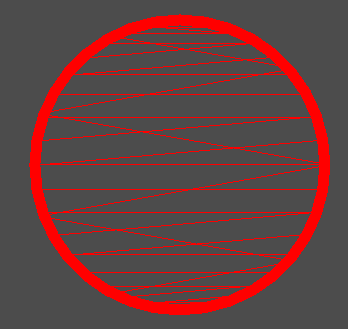
There are additional lines when drawing a concave polygon, that were not there in Beta 2 and all previous Godot versions
Steps to reproduce:
Draw a shape with a cutout shape inside it as a single concave polygon.
Or run the attached repro project.
Try the same in beta 3 and beta 2 and compare the results.
Minimal reproduction project:
bug_repro_proj.zip
Screenshots of repro project in Beta 2

And that same project in Beta 3 and beyond:
 TicklesTheBrain
All 3 comments
I ran a bisect and it seems this was introduced on this commit:
https://github.com/godotengine/godot/commit/e6ebc43d725710f69094afa6ff47d91e50cce1ad?diff=unified#diff-e64fc7b93ef7deefed9e5978c3615901L825-L829
by drawing lines for AA using the indices. I'm not sure what to do, so I'll leave this here open for discussion.
 MadEqua
on 26 Dec 2019
MadEqua
on 26 Dec 2019
CC @pouleyKetchoupp
 clayjohn
on 27 Dec 2019
clayjohn
on 27 Dec 2019
@TicklesTheBrain This case will be fixed with PR #34726. Note that you also need to disable hdr in your example project for antialiasing to work properly.
 pouleyKetchoupp
on 1 Jan 2020
pouleyKetchoupp
on 1 Jan 2020
Related issues
 gonzo191
·
3Comments
gonzo191
·
3Comments
 RebelliousX
·
3Comments
RebelliousX
·
3Comments
 rgrams
·
3Comments
rgrams
·
3Comments
 blurymind
·
3Comments
blurymind
·
3Comments
 EdwardAngeles
·
3Comments
EdwardAngeles
·
3Comments
Most helpful comment
I ran a bisect and it seems this was introduced on this commit:
https://github.com/godotengine/godot/commit/e6ebc43d725710f69094afa6ff47d91e50cce1ad?diff=unified#diff-e64fc7b93ef7deefed9e5978c3615901L825-L829
by drawing lines for AA using the indices. I'm not sure what to do, so I'll leave this here open for discussion.