Godot: Regression: We can't rename actions in InputMap
Godot version:
3.2.alpha.official
OS/device including version:
Solus 4.0 Gnome 3.34.1
Issue description:
In 3.1 when we clicked the action name in the Project->Project Settings->Input Map we were able to edit the name of the action, as it seems it is not possible to do this anymore
Ps: As it seems this regression seems to happen very often in Godot (#517, #27113...)
Steps to reproduce:
- Go to Project->Project Settings->Input Map
- Try to click on an action
- It doesn't allow you to edit its name
Minimal reproduction project:
Any default project
 henriiquecampos
All 8 comments
Note that it's normal that you can't rename default actions (ui_*).
But indeed custom actions used to be renamable.
 akien-mga
on 31 Oct 2019
akien-mga
on 31 Oct 2019
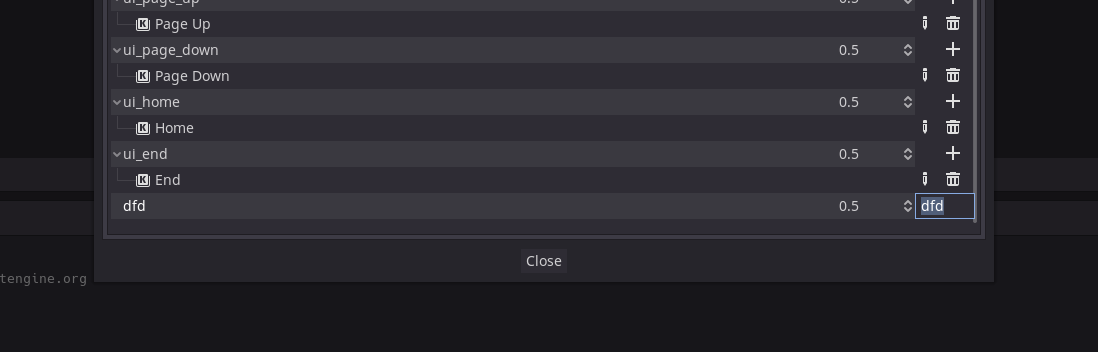
Working on Master. Click the name of the action and press Space.
 jabcross
on 1 Nov 2019
jabcross
on 1 Nov 2019
But yes, it's weird that the text input opens on the corner and is so tiny. It should replace the label while it's editing.
Also, pressing Space is not very intuitive. I'd expect a double-click to work.
jabcross
on 1 Nov 2019
Pressing Enter also works, which is the standard for MacOS. F2 doesn't.
jabcross
on 1 Nov 2019
IINM double click used to work for that.
akien-mga
on 1 Nov 2019
On 3.1.1 you just needed a single click
henriiquecampos
on 1 Nov 2019
I have checked this issue in v3.2.alpha.custom_build.9fcd38fc7 (which is basically built from master). I see that we are unable to change the name for default actions (ui_*). But for custom actions I am able to rename the actions.
Tested on : Ubuntu 18.04.3 LTS
Suggestion: I guess a double-click to change the name should be better as this operation would feel much more similar (as with other applications), and correspondingly more use-friendly.
I am Open to suggestions
 Arunkumar1998BOM
on 3 Nov 2019
Arunkumar1998BOM
on 3 Nov 2019
I am on it, the problem is already solved. I'll push the PR ASAP.
 groud
on 3 Nov 2019
groud
on 3 Nov 2019
Related issues
 testman42
·
3Comments
testman42
·
3Comments
 gonzo191
·
3Comments
gonzo191
·
3Comments
 mooseyfaith
·
3Comments
mooseyfaith
·
3Comments
 ivanskodje
·
3Comments
ivanskodje
·
3Comments
 timoschwarzer
·
3Comments
timoschwarzer
·
3Comments
Most helpful comment
But yes, it's weird that the text input opens on the corner and is so tiny. It should replace the label while it's editing.
Also, pressing Space is not very intuitive. I'd expect a double-click to work.