Godot: Artifacts when manipulating SHADOW_VEC on a light shader
Godot version:
3.2, alpha 2
OS/device including version:
Windows 10, NVIDIA GTX 1070
Issue description:
Trying to manipulate SHADOW_VEC on a shader, to make vertical shadows on the walls.
This tends to generate artifacts with the shadows. I don't know if this is really a problem or something wrong with my code but thought it should be reported.
Steps to reproduce:
Run minimal project and move character.
Minimal reproduction project:
test_shadowvec.zip

 securas
All 15 comments
@JFonS @azagaya
 clayjohn
on 15 Oct 2019
clayjohn
on 15 Oct 2019
Hi! Try with this:
test_shadowvec.zip
 azagaya
on 15 Oct 2019
azagaya
on 15 Oct 2019
There seems to be a problem with the offset.
azagaya
on 15 Oct 2019
@clayjohn Moving the light occluders a bit (like -0.5 in y axis both points) seems to workarround this.. IDK why, but could help us for a soulition. Apparently having light occluders in the limits is causing problems, cause hideing the light occluder from a wall makes the shadow works properly in that wall.
azagaya
on 16 Oct 2019
Hi @azagaya, thanks for cheking this out. But you changed the walls offsets, which is a big no within ysort nodes.
Also, you seem to be using some of the old 2.1 light shader code, which is not necessary in this example. It seems that this code comes from Juan's isometric light example with the rotation removed. No?
In any case, the shadows generated by the back walls are now wrong due to the movement of the occluders in the example.
I've modified the light shader in your example for this:
void light(){
SHADOW_VEC.y += -VAR1.y + 1.0/TEXTURE_PIXEL_SIZE.y - 31.0;
LIGHT *= 1.0;
}
and now it seems to work fine when the character is in front of the walls. Next is the case when the character is behind the walls.
test_shadowvec.zip
securas
on 16 Oct 2019
Bug goes away completely when using gradient_length > 0 or any filter.
Looks like the issue may just be z-fighting caused by the arbitrary UV offset. It might be necessary to use a more sophisticated approach like the one in the isometric_light demo
clayjohn
on 16 Oct 2019
@securas hi! Yes, i know changing the offset is a no in y-sort.. i just sent that as an example to guide us reach the cause of the problem, and to show that the problem might be related to offaet. I used old code just to try, as you suggested, that it was not code's fault... then i forgot to changi it back.
The problems seems to be related with the occluders, as hideing occluders in other walls mmakes shadows work for them. Also, moving occluders a bit up so they does not stay at the limit of the walls also works (please try moving occluders -0.5 in y and check if it also works fine for you!). Just moving the occluders work. I'm going to try today what @clayjohn suggested about gradients!
azagaya
on 16 Oct 2019
@clayjohn i think the effect with the gradient is the same than moving the occluder a bit "inside" the walls. We should investigate there if something could be done for fixing this.
@securas Your example looks fine for me even with player behind walls. Are you seeing something wrong there? And have in mind, that in this case, 1.0/TEXTURE_PIXEL_SIZE is equal to 32, which means that you are actually doing this:
void light(){
SHADOW_VEC.y += -VAR1.y + 1.0;
LIGHT *= 1.0;
}
Which adds a small offset that causes this:

Although is not visible unless you zoom in.
Moving the occluders -0.5 in y seems to be the best workarrond for me now. Would you check it please? Of course, if i'm not mistaken, the light processor should be like this:
void light(){
SHADOW_VEC.y += -VAR1.y;
LIGHT *= 1.0;
}
@azagaya Moving the occludes solves the problem but also leads to a small offset on the sides of the walls. Also, that approach cannot be used when defining tilesets, which is the ultimate objective. At least I tried to change the polygon and not the occluder transform without success.
So far, the simplest option is the light shader change.
As for behind the walls... Are you not seeing this?
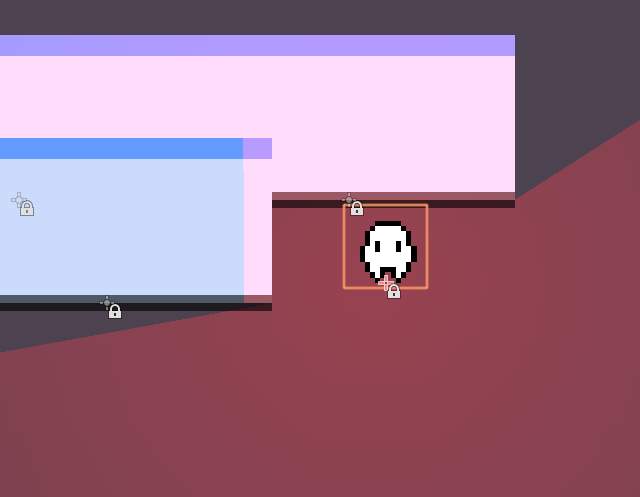
securas
on 16 Oct 2019
Well... The workaround I found the easiest at least for now is to turn off the light when behind the wall, as in:
shader_type canvas_item;
varying float VAR1;
void vertex()
{
    VAR1 = VERTEX.y;
}
void light()
{
    if( ( LIGHT_VEC.y - VAR1 ) <= 0.0 )
    {
        SHADOW_VEC.y += -VAR1 + 1.0;
    }
    else
    {
        LIGHT *= 0.0;
    }
    LIGHT *= 1.0;
}
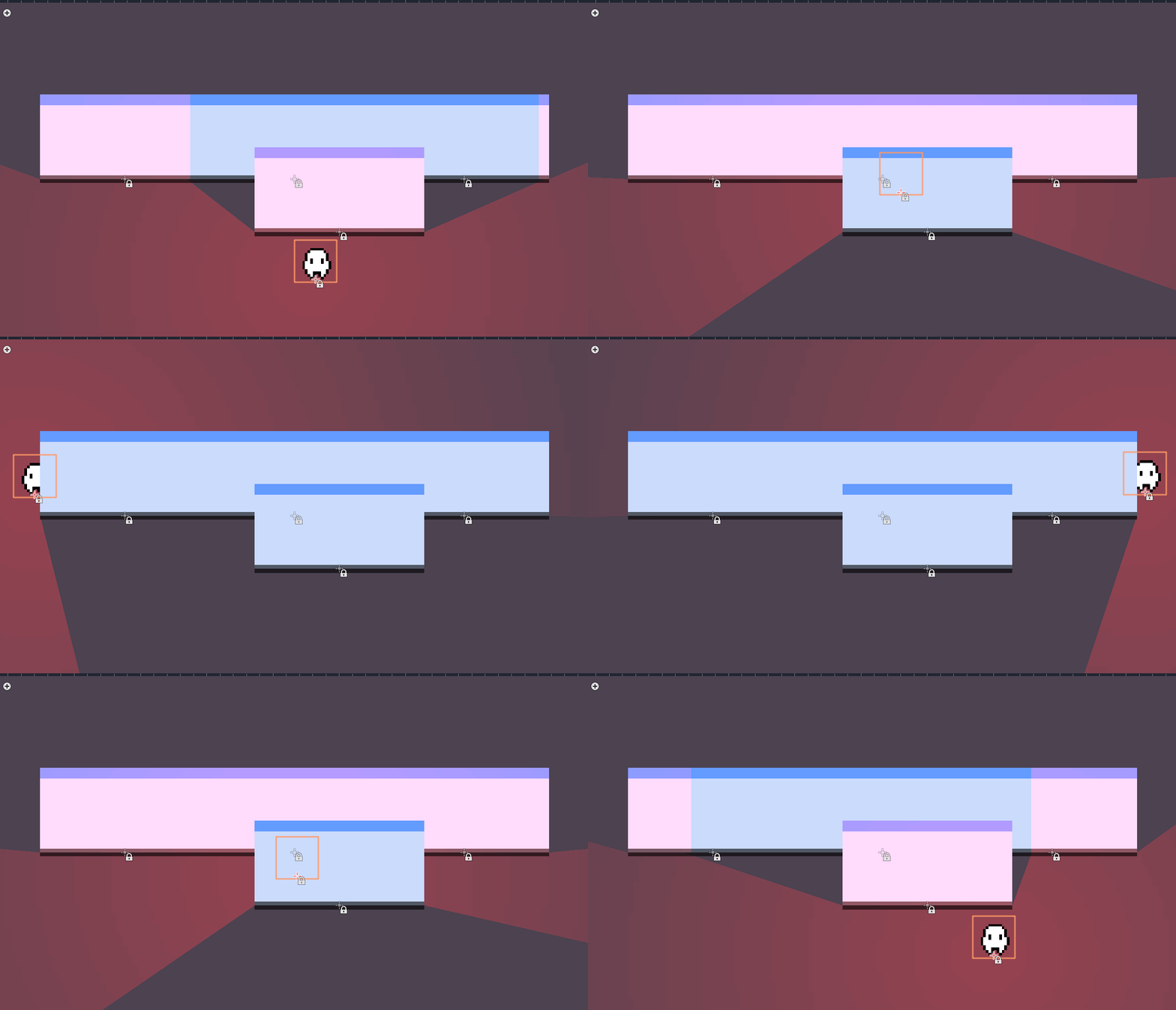
securas
on 16 Oct 2019
Hi! yes, i had not noticed that problem when behind the walls, my bad.
Your workarround seems the best if you don't mind that little ofset in the vertical shados. Also you coud try making SHADOW_VEC.y += -VAR1 + 0.5; or something smaller if you want to reduce that. IDK what is causing this, but if i found out i'll try to solve it.
azagaya
on 16 Oct 2019
Hey @securas, one more question. This behaviour wasn't present in 3.0 or 2.x? Perhaps we can find out something on where the bug is if it's not present in those versions.
azagaya
on 16 Oct 2019
Not sure that's worth the trouble @azagaya The shaders are totally different, I think.
securas
on 16 Oct 2019
The implementation is actually very similar. If anything, azagaya's is more robust. If you look at the old isometric demo you can see it handled being behind and in front of occluders differently.
clayjohn
on 16 Oct 2019
I can confirm this was also happening in 3.0.6.
azagaya
on 17 Oct 2019
Related issues
 SleepProgger
·
3Comments
SleepProgger
·
3Comments
 RebelliousX
·
3Comments
RebelliousX
·
3Comments
 n-pigeon
·
3Comments
n-pigeon
·
3Comments
 testman42
·
3Comments
testman42
·
3Comments
 blurymind
·
3Comments
blurymind
·
3Comments
Most helpful comment
Well... The workaround I found the easiest at least for now is to turn off the light when behind the wall, as in: