Godot: Web-exported game - Error: Could not load game data at path '.'. Is the .pck file missing?
Godot version:
8f3fea20 (3.1 branch) + a custom module, built with
scons -j2 platform=javascript tools=no target=release CXXFLAGS=--std=c++11
OS/device including version:
Windows 7 64-bit, browsers Firefox and Chrome
emscripten 64 bit latest (1.38.46)
Issue description:
When exporting the game for web and running, I get:
Error: Could not load game data at path '.'. Is the .pck file missing?
But if really remove the pck file (to check the suggestion from the message above), I get this instead:
Failed loading file 'index.pck': File not found
Export for Windows (same commit, compiled with Visual Studio 2017) runs without the error
Steps to reproduce:
- Made a html5 game export
- Hosted on local python server (python -m http.server) or itch.io
- After game loading bar finished, the browser popped up the error message box
Minimal reproduction project:
Any project I tried, including Godot examples
GLES 2 renderer at least, can't test WebGL 2 on my computer
 starry-abyss
All 17 comments
Tried the examples on 3.1.1 stable and stock templates, sometimes they are black screen, sometimes OK, sometimes give some errors saying about render buffer and/or audio context...
It seems to me that, sadly, web export is in kind of half-baked state in Godot?
starry-abyss
on 29 Sep 2019
This bug sounds very similar to #32117. Make sure the project name doesn't contain a dot.
Render buffer and audio context errors have been reported in other issues. Unfortunately, few people are knowledgeable with Emscripten in general, which leads to issues being fixed at a slower pace compared to most other platforms.
 Calinou
on 29 Sep 2019
Calinou
on 29 Sep 2019
Sometimes (rarely) I get the same message, but usually hard-refreshing solves it. (I shift-click the refresh button.)
Try hard-refreshing a few times, also you can (I only had to do this for unity, but maybe it helps) open the dev tools in your browser, switch to the network tab, and tick disable cache, and then hard-refresh (while it's still open). Try it multiple times.
If it still doesn't work try uploading an exported project that has issues.
The renderbuffer and audio context errors are usually not the real problem, they just get thrown after something else has already failed.
You can also try the emscripten version from #32117 for your custom build.
I'll update my emscripten later to master, to see what happens.
 Relintai
on 29 Sep 2019
Relintai
on 29 Sep 2019
It doesn't contain a dot except the extension, if export is "index.html" (plus index.pck and so on), still doesn't work
@Relintai Now I get this and no idea how to get older llvm:
shared:WARNING: (Emscripten: system change: 1.38.27|D:/build/emscripten/emsdk/fa
stcomp/fastcomp/bin|6.0 vs 1.38.46|D:/build/emscripten/emsdk/fastcomp/fastcomp/b
in|6.0, clearing cache)
shared:ERROR: Emscripten, llvm and clang build versions do not match, this is da
ngerous (1.38.27, 1.38.31, 1.38.31)
shared:ERROR: Make sure to rebuild llvm and clang after updating repos
shared:INFO: (Emscripten: Running sanity checks)
shared:ERROR: Cannot find D:/build/emscripten/emsdk/fastcomp/fastcomp/bin\lli.ex
e, check the paths in ~/.emscripten
Okay I updated my emscripten, and the same Could not load game data at path '.'. Is the .pck file missing error instantly appeared. But I forgot to clean caches, so I'll need to test it again, because half the code was compiled with an older version. I'll do it a bit later.
However then I tried the emscripten version from the other issue, and that works, but it turns out this is the proper command to install it from scratch:
.\emsdk.bat install sdk-1.38.27-64bit
.\emsdk.bat activate sdk-1.38.27-64bit
according to the manual anything before 1.38.33 need to be installed like this.
(Also sdks older than this should work, I was 2 versions below this originally).
When rebuilding don't forget to clear your scons cache, emscripten cache, and your build directory from javascript object files like I did first.
Also, I git cleaned, and updated my emscripten install before doing this, just to be safe.
Relintai
on 30 Sep 2019
The downgrade helped, my game now works in Chrome, but gives just black screen in Firefox. Console output is about the same, hinting the game loaded. Probably there is something wrong with the browser, since Unity games are also black screen.
UPDATE: fixed Firefox black screen in Godot web (and in Unity web) by updating NVidia drivers!
Thank you @Relintai
starry-abyss
on 30 Sep 2019
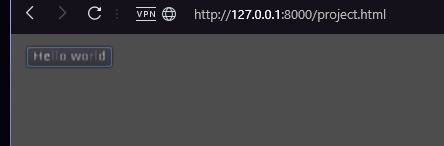
Downgrading did work but my export made the test button blurry
 sprite-1
on 14 Oct 2019
sprite-1
on 14 Oct 2019
@sprite-1 Do other exported projects (such as this one) look blurry using the same browser?
Calinou
on 14 Oct 2019
@Calinou Not as far as I can tell

sprite-1
on 14 Oct 2019
I just experienced the same .pck file missing error after I exported to HTML5 (bomb demo). I've tried hard-refreshing like it says in previous comments. But doesn't work. I just downloaded godot today, so I could be doing something wrong.
 nrcionline
on 24 Dec 2019
nrcionline
on 24 Dec 2019
@nrcionline Using pre-built Godot 3.1.2? Did you try hosting the game on python server as suggested here https://docs.godotengine.org/en/3.1/getting_started/workflow/export/exporting_for_web.html?
starry-abyss
on 24 Dec 2019
Yes I'm using the default standard Godot 3.1.2 stable win64 version. I don't use python. I use iis. It should work on any webserver, right? If I edit the .html file and hardcode the PCK file to include a "." before it, it works, but then gives another error:
const EXECUTABLE_NAME = 'Bomb';
const MAIN_PACK = '.Bomb.pck';
Failed loading file '.wasm': Not Found
I access this by going to localhost/Bomb/Bomb.html
All the game files are named Bomb.
nrcionline
on 24 Dec 2019
@nrcionline Sorry, can't reproduce, unfortunately. The "multiplayer bomber" demo game starts for me with python -m http.server, in both Firefox and Chrome. I had to do a regular page refresh on Chrome though.
Fresh downloaded the engine, templates, and demo.
starry-abyss
on 25 Dec 2019
Yes I'm using the default standard Godot 3.1.2 stable win64 version. I don't use python. I use iis. It should work on any webserver, right? If I edit the .html file and hardcode the PCK file to include a "." before it, it works, but then gives another error:
const EXECUTABLE_NAME = 'Bomb';
const MAIN_PACK = '.Bomb.pck';
Failed loading file '.wasm': Not Found
I access this by going to localhost/Bomb/Bomb.html
All the game files are named Bomb.
nrcionline
on 25 Dec 2019
For those trying to help - to reproduce I'm using IIS not python.
nrcionline
on 25 Dec 2019
It should work on any webserver, right?
Right.
For those trying to help - to reproduce I'm using IIS not python.
I don't know what is IIS, but if it's working on a simple dummy python server, but not on IIS, than it's likely the problem with IIS, not with Godot, right?
starry-abyss
on 25 Dec 2019
Anyone who is familiar with IIS want to help? Has no one ever tried IIS during any testing? Any help file to know how to configure the output for IIS?
nrcionline
on 25 Dec 2019
Related issues
 SleepProgger
·
3Comments
SleepProgger
·
3Comments
 ducdetronquito
·
3Comments
ducdetronquito
·
3Comments
 nunodonato
·
3Comments
nunodonato
·
3Comments
 mefihl
·
3Comments
mefihl
·
3Comments
 RebelliousX
·
3Comments
RebelliousX
·
3Comments
Most helpful comment
Okay I updated my emscripten, and the same
Could not load game data at path '.'. Is the .pck file missingerror instantly appeared. But I forgot to clean caches, so I'll need to test it again, because half the code was compiled with an older version. I'll do it a bit later.However then I tried the emscripten version from the other issue, and that works, but it turns out this is the proper command to install it from scratch:
according to the manual anything before 1.38.33 need to be installed like this.
(Also sdks older than this should work, I was 2 versions below this originally).
When rebuilding don't forget to clear your scons cache, emscripten cache, and your build directory from javascript object files like I did first.
Also, I git cleaned, and updated my emscripten install before doing this, just to be safe.