Godot: Android build gradle taking > 1 hour to compile
Godot version:
Latest master (20/9/19) commit 2add51d
OS/device including version:
Linux Mint 18.2
Issue description:
Android is taking ages to compile (is still compiling right now, almost at an hour now, previously it would take 5-10 mins).
I am requesting a single architecture, armv7:
scons -j4 platform=android target=release_debug android_arch=armv7
cd platform/android/java
./gradlew build
Scons is compiling reasonably quickly as usual, however gradle seems to be taking ages and is also compiling cpps, apparently for every architecture? I'm not sure whether gradle used to compile any cpps before.
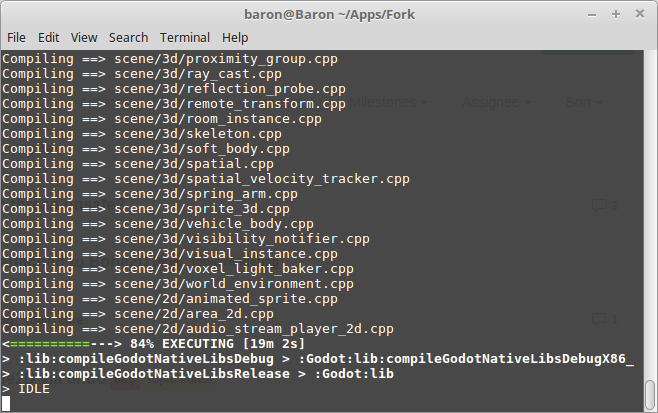
This shows it compiling x86, which I didn't request...
Also notable is the CPU usage seems to be very low in the compile process in task manager, 0%.
Steps to reproduce:
Download latest master, compile android with single architecture.
_Edit : It has finished compiling, it took near 3 hours .. clearly something wrong._
 lawnjelly
All 18 comments
Likely related to #31919, CC @m4gr3d.
 akien-mga
on 20 Sep 2019
akien-mga
on 20 Sep 2019
@lawnjelly This is expected behavior, although it could use some improvement :)
The scons compile step is no longer needed as the gradle build is setup to compile the native libs automatically, so you can just run:
cd platform/android/java
./gradlew build
The reason it takes so long is, as you guessed, it's setup by default to compile for all architecture (defined here).
To speed up the build, you should comment out in the build.gradle file all the architectures you're not interested in (in this case, everything but armv7).
The documentation needs to be updated to reflect the new process (issue #2773), and I'll look into ways to automatically detect the desired architecture so as to avoid the long compile time.
 m4gr3d
on 20 Sep 2019
m4gr3d
on 20 Sep 2019
@lawnjelly Also, allowing scons to build in parallel by adding for example , "-j12" at the end of the line: https://github.com/godotengine/godot/blob/a34b77e271da5f3d550acfac1e5557f2467c6266/platform/android/java/lib/build.gradle#L73
will significantly speed it up (depending on how many cpu cores you have)
 NeoSpark314
on 21 Sep 2019
NeoSpark314
on 21 Sep 2019
@NeoSpark314 Is it possible to automatically detect the number of CPU threads in Gradle? If so, it would be nice to add it by default.
 Calinou
on 21 Sep 2019
Calinou
on 21 Sep 2019
@Calinou good idea; yes; seems to be possible; I tried with
, "-j"+Runtime.runtime.availableProcessors()
and it works for me as expected. @m4gr3d do you think this can be added?
NeoSpark314
on 21 Sep 2019
Ok I've tried the 2 edits to the build gradle, limiting the architecture to armv7, and adding "-j4" to the list of arguments to scons.
When I change a source file, it seems to be building a library libgodot.android.opt.armv67.neon.so in bin folder, however android_debug.apk and android_release.apk are unchanged, also the apks in android/java/build/outputs/apk are unchanged, so as far as I can see I can't export the changes?
lawnjelly
on 22 Sep 2019
It seems the resulting .apk are now in an app folder: platform/android/java/app/build/outputs/apk/
NeoSpark314
on 22 Sep 2019
I also just noticed that #32248 is needed to make it work; and to compile the actual templates the call is ./gradlew generateGodotTemplates that outputs the .apks then directly in the main godot/bin folder. (the apks in the app/build folder are not the final export templates).
NeoSpark314
on 22 Sep 2019
PR #32269 should resolve this issue.
@Calinou @NeoSpark314 Thanks for the tip about detecting the number of cpu in gradle. I've added it to the gradle build tasks.
m4gr3d
on 23 Sep 2019
perhaps @m4gr3d might be interested in improvement
https://github.com/godotengine/godot/issues/32270
 avril-gh
on 23 Sep 2019
avril-gh
on 23 Sep 2019
@m4gr3d tested PR https://github.com/godotengine/godot/pull/32269
i used
cd platform/android/java
call "gradlew.bat" generateGodotTemplates -Pandroid_arch=armv7
Its been compiling for around 10 minutes at ~85% of CPU utilization
then it reads 'progress_finish' like shown below
Compiling ==> thirdparty\freetype\src\type42\type42.c
Compiling ==> thirdparty\freetype\src\winfonts\winfnt.c
Compiling ==> thirdparty\freetype\src\sfnt\sfnt.c
Copy("platform\android\java\lib\libs\debug\armeabi-v7a\libc++_shared.so", "C:\Users\dev\AppData\Local\Android\Sdk\ndk-bundle\sources\cxx-stl\llvm-libc++\libs\armeabi-v7a\libc++_shared.so")
Linking Static Library ==> modules\freetype\libfreetype_builtin.android.debug.armv7.neon.a
progress_finish(["progress_finish"], [])
then CPU usage has fallen to 1% and stays like this for 1.5 hour
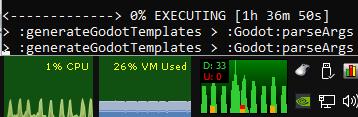
2 hours allready passed and it still didnt finished.
before it's not been that long. ...i think something's wrong and perhaps i will just cancel.
avril-gh
on 24 Sep 2019
@avril-gh from the screenshot, it looks like you're using cmd.exe. If so, it's working as expected and finishing quickly like you saw, but because of the console limitation, cmd.exe doesn't update correctly.
You can try using a better shell like powershell.exe.
Note, if using powershell.exe, you'll have to quote the command arguments (e.g: .\gradlew.bat generateGodotTemplates "-Pbuild_target=debug,release" "-Pandroid_arch=armv7,arm64v8")
m4gr3d
on 24 Sep 2019
Also you can validate that the first build finished correctly by looking inside the godot/bin directory.
On completion, that directory should contain the generated build templates (e.g: android_debug.apk for debug build_target, android_release.apk for release build_target, and android_source.zip)
m4gr3d
on 24 Sep 2019
i rerun it with
gradlew generateGodotTemplates -Pandroid_arch=armv7 -Pbuild_target=debug,release
and it finished in 25 minutes
avril-gh
on 24 Sep 2019
Looks within norms. Running with the debug build target only took you ~10min, so with both debug and release, 25min seems normal since the release build is usually a bit slower than the debug one.
m4gr3d
on 24 Sep 2019
@m4gr3d
after some tests it seems to look nice,
initial compile is long (it always is) but then, with small changes in godots code, it build fast.
(not mention output apk seems smaller which is good)
i think this could be merged because its better than what is currently in master and more people could test it. However it really need to be updated in godot docs quick because it is different from previous one and will bring wave of issues about 'failed to compile'. ()
btw, theres a problem
i used android_arch=armv7 and in release apk i got lib\armeabi-v7a as expected, however in debug apk i got additionaly lib\arm64-v8a even tho i didnt requested it in cmd line.
so armv8 still gets compiled / linked and assembled into apk taking extra time. (not mention the size of apk)
hah and another 'easter egg' 😉 i used android_arch=x86 but in apk i got x86 AND as a bonus armv7 one . You really shoulda look in it
... but its promising 👍
avril-gh
on 24 Sep 2019
@avril-gh the included 'extras' are normal :). If you don't clean them, the artifacts generated from previous builds remain around, and the gradle build include them when generating the apk.
It doesn't take any additional time to include them since they're already generated, so nothing to worry about here.
m4gr3d
on 24 Sep 2019
Lets wait for it to be merged and more people join testing.
avril-gh
on 24 Sep 2019
Related issues
 ducdetronquito
·
3Comments
ducdetronquito
·
3Comments
 mooseyfaith
·
3Comments
mooseyfaith
·
3Comments
 RayKoopa
·
3Comments
RayKoopa
·
3Comments
 Zylann
·
3Comments
Zylann
·
3Comments
 bojidar-bg
·
3Comments
bojidar-bg
·
3Comments
Most helpful comment
@lawnjelly This is expected behavior, although it could use some improvement :)
The
sconscompile step is no longer needed as the gradle build is setup to compile the native libs automatically, so you can just run:The reason it takes so long is, as you guessed, it's setup by default to compile for all architecture (defined here).
To speed up the build, you should comment out in the build.gradle file all the architectures you're not interested in (in this case, everything but armv7).
The documentation needs to be updated to reflect the new process (issue #2773), and I'll look into ways to automatically detect the desired architecture so as to avoid the long compile time.