Godot: Using the Inspector to create a New Script tries to inherit from the wrong class
Godot version:
v3.1.1.stable.mono.official
v3.2.dev.mono.custom_build.ad0d87b4d
OS/device including version:
Windows 10
Issue description:
When I use the inspector to replace an attached script with a new script it defaults to inheriting from the script I am replacing.
At the moment this clearly wrong - I am replacing a GDScript script with a C# script so inheritance is impossible. However even if I wasn't switching languages I'm not sure this would be the common workflow.
If instead I Clear the script first before selecting New Script then the dialog offers to inherit from the correct node type.
Steps to reproduce:
Use the Inspector to select New Script on a node that already has one:
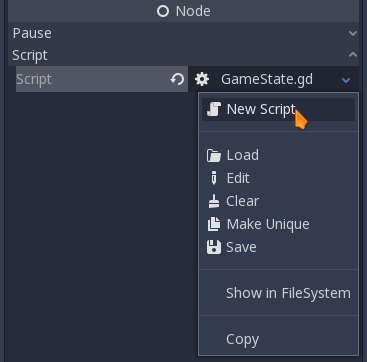
Note the value in the Inherits field:

 KellyThomas
All 4 comments
The behaviour of inheriting the existing script is a good feature, but it should be moved to an Extend Script menu option, like there is where you right-click on a node with an existing script.
So it should be:
- New Script
- Extend Script
when there is an existing script, and: - New Script
otherwise.
"Extend Script" should ensure that the "Language" field matches the one of the script being inherited.
 akien-mga
on 26 Jul 2019
akien-mga
on 26 Jul 2019
Hi, I wanted to take a look at this issue. Adding the following:
case OBJ_MENU_NEW_SCRIPT: {

    if (Object::cast_to<Node>(get_edited_object())) {
        Node *n = Object::cast_to<Node>(get_edited_object());
        Ref<Script> empty = EditorNode::get_singleton()->get_object_custom_type_base(n);
        n->set_script(empty.get_ref_ptr());
        EditorNode::get_singleton()->get_scene_tree_dock()->open_script_dialog(n);
    }

} break;
case OBJ_MENU_EXTEND_SCRIPT: {

    if (Object::cast_to<Node>(get_edited_object())) {
        EditorNode::get_singleton()->get_scene_tree_dock()->open_script_dialog(Object::cast_to<Node>(get_edited_object()));
    }

} break;
to:
https://github.com/godotengine/godot/blob/1481d299ea97fa1311a75a9ee39eb97d624a8619/editor/editor_properties.cpp#L2184-L2190
seems to behave like expected, but the current script gets removed from the property as soon as New Script is selected (so pressing cancel in the popup does not recover the previous script).
Is there a way to call open_script_dialog() with a no inheritance parameter? Or is it necessary to add a flag somewhere around here?:
https://github.com/godotengine/godot/blob/06a6507751f5899a590a1c67915890550e5a2793/editor/scene_tree_dock.cpp#L432-L446
I apologize if this is a silly solution, it is my first time dwelling this deep into Godot.
 cgxeiji
on 29 Jul 2019
cgxeiji
on 29 Jul 2019
Hi, I want to work on this.
Should I add a new case with a name something like TOOL_ATTACH_SCRIPT_SCRATCH to SceneTreeDock::_tool_selected or should I rename the existing TOOL_ATTACH_SCRIPT to TOOL_EXTEND_SCRIPT and add another TOOL_ATTACH_SCRIPT? While the first option is safer the second option seems more sensible.
 argentite
on 5 Oct 2019
argentite
on 5 Oct 2019
Fixed by #32954.
akien-mga
on 23 Oct 2019
Related issues
 rgrams
·
3Comments
rgrams
·
3Comments
 bojidar-bg
·
3Comments
bojidar-bg
·
3Comments
 ducdetronquito
·
3Comments
ducdetronquito
·
3Comments
 RayKoopa
·
3Comments
RayKoopa
·
3Comments
 n-pigeon
·
3Comments
n-pigeon
·
3Comments
Most helpful comment
The behaviour of inheriting the existing script is a good feature, but it should be moved to an
Extend Scriptmenu option, like there is where you right-click on a node with an existing script.So it should be:
when there is an existing script, and:
otherwise.
"Extend Script" should ensure that the "Language" field matches the one of the script being inherited.