Godot: [2.1] 2D rendering issue regarding windows focus
Godot version:
2.1.5
OS/device including version:
- Windows (only windows user reported it)
- NVidia GTX 1080Ti
Issue description:
- Most of the rendering is blurry when godot has the focus.
- But if you unfocus godot, everything gets sharp and well rendered.
Minimal project + step to reproduce
https://github.com/xsellier/godot-2.1-render-bug
List of people who are having the same issue
https://steamcommunity.com/app/726840/discussions/0/1651043958646410385/
https://steamcommunity.com/app/726840/discussions/0/1842440600605384185/ (look at the last message for more informations)
https://steamcommunity.com/app/726840/discussions/0/1797403972744401372/
https://steamcommunity.com/profiles/76561198141817886/recommended/726840/
 xsellier
All 14 comments
Godot 2.1 doesn't feature DynamicFont oversampling, so if you use the 2d stretch mode, you will have to find another way to get crisp fonts. One way is to use an high "design resolution" in the Project Settings (by setting the width and height to 3840 and 2160, for instance), then set the Test Width and Test Height to lower values when testing the project.
 Calinou
on 5 Jun 2019
Calinou
on 5 Jun 2019
Not related to font oversampling, but thank you.
xsellier
on 5 Jun 2019
@xsellier The comment I wrote also applies to other 2D elements, as you basically need to ship higher-resolution assets than what you'd use at most resolutions.
Calinou
on 5 Jun 2019
Please, read the issue, please do it:
https://github.com/binogure-studio/city-game-studio-i18n/issues/105
xsellier
on 5 Jun 2019
@xsellier I don't know what could be causing the visual output to change depending on whether the game window is focused or not.
That said, I can see a separate issue on the second screenshot: when you enable filter and mipmaps, Godot will downscale 2D elements using bilinear filtering, which doesn't look great for heavily-downscaled images. Godot 3.1 has an Image method to resize images with trilinear interpolation (which usually looks better), but it can only be called manually. This means it unfortunately can't be used to resize all 2D elements with trilinear interpolation.
Calinou
on 5 Jun 2019
You are right, it _might_ be related to downscaling images. However, here is a sprite (so, not a UI element),
On left, application is on background, and on the right application is on foreground:
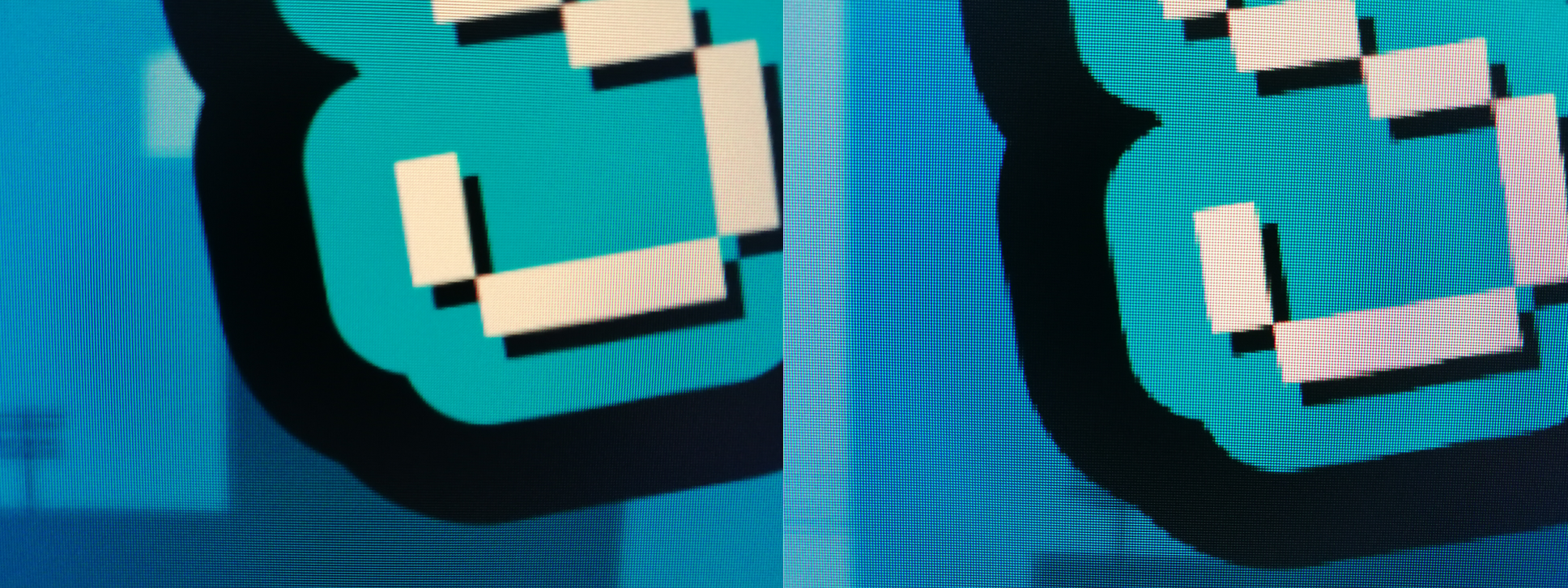
The sprite is not downscaled
xsellier
on 5 Jun 2019
Just to add a bit more informations about it, the same scene from Godot Engine

If it was a miss configuration issue, let's say that I've used the wrong size for an asset, and I've also used the wrong font. Is it possible that it happens for some people, but not for all of them?
xsellier
on 5 Jun 2019
Here is another _tiny_ issue, I'm not sure if it is a different issue.
On the left, you can see that there is an issue with the rendering. On the right the image is properly rendered. Difference between those 2 images is the camera position (x: +0, y: ~50px).

xsellier
on 5 Jun 2019
@xsellier regarding your tiny issue, I think you could try to enable rendering/quality/2d/use_pixel_snap in project settings, so that sub-pixel camera position won't affect rendering, though I'm not sure whether it's present in 2.1. If not, you could try to manually clamp camera position yourself to "integer" coordinates.
I think zooming could also somehow interfere with this (mipmaps generation issue)?
Also, this PR #19276 was supposed to help this kind of issue for me back then.
 Xrayez
on 6 Jun 2019
Xrayez
on 6 Jun 2019
@xsellier regarding your _tiny_ issue, I think you could try to enable
rendering/quality/2d/use_pixel_snapin project settings, so that sub-pixel camera position won't affect rendering, though I'm not sure whether it's present in 2.1. If not, you could try to manually clamp camera position yourself to "integer" coordinates.I think zooming could also somehow interfere with this (mipmaps generation issue)?
Nice suggestion. I tried with pixel_snap enabled, it fixes the _tiny_ issue. Since I did not want to use pixel_snap because it breaks some animations (stuttering), I replaced the set_pos function of the camera by something like:
func set_camera_pos(position):
  position.x = int(position.x)
  position.y = int(position.y)

  set_pos(position)
About the main issue, 2D rendering, I've narrowed it to the following conditions:
- Windows (from 8 to 10)
- Screen resolution above 2560 x 1440
- Set Godot Engine to fullscreen
- Graphic card: NVidia
So this issue is not related to this windows issue: https://support.microsoft.com/en-us/help/2802799/display-resolutions-higher-than-2048x1152-may-not-display-properly-on
So this is an actual screenshot of the minimal project:
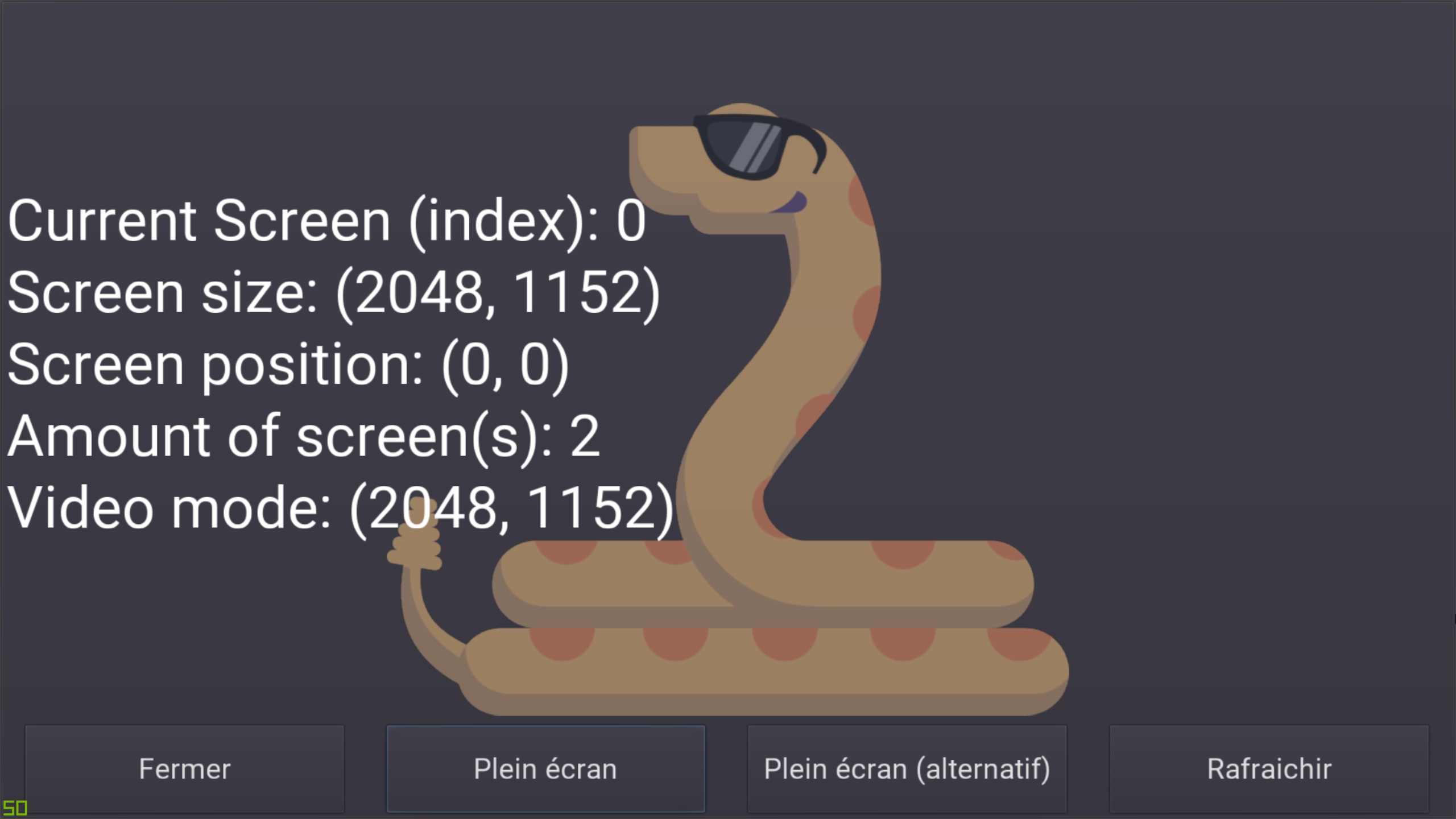
As you can see, the image resolution is 2560 x 1440 but it shows only 2048 x 1152.
The screenshot isn't blurry because the issue cannot be _screenshot_, meaning if you want to see the issue you need to take an actual picture of your screen.
xsellier
on 6 Jun 2019
I'm not sure if this is related, but if you're using a scaling factor higher than 100% in Windows, try making the Godot executable DPI-aware as explained in https://github.com/godotengine/godot/issues/24922#issuecomment-455479830.
Calinou
on 6 Jun 2019
@Calinou Thank you, since in v2.1.* High DPI is not implemented for Windows, I had to cherry-pick this commit: https://github.com/godotengine/godot/commit/eb0f9651b3bb12b79db4ee4f8862a3be16a11ea5
Backporting it to v2.1 branch fixes the issue
xsellier
on 6 Jun 2019
Fixed by #29550.
 akien-mga
on 11 Jun 2019
akien-mga
on 11 Jun 2019
Related issues
 bojidar-bg
·
3Comments
bojidar-bg
·
3Comments
 kirilledelman
·
3Comments
kirilledelman
·
3Comments
 blurymind
·
3Comments
blurymind
·
3Comments
 testman42
·
3Comments
testman42
·
3Comments
 ducdetronquito
·
3Comments
ducdetronquito
·
3Comments
Most helpful comment
@Calinou Thank you, since in v2.1.* High DPI is not implemented for Windows, I had to cherry-pick this commit: https://github.com/godotengine/godot/commit/eb0f9651b3bb12b79db4ee4f8862a3be16a11ea5
Backporting it to v2.1 branch fixes the issue