Godot: Android CLI build fails due to jarsigner
Godot version: 3.1.1 stable
OS/device including version: Linux
Issue description:
I cannot figure out how to export a project to android using the CLI
When I run
godot -v --export-debug "Android" build/project.apk
I get the following error
ERROR: instance: Class 'EditorSettings' can only be instantiated by editor.
   At: core/class_db.cpp:523.
ERROR: poll: /home/cnidarias/.config/godot/editor_settings-3.tres:3 - Parse Error: Can't create sub resource of type: EditorSettings
   At: scene/resources/resource_format_text.cpp:561.
ERROR: load: Condition ' err != OK ' is true. returned: RES()
   At: core/io/resource_loader.cpp:208.
ERROR: _load: Failed loading resource: /home/cnidarias/.config/godot/editor_settings-3.tres
   At: core/io/resource_loader.cpp:285.
WARNING: create: Could not open config file.
   At: editor/editor_settings.cpp:871.
It then continues adding and such and ends like this
      export: step 103: File: res://server/scripts/DatabaseHandler.gd.remap
        export: step 103: File: res://server/scripts/MainServer.gd.remap
        export: step 103: File: res://assets/icon_192x192.png
        export: step 103: File: res://assets/splashScreen.png
        export: step 103: File: res://project.binary
0 param: --use_depth_32
1 param: --use_immersive
export: end
WARNING: cleanup: ObjectDB Instances still exist!
   At: core/object.cpp:2095.
ERROR: cleanup: There are still MemoryPool allocs in use at exit!
   At: core/pool_vector.cpp:70.
with no output apk being produced.
I am assuming that the reason the APK is not being produced is because the jarsigning cannot happen as the configuration for the jarsigning bin as well as the default keystore are defined in the editor settings that it initially failed to parse.
The result of executing the command is that the original editor_settings-3.tres will be overwritten with a default one
Reproducing is pretty simple just run the command for any project.
Just to point out, when I set the settings for exporting in the GUI I am able to generate the apk, so this is strictly the CLI not working correctly.
It would be _really_ nice if CLI was working though so that we could have automated builds for our game using Docker to compile the apk
Furthermore this might be related #16949 but I don't think it is the same because I am able to build it for linux without issues
 Cnidarias
All 20 comments
I'm facing this bug too.
I noticed that if you change the output file extension to zip, the file will be created successfully. My guess is that in this case jarsigner and apk are not executed.
Something seems to be wrong with config reading when launching godot in CLI-mode. If export/android/adb or export/android/jarsigner specified in ~/.config/godot/editor_settings-3.tres, then I've got the same error as @Cnidarias .
After that the config is getting reset to vanilla but the error is keep showing every time the exporter launches. The only way to get rid of it is to delete entire ~/.config/godot directory.
I made a docker container with android-sdk and godot so it'll be a little easier to reproduce: bemyak/godot-ci:3.1.1, hope this will help.
 bemyak
on 18 Jun 2019
bemyak
on 18 Jun 2019
The issue is still can be reproduced with Godot 3.2 alpha 3.
Can we bring it into 3.2 milestone?
bemyak
on 24 Oct 2019
Well, actually I was wrong, apk file is created and can be successfully installed on device.
Couple of errors is still there
ERROR: bind: Method/Function Failed, returning: ERR_UNAVAILABLE
At: drivers/unix/net_socket_posix.cpp:386.
ERROR: bind: Method/Function Failed, returning: ERR_UNAVAILABLE
At: drivers/unix/net_socket_posix.cpp:386.
at the start of the export and
ERROR: ~List: Condition ' _first != __null ' is true.
At: ./core/self_list.h:112.
ERROR: cleanup: There are still MemoryPool allocs in use at exit!
At: core/pool_vector.cpp:69.
at the end. But they are no longer preventing apk from being generated.
bemyak
on 3 Nov 2019
Can confirm I got a similar error output as @bemyak on a Ubuntu based CI environment, using headless Godot Engine instance v3.2.1 :
ERROR: _fs_changed: Project export failed with error code 12 for preset 'Android'.
export: end
   At: editor/editor_node.cpp:634.
ERROR: ~List: Condition ' _first != __null ' is true.
At: ./core/self_list.h:112.
ERROR: cleanup: There are still MemoryPool allocs in use at exit!
At: core/pool_vector.cpp:69.
However in my case, no APK is generated.
 tommywalkie
on 21 Apr 2020
tommywalkie
on 21 Apr 2020
@tommywalkie , check that you have jarsigner and other stuff installed. Check this Dockerfile, it does everything that needed: https://github.com/bemyak/godot-ci/blob/master/Dockerfile
bemyak
on 21 Apr 2020
@bemyak I was actually trying to implement it in a Github Actions way and figuring out how to interact with it with Docker CLI.
I was previously doing the _same_ configuration steps from scratch on Github's Ubuntu machine because it litterally has everything and anything.
check that you have
jarsignerand other stuff installed.
I've noticed when I set adb path to $ANDROID_HOME/platform-tools/adb instead of /usr/local/lib/android/sdk/platform-tools/adb, or jarsigner path to $JAVA_HOME/bin/jarsigner instead of /usr/lib/jvm/zulu-8-azure-amd64/bin/jarsigner, the CLI was warning me I was using incorrect paths. Setting them with the right paths solved these warnings. So I was supposing the issue is somewhere else but I may be wrong.
tommywalkie
on 21 Apr 2020
@bemyak Could build the Docker image, using this Dockerfile, and could reproduce the issue here. I also added two steps where I just do a ls command in container's WORKDIR before and after the export attempt, maybe I could learn something from it.
Runned this command in the Docker container :
# 'godot-ci' is the container name
docker exec godot-ci godot --export "Android" ./sample_godot_rust_app.apk
I can confirm no APK is being generated and some res: directory appeared after the build.
🢒 Run docker exec godot-ci ls
Cargo.toml
Cross.toml
LICENSE
README.md
assets
build
default_env.tres
dockerfiles
export_presets.cfg
+ output.log
project.godot
+ res:
scenes
src
target
templates
I've noticed when I set adb path to
$ANDROID_HOME/platform-tools/adbinstead of/usr/local/lib/android/sdk/platform-tools/adb, or jarsigner path to$JAVA_HOME/bin/jarsignerinstead of/usr/lib/jvm/zulu-8-azure-amd64/bin/jarsigner, the CLI was warning me I was using incorrect paths. Setting them with the right paths solved these warnings. So I was supposing the issue is somewhere else but I may be wrong.
This is because paths are directly sent to OS::execute(), rather than using a shell to expand environment variables and find the binary in PATH. We could change this but I'm not sure how difficult it would be.
 Calinou
on 24 Apr 2020
Calinou
on 24 Apr 2020
@tommywalkie Also, I may have found out what went wrong in your particular CI script. When you export a project to Android in release mode with --export, the debug keystore in the Editor Settings is ignored. Instead, you must define the path to the release keystore and the credentials in export_presets.cfg. (Remember not to commit this information to version control, so use sed and secrets to set it in the CI step.)
This is done because unlike a debug keystore created for development purposes, release keystores are often specific to a project.
https://github.com/godotengine/godot/pull/35930 should alleviate the need to use sed for this particular step.
Calinou
on 24 Apr 2020
@Calinou Oh it makes sense ! Thanks for your response, I'll try that !
Also, as a side question : Is there a difference between the following fields ?
debug_keystore_user/debug_keystore_passdebug_user/debug_pass
tommywalkie
on 24 Apr 2020
@tommywalkie Digging through source, I found that debug_keystore_user is what the manpage of jarsigner calls alias. AndroidStudio uses alias too, if you're familiar with it. You can imagine it as the name of the specific key in the keystore (there can be multiple).
debug_user and debug_pass are the same respectively, just that they overwrite the before mentioned, if defined. They are defined in export_presets.cfg though (One sed statement less ^^).
 Filius-Patris
on 24 Apr 2020
Filius-Patris
on 24 Apr 2020
I was trying the two different approaches in a single run, the first job using --export-debug worked while the second job (Source of the CI job), which is using --export and a release keystore and Github Secrets, didn't work.
debug_useranddebug_passare the same respectively
@Filius-Patris Mmmmm this maybe explains why I got an jarsigner error: java.lang.RuntimeException: keystore load: Keystore was tampered with, or password was incorrect error while I did set up export presets like this :
- name: Set new export presets for release, using secrets
  env:
    ANDROID_RELEASE_KEYSTORE: ${{ secrets.ANDROID_RELEASE_KEYSTORE }}
    ANDROID_RELEASE_KEYSTORE_USER: ${{ secrets.ANDROID_RELEASE_KEYSTORE_USER }}
    ANDROID_RELEASE_KEYSTORE_PASS: ${{ secrets.ANDROID_RELEASE_KEYSTORE_PASS }}
  run: |
    sed -i '/\[preset.2.options\]/a keystore\/release = "'$ANDROID_RELEASE_KEYSTORE'"' ./export_presets.cfg
    sed -i '/\[preset.2.options\]/a keystore\/release_user = "'$ANDROID_RELEASE_KEYSTORE_USER'"' ./export_presets.cfg
    sed -i '/\[preset.2.options\]/a keystore\/release_pass = "'$ANDROID_RELEASE_KEYSTORE_PASS'"' ./export_presets.cfg
As @Filius-Patris explained me in https://github.com/tommywalkie/sample-godot-rust-app/issues/14, I was wrong about how to handle jarsigner and release keystore.
So for reference, for anyone who wants to know how to resolve it, following @Filius-Patris's advices, here is what I did :
# From your own terminal, create a release keystore and choose an alias.
# This assumes you have Android SDK (which might come with keytool CLI) installed.
# You will be asked to answer questions and provide a passphrase and confirm it.
keytool -genkeypair -v -keystore ./release.keystore -alias some-alias -keyalg RSA -keysize 2048 -validity 10000

# Then, create a GPG key, using GPG CLI, which is provided in most Linux distribs and by GnuPG for Windows users
# This will ask you to provide a passphrase.
# It will create a .gpg file.
gpg -c .\release.keystore
Finally, in the CI workflow, decrypt the keystore, using the passphrase, and don't forget to set correctly the keystore path, keystore password and the alias in export presets, in keystore/release, keystore/release_user and keystore/release_pass fields.
gpg --quiet --batch --yes --passphrase="$DECRYPTION_KEY" --output release.keystore release.keystore.gpg
Just FYI to any future users using Godot 3.2.2 my issue was that export_presets.cfg had a different value than the other files.
So to the Godot developers I think we should have 1 and preferably only one spot in which to set this information, as opposed to currently have 3 potentially conflicting places.
Although having an environmental variable override the settings is still fine by me for my purposes on GitLab CI too.
 FeralBytes
on 14 Jun 2020
FeralBytes
on 14 Jun 2020
@FeralBytes #35930 implements environment variable overrides for Android keystore information.
Calinou
on 15 Jun 2020
Godot version:
3.2.2
OS/device including version:
gitlab/docker
Issue description:
I want to configure a custom build for android on gitlab. My docker image is at https://github.com/dbrova15/godot-ci-android-bakz
An error occurs during assembly
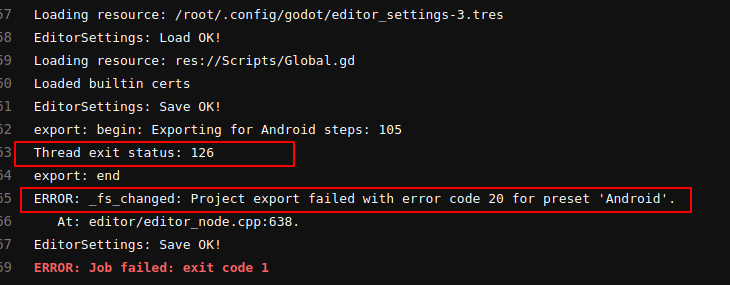
A project with no problem is exported to my computer. I move the android folder to the docker unchanged.
Tell me what am I doing wrong?
Steps to reproduce:
In any project, set the custom build ON.
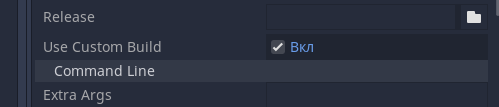
Follow instructions from repository:
https://github.com/dbrova15/godot-ci-android-bakz
 dbrova15
on 2 Jul 2020
dbrova15
on 2 Jul 2020
Just FYI to any future users using Godot 3.2.2 my issue was that export_presets.cfg had a different value than the other files.
So to the Godot developers I think we should have 1 and preferably only one spot in which to set this information, as opposed to currently have 3 potentially conflicting places.
Although having an environmental variable override the settings is still fine by me for my purposes on GitLab CI too.
@FeralBytes, Was there a problem somewhere in the file? What value did you need to change?
dbrova15
on 2 Jul 2020
@dbrova15 , instead of just appending lines to ~/.config/godot/editor_settings-3.tres try deleting them first, they can already be defined somewhere earlier, which makes your config invalid.
Check my Docker file for an example.
bemyak
on 2 Jul 2020
@dbrova15 , instead of just appending lines to
~/.config/godot/editor_settings-3.trestry deleting them first, they can already be defined somewhere earlier, which makes your config invalid.Check my Docker file for an example.
@bemyak, Did as you advised. Nothing changed.
An error occurs only if you set Usa custom build True. If this parameter is set to False, then everything works fine.
The fact is that I need a share button in the application. And for this you need to have this option turned on.
dbrova15
on 3 Jul 2020
You can see the blame here, where I made fixes 1 month ago to get CI working. https://gitlab.com/FeralBytes/FreecoiL/-/blame/master/.gitlab/ci_scripts/editor_settings-3.tres
NOTE: my CI is failing right now to build but that is due to the docker image that I am using. It was working fine for 3.2.2-beta4, but the image broke, not my fault just the docker image is bad. I will either revert or make my own soon.
FeralBytes
on 17 Jul 2020
Related issues
 ndee85
·
3Comments
ndee85
·
3Comments
 SleepProgger
·
3Comments
SleepProgger
·
3Comments
 mooseyfaith
·
3Comments
mooseyfaith
·
3Comments
 nunodonato
·
3Comments
nunodonato
·
3Comments
 ivanskodje
·
3Comments
ivanskodje
·
3Comments
Most helpful comment
I'm facing this bug too.
I noticed that if you change the output file extension to
zip, the file will be created successfully. My guess is that in this casejarsignerandapkare not executed.Something seems to be wrong with config reading when launching godot in CLI-mode. If
export/android/adborexport/android/jarsignerspecified in~/.config/godot/editor_settings-3.tres, then I've got the same error as @Cnidarias .After that the config is getting reset to vanilla but the error is keep showing every time the exporter launches. The only way to get rid of it is to delete entire
~/.config/godotdirectory.I made a docker container with android-sdk and godot so it'll be a little easier to reproduce:
bemyak/godot-ci:3.1.1, hope this will help.