Godot: Collapse / Expand All doesn't work with mouse input
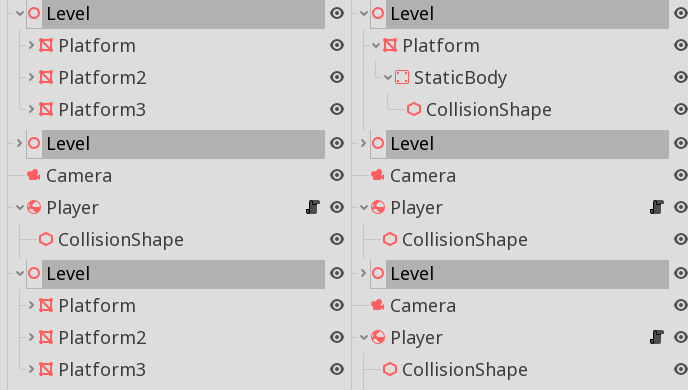
In lists (Like the scene window list of nodes or the Create New Node window) Alt + Left Cursor key collapses all the nodes and their children and Alt + Right Cursor key expands the whole hierarchy of the children.
But Alt + mouse clicks do not replicate the same behavior. When working with such UI items one tends to use the mouse so the behavior should be the same with mouse input and Alt key should be a modifier to the mouse clicks also.
 ssoher
All 7 comments
19936 was merged a bit late to fix this I guess, I wasn't aware of Alt + Left/Right feature, maybe because it wasn't present at the moment I started working on it or simply not documented. It also uses Shift for this instead. 🤔
 Xrayez
on 24 Jul 2019
Xrayez
on 24 Jul 2019
@ssoher Can you (or anyone else) still reproduce this bug in Godot 3.2.2 or any later release?
If yes, please ensure that an up-to-date Minimal Reproduction Project (MRP) is included in this report (a MRP is a zipped Godot project with the minimal elements necessary to reliably trigger the bug). You can upload ZIP files in an issue comment with a drag and drop.
 Calinou
on 16 Jul 2020
Calinou
on 16 Jul 2020
It currently doesn't work in 3.2.3 with Alt being pressed (works with keyboard arrows). Only Shift works as implemented in #19936. Perhaps this could be remapped to Alt if that's a big deal. 😮
Xrayez
on 16 Jul 2020
@Xrayez I guess you could make it work with both Alt or Shift, just in case.
Calinou
on 16 Jul 2020
@Calinou you previously mentioned that Ctrl is also common in other software: https://github.com/godotengine/godot/pull/19936#issuecomment-505522374. Perhaps we could handle all the modifiers, just in case? 😃
I think it won't interfere with anything, as long as you actually click on the arrows.
Xrayez
on 16 Jul 2020
I got curious how currently Alt works as described in OP.
So yeah... All that was needed is simply adding the logic directly to Tree input handling to support mouse input (mainly talking about #19936). But given solutions must be local, it's no big deal after all!
Also CC @FeatherAntennae to be aware of this possibly hidden feature, in relation to #33984.
Xrayez
on 16 Jul 2020
CTRL or SHIFT won't interfere directly if clicking on the arrow, but I recommend against using them for this. Some software do use them, but it's generally not seen as a good practice as it conflicts with the multi-select functionality which is also standard in a list.
People trying to select many things using Shift or CTRL, especially if trying to go as fast as possible, might accidentally hit the arrow, collapsing everything recursively. This could be a bit frustrating on big lists.
In #36926 I went with ALT, because it doesn't interfere with anything and it's kind of this key's purpose to alter or to give an alternative function! ^^
 FeatherAntennae
on 17 Jul 2020
FeatherAntennae
on 17 Jul 2020
Related issues
 blurymind
·
3Comments
blurymind
·
3Comments
 nunodonato
·
3Comments
nunodonato
·
3Comments
 gonzo191
·
3Comments
gonzo191
·
3Comments
 timoschwarzer
·
3Comments
timoschwarzer
·
3Comments
 ndee85
·
3Comments
ndee85
·
3Comments
Most helpful comment
CTRL or SHIFT won't interfere directly if clicking on the arrow, but I recommend against using them for this. Some software do use them, but it's generally not seen as a good practice as it conflicts with the multi-select functionality which is also standard in a list.
People trying to select many things using Shift or CTRL, especially if trying to go as fast as possible, might accidentally hit the arrow, collapsing everything recursively. This could be a bit frustrating on big lists.
In #36926 I went with ALT, because it doesn't interfere with anything and it's kind of this key's purpose to alter or to give an alternative function! ^^