Godot: Default color is invisible in Visualscript (Alpha is 0)
Godot version:
3.1.1
Issue description:
I used a node that required a Color, and was very confused why it wasn't working until I noticed that the alpha was set to 0.
Steps to reproduce:
Add a Set Local Variable node, set its type to Color, click on the color editor and see that alpha is 0.
 Jummit
All 7 comments
It should probably default to Color(1, 1, 1, 1) (opaque white) as that's what most properties default to.
 Calinou
on 28 Apr 2019
Calinou
on 28 Apr 2019
Seems like this is what causes the Color to be 0, 0, 0, 0
https://github.com/godotengine/godot/blob/dd2cd06165670bb0d78bf4aa397935be15716e76/modules/visual_script/visual_script.cpp#L95-L103
A null object is forced to be converted to a Color object, which messes up the values. What would the best solution be? I feel like hardcoding a color constructor wouldn't be right.
Seems like Color() (the constructor without any arguments) would work. It returns (0, 0, 0, 1). Maybe that should be used instead of the current approach.
Jummit
on 30 Apr 2019
Can you provide a more descriptive way to reproduce this? I think the required changes is this default constructor but I would like to test it first...
https://github.com/godotengine/godot/blob/ee5ba3e0974caba3e3589d2a53405ef7328dc1b1/core/color.h#L206-L211
 hbina
on 18 May 2019
hbina
on 18 May 2019
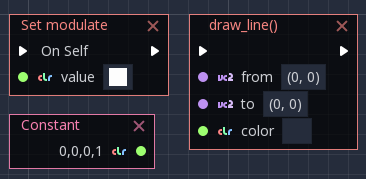
So apparently this only happens in function calls:
- Set member nodes (for example modulate) have color 1, 1, 1, 1
- Color constants have color 0, 0, 0, 1
- Function calls (for example draw functions) have color 0, 0, 0, 0
Jummit
on 18 May 2019
I assume it should all be constructed to Color as 1,1,1,1?
hbina
on 31 May 2019
So what's the state of this issue? What is the appropriate way to resolve it? I have submitted a PR a while ago with some breaking changes.
hbina
on 28 Jun 2019
I am completely new to this project. I would like to know how we can add the Set Local Variable Node in the editor, as I would like to reproduce the issue first and then pitch in any thoughts
 Arunkumar1998BOM
on 1 Nov 2019
Arunkumar1998BOM
on 1 Nov 2019
Related issues
 SleepProgger
·
3Comments
SleepProgger
·
3Comments
 gonzo191
·
3Comments
gonzo191
·
3Comments
 EdwardAngeles
·
3Comments
EdwardAngeles
·
3Comments
 mooseyfaith
·
3Comments
mooseyfaith
·
3Comments
 Zylann
·
3Comments
Zylann
·
3Comments
Most helpful comment
I assume it should all be constructed to Color as
1,1,1,1?