Godot: Audio tab goes under the taskbar
Godot version:
v3.1.rc1
OS/device including version:
windows 10 x64
Issue description:
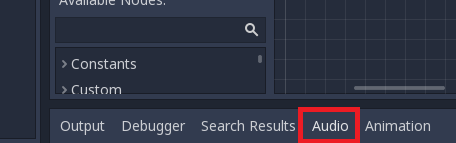
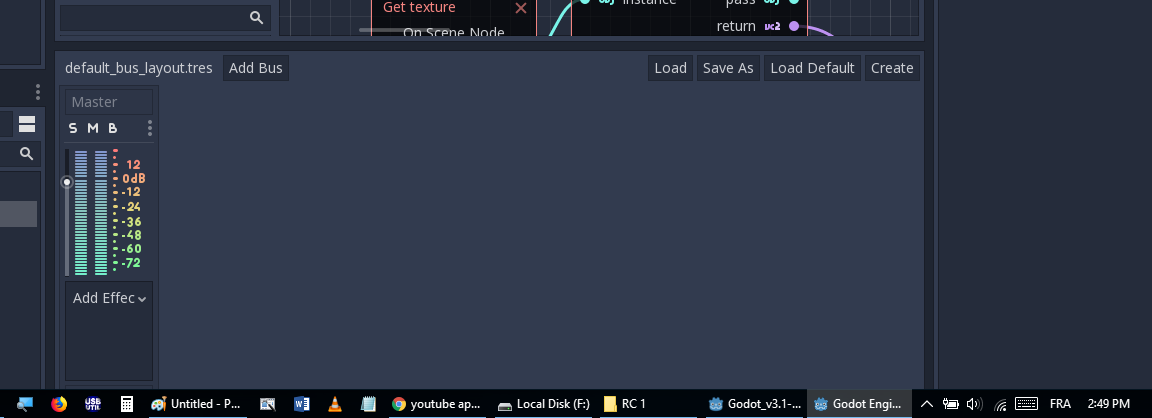
When click on "Audio" tab, the bottom side of godot goes under the taskbar, until toggle full screen and change to other tab (output, debugger, ..)
 sami8github
All 6 comments
Working on it :)
 samH-FIT
on 10 Mar 2019
samH-FIT
on 10 Mar 2019
I was looking at it with samH, we weren't able to recreate it on a windows machine but we were able to recreate on a mac. Could you provide additional details on how you produced it?
 JohnJLight
on 12 Mar 2019
JohnJLight
on 12 Mar 2019
I'm almost sure that I saw same issue maybe half year ago, but I can't find.
To reproduce this you need to have small height of screen.
Also it is possible to reproduce this bug in similar way(in this case is horizontal but it has same cause):
- Change to 2d viewport with opened Output window
- Change godot size to smallest as possible
- Open script tab and open at bottom Audio tab
- (For me only this point is issue) When I change godot back to 2D viewport and Output tab, then Godot still hide some part of editor, even if have a lot of space. Godot reorganize docks only if we manually change it size.
Video: https://streamable.com/cmwkt
I don't really think that is really a bug. When minimum size of Godot docks are greater than current available space on screen, then Godot try to resize window or just hide part of self
 qarmin
on 12 Mar 2019
qarmin
on 12 Mar 2019
After running rc3, the bug gone in rc1 or beta.
I did the folowing the bug reproduced in rc3:
1) run rc3 (no bug) and close it
2) run beta9 (no bug) and close it
3) run rc3 again it will reproduce
4) close rc3 and run it again (nobug)
the bug will reproduce after running an older version
sami8github
on 13 Mar 2019
I can confirm this on commit https://github.com/godotengine/godot/commit/580b0c651df86675145a696b1e961b224bf3ad8c.
Small editor

Large editor

To solve this, we could decrease the minimum size of the Audio tab (and allow scrolling inside if it's not tall enough to display the volume sliders).
 Calinou
on 17 May 2019
Calinou
on 17 May 2019
This is also the case sometimes with Animations and other huge tabs not just Audio.
 ultimateprogramer
on 14 Feb 2020
ultimateprogramer
on 14 Feb 2020
Related issues
 mefihl
·
3Comments
mefihl
·
3Comments
 mooseyfaith
·
3Comments
mooseyfaith
·
3Comments
 blurymind
·
3Comments
blurymind
·
3Comments
 bojidar-bg
·
3Comments
bojidar-bg
·
3Comments
 SleepProgger
·
3Comments
SleepProgger
·
3Comments
Most helpful comment
Working on it :)