Godot: Can't switch off Anti-Aliasing of Dynamic Fonts
Godot v3.1 Beta 3
Windows 10.
GeForce GTX 550
Can't switch off Anti-Aliasing of some Dynamic Fonts (.ttf) in game, only Editor.
I would expect to be able to turn off the Anti-Aliasing for low res retro games. I would expect the game to mimic the Editor settings. Some fonts work, some don't. Size of font doesn't seem to make a difference. I've included an example project.
Set Anti-Aliasing to 'off' in the editor after adding a Dynamic Font.
 Bat-Computer
All 10 comments
This isn't an antialiasing problem but the way OpenGL treats subpixel rendering (when a sprite is at a float position). Enable Use pixel snap under quality in the project settings to avoid that issue.
 mrcdk
on 5 Feb 2019
mrcdk
on 5 Feb 2019
I neglected to enable Pixel-Snap in my example. But I still have the problem depending on the font used and sometimes the size. The 'PressStart2P.ttf' font in my example seems to display without Anti-Aliasing at any size, albeit a bit squished at times. But the other font 'ARCADECLASSIC.TTF' does not. At some sizes it is Anti-Aliased, other sizes not.
If this was an OpenGL issue, would this not affect both fonts the same? Sorry if I'm wrong, it just doesn't seem logical.
Thanks.
Bat-Computer
on 5 Feb 2019
Depends, is the font size the correct one for that font? If a font is made for 12 pixels, for example, if you use 13 pixels it will be stretched and will create those issues. With pixel fonts you have to take that into consideration when giving it the font size and whatnot.
mrcdk
on 5 Feb 2019
Would this be related to https://github.com/godotengine/godot/issues/8022#issuecomment-435710214?
 Zylann
on 5 Feb 2019
Zylann
on 5 Feb 2019
@Zylann DynamicFonts are rendered to bitmaps using FreeType, they don't make use of distance fields.
 Calinou
on 5 Feb 2019
Calinou
on 5 Feb 2019
there seems to be something awry with the DynamicFontData resource type - it wont save the aliased or hinting properties to the .tres when set in the inspector, and clears them on load if you add them manually
im using this workaround (toggling the filter or mipmaps makes it reload so the antialiasing setting gets applied)
extends Label

func _ready():
    get_font("font").font_data.antialiased = false
    get_font("font").use_filter = true
    get_font("font").use_filter = false
(this is in 3.2 beta4)
 yakrell
on 30 Dec 2019
yakrell
on 30 Dec 2019
Still reproducible in Godot 3.2.2 Stable.
 ghost
on 18 Aug 2020
ghost
on 18 Aug 2020
Can't confirm this whatsoever.
[gd_resource type="DynamicFont" load_steps=2 format=2]

[sub_resource type="DynamicFontData" id=1]
antialiased = false
font_path = "res://Interface/Fonts/Roboto/Roboto-Regular.ttf"

[resource]
size = 48
outline_size = 1
outline_color = Color( 0, 0, 0, 1 )
use_filter = true
font_data = SubResource( 1 )
 TheDuriel
on 17 Sep 2020
TheDuriel
on 17 Sep 2020
Still reproducible in Godot 3.2.3 Stable.
This is when i set up the project:
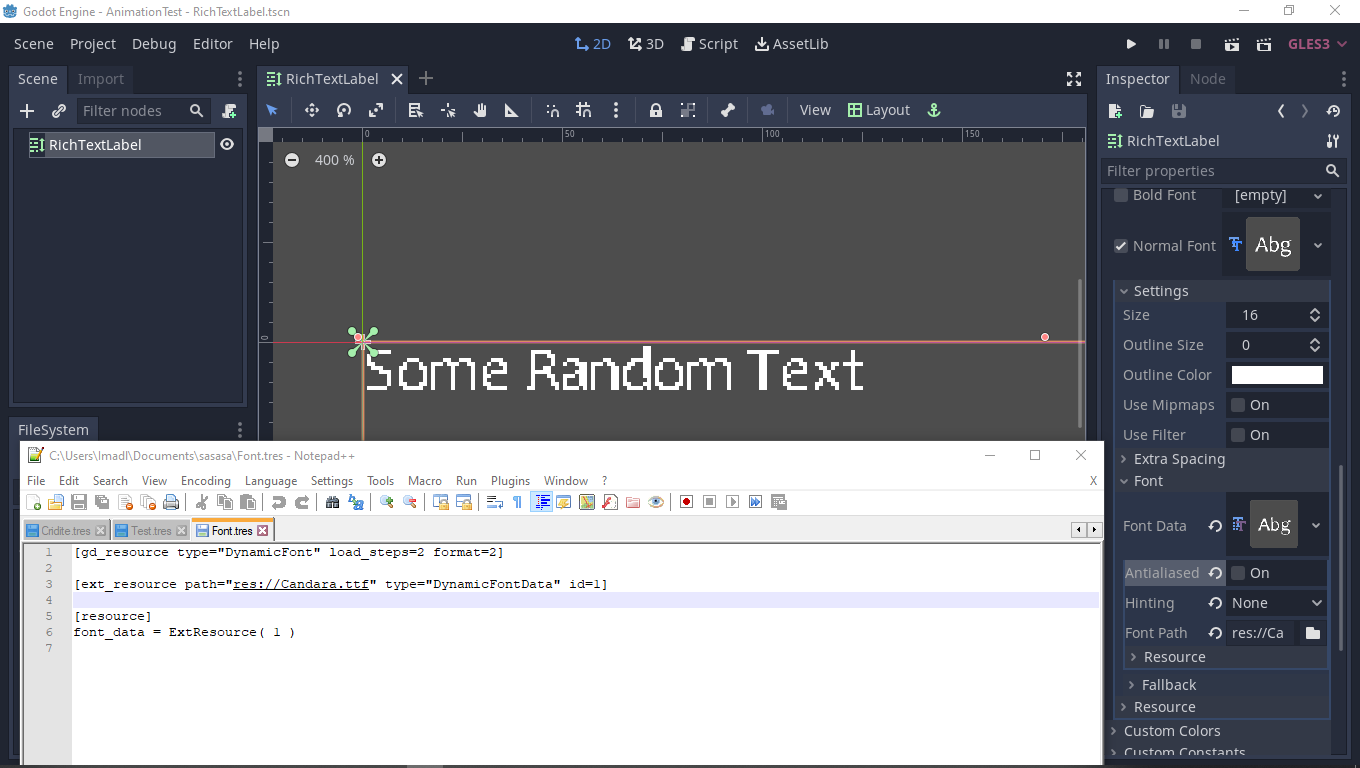
and this when i reload it:
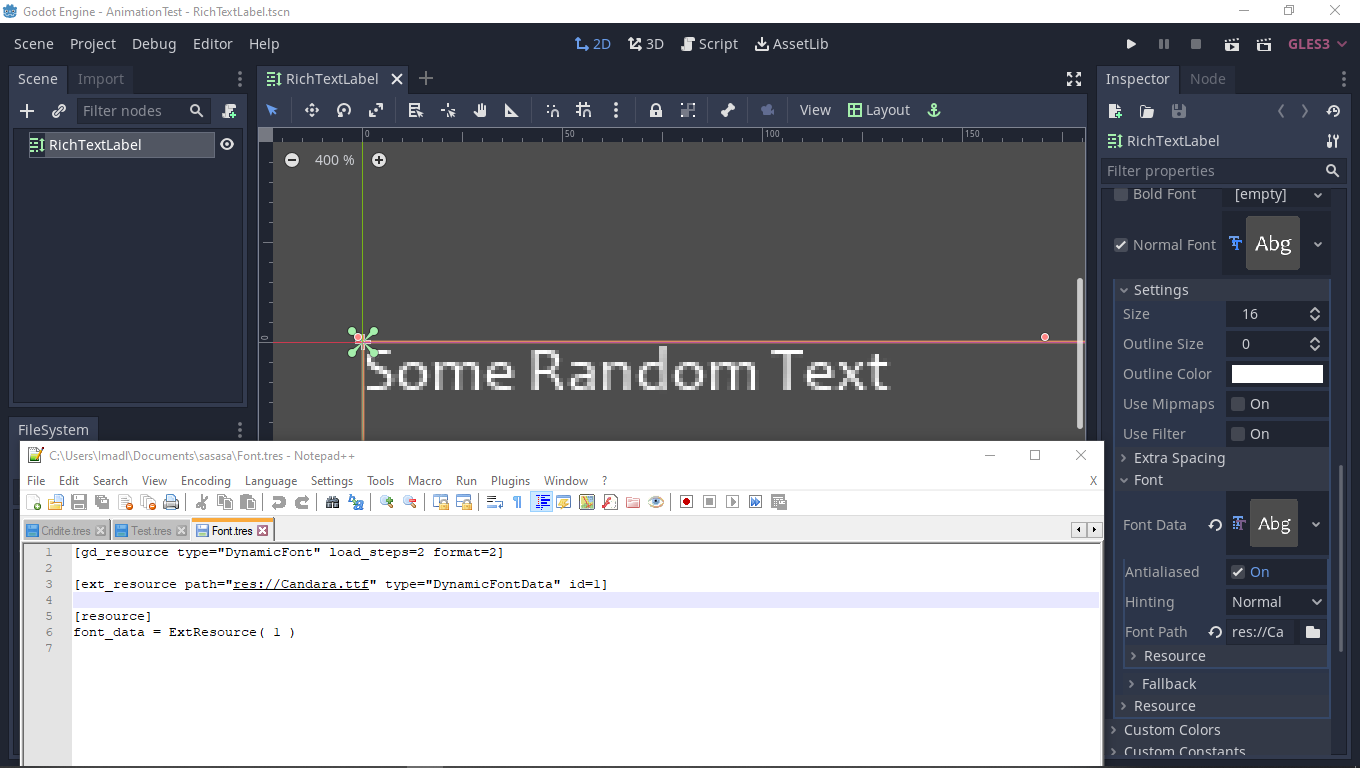
And when playing the game, no matter if the AA is on or off, it will render it on.
unless you set it on ready to be off.
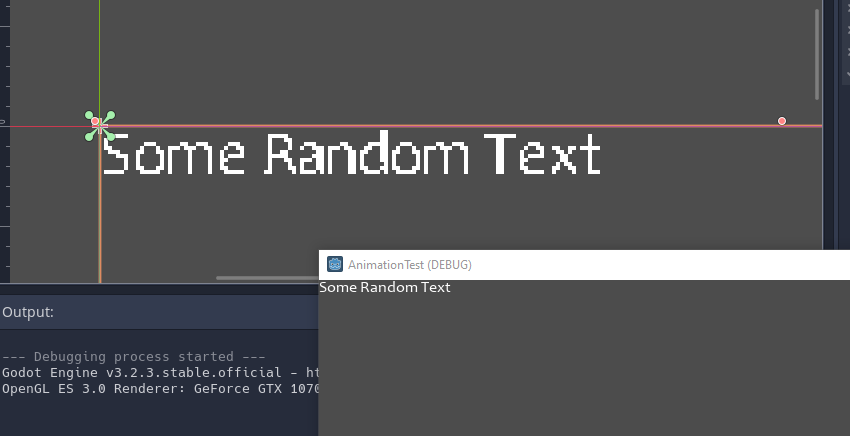
ghost
on 17 Sep 2020
And when playing the game, no matter if the AA is on or off, it will render it on.
You need to save the DynamicFontData (not the DynamicFont!) to a resource on disk for it to work. This is because the TTF/OTF file can't contain metadata about whether it should be antialiased or not. See the comments above. Alternatively, use this workaround: https://github.com/godotengine/godot/issues/25626#issuecomment-569575813
Calinou
on 17 Sep 2020
Related issues
Calinou
·
219Comments
 karroffel
·
144Comments
karroffel
·
144Comments
 RiverMesa
·
142Comments
RiverMesa
·
142Comments
 akien-mga
·
366Comments
akien-mga
·
366Comments
 nunodonato
·
143Comments
nunodonato
·
143Comments
Most helpful comment
there seems to be something awry with the DynamicFontData resource type - it wont save the aliased or hinting properties to the .tres when set in the inspector, and clears them on load if you add them manually
im using this workaround (toggling the filter or mipmaps makes it reload so the antialiasing setting gets applied)
(this is in 3.2 beta4)