Godot: Let PhysicalBone detect collisions, and allow application of impulses
Godot version:
master / f32c826924
OS/device including version:
Manjaro Linux 18.0.2
Issue description: _(This is a feature request)_
What I'm trying to achieve is to make a 3d character react to a hit impact in a more realistical manner. To be specific, imagine a sword fighting game in which you can attack your enemy and hit his various body parts with your sword.
To be able to achieve such an effect, you'd probably need to know exactly where (i.e. global 3d position in Vector3) the sword hit, and strength and direction of the impact (i.e. a force represented as Vector3).
Once you get that information somehow, you need to apply that force to the appropriate part of the enemy character's body. I imagine such a character would have a ragdoll setup, consisting of PhysicalBone nodes in a 'sleeping' status then need to get 'awakened' (i.e. by invoking Skeleton.PhysicalBonesStartSimulation) before applying the aforementioned force data (i.e. like RigidBody.IntegrateForce).
However, if I'm not mistaken, neither of those is possible with the current status of Godot. First off, there is no signal to detect collision in PhysicalBone or CollisionShape so we can't take the more natural approach of letting the object that is being hit to decide what could be a proper reaction to the impact.
And even if we can make the sword a RigidBody, driving it by applying forces would be awfully impractical, since the movement of the weapon is usually determined by what animation the character plays when it attacks, rather than based on some complex procedural, physics calculations.
In Unity, in comparison, there is a OnCollisionEnter(Collision) callback which I believe to be usable from any collider component. I think it'd be much better if Godot has an equivalent signal in either CollisionShape or PhysicsObject node, so that we can gather such information like exactly where the object was hit or how hard and more.
Also, it doesn't seem to be possible to apply force to exact location on the target rig with proper intensity and direction. We can make the character RigidBody and use IntegrateForce, of course, but it'd probably make the whole body flying when I hit its arm, for instance, instead of just making the arm thrown back as it is expected when it gets hit by a solid object.
Ideally, it'd be better if either we can make PhysicalBone to inherit from RigidBody, or pull up methods like IntegrateForce to their common ancestor, so we can interact with the former in the above mentioned scenario.
 mysticfall
All 32 comments
@AndreaCatania not sure if what they are asking makes sense, please take a look :)
 QbieShay
on 3 Feb 2019
QbieShay
on 3 Feb 2019
If what you're trying to accomplish is this, you'll have a hard time in any engine. You already can do what you want using Area and some programming, albeit it's not easy.
Basically:
- Separate the body in Areas.
- Make a
forcevariable in things used to attack (your sword for example), and when it enters an Area just get it usingget_overlapping_bodies()[i].force. - To apply realistic force, I'm not so sure since I'm not used to 3D. But I would guess you'd have to use different RigidBodies for each member and pin them to the torso.
 mateusak
on 3 Feb 2019
mateusak
on 3 Feb 2019
@mateusak That video looks super cool! But in fact, there were multiple much simpler systems in Unity that could provide similar effect also, like:
- https://youtu.be/vaxXxYa9lZs?t=440 (See how the API takes the impact vector to start a ragdoll).
And it was quite straight forward to creat hitboxes/hurtboxes for a skeleton in Unity, since each collider could detect collisions, and Unity auto creates a ragdoll like Godot does with PhysicalBones:
As I wrote in the issue description, Godot can make a ragdoll in a similar manner as in Unity, but the resulting rig cannot be used in the same manner since in Godot, physical bones or collision shapes cannot detect collisions nor be able to be physically acted upon in a direct manner.
As to your suggestion, I guess attaching either Area or RigidBody to each major bones would work (albeit being awfully inconvenient and probably inefficient) for the hit detection part. But I doubt hitting such a node would cause its parent bone (i.e. either a physical bone or bone attachment) to move though.
mysticfall
on 4 Feb 2019
@mysticfall You can use the RigidBody's signals to do what you want. The functionality is the same as Unity's.
I guess the problem you're having is that your sword is a KinematicBody and the player a RigidBody, which would render no hits being registered. You can attach an Area to your sword to overcome that problem.
Albeit, my suggestion is still better. With Areas you have more control over hit points. And it's not really inefficient. About applying realistic forces I really can't help you since I've only ever used 2D, but knowing Godot there's definitely a way, just search a bit more.
mateusak
on 4 Feb 2019
@mateusak The main problem is, in order for the a character rig to react to physical impact in such a manner, it needs to move only the affected part of its joints.
Say, you attached a rigid body node to either a physical bone or bone attachement of your rig's head. But I doubt if the character would jerk its head when you call IntegrateForce on that rigidbody, because the rigidbody is a child of the head bone, not vice versa.
(By the way, does body_entered signal emitted by an Area node provide information on the direction and strength of the force?)
And also, having to attach a rigid body or area node for each major bone would be problematic itself, as it's inconvenient and would make the rig setup still more cluttered than as it is now (try creating a ragdoll setup, and it will add tons of non hierarchical nodes under your skeleton, but now we have to double that number), and most importantly, it could be bad for performance too since we are essentially doubling the number of colliders.
mysticfall
on 4 Feb 2019
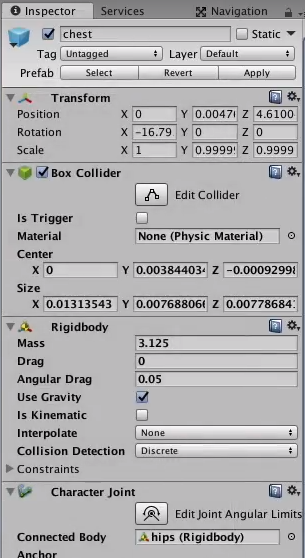
By the way, I searched up a couple of tutorial videos on Unity's ragdoll wizard to confirm what I remember, and it seems that they indeed attach collider and rigidbody component for each bones which makes it easy to detect a collision (with information on its direction and strength) and apply arbitrary force on that specfic part of the rig:
mysticfall
on 4 Feb 2019
@mysticfall The body_entered signal returns the node that collided. From there you can access anything you want, given you're creative enough.
It seems you're worried about clutter and performance. Clutter can be reduced if you make the Area a child of your already existing nodes. About performance, don't worry, you need around 11 Areas to divide the human body; that's not nearly enough to cause performance issues, even if you have more than one player.
mateusak
on 4 Feb 2019
@mateusak How do you know exactly where a bullet has hit and with how much velocity when all that signal gives is a single Node argument?
And even if there was such a way, how can you apply force to a rigid body that is attached to a physical bone so that the movement of the former would be duplicated in the latter?
And that is even when we assume doubling the number of collision shapes and joints somehow wouldn't affect the performance, or be easy to setup.
mysticfall
on 4 Feb 2019
_(It seems that mateusak has deleted the comment to which I wrote this reply. I mention this only because I fear others may find it odd to read this.)_
@mateusak I'm not trying to be rude, but I suspect you don't fully understand the implication of constructing such a system in a 3D environment as you already admitted you have only used Godot for 2D projects yourself.
I wouldn't worry about any of those things, if all I wanted to do was making a character sprite in a 2D game, adding some hit box areas here and there, then running some code to play an animation if a bullet 'enters' that area or other similar kind of things.
Have you ever tried to setup a ragdoll in Godot? And please tell me how the following screenshot doesn't look cluttered as it is (that's just about only half of the whole setup by the way):

I'm not bashing the current status of the ragdoll system, since I'm perfectly aware that it's one of the bleeding edge features that was introduced quite recently. But what I'm saying is that you are basically claiming it would be easy to attach a rigid body or area node to every such physical bone and somehow it would work and it'd be both efficient and clutter free which I have to doubt to be the case for a good reason.
Again, I'm not trying to insult you nor ignore your own experience with Godot. But claiming it's a 'non-issue' or that I'm not familiar with the way Godot supposed to work without even having tried something similar yourself is not a very constructive way to discuss how we can make Godot even better.
If you still believe somehow it's only because I don't have sufficient experience with Godot that I need such a feature, try implementing a proof-of-concept hit reaction system with the TPS demo yourself and see how easy and efficient what you have suggested would work (that is, if it even works at all).
mysticfall
on 4 Feb 2019
@mysticfall I apologize for not being clear, and I realize I may have been rude. What I meant for non-issue is that Godot has been used to make very complicated games, so there IS a way already, that's why I told you Q&A would help you more.
Now on to why what you proposed can't be implemented; CollisionShapes are a gimmick. It has no function by itself: it only specifies an area that is used by a body. The equivalent to a Unity CollisionShape in Godot is an Area. That's why I said it won't cause a performance issue. In Unity did you worry on how many CollisionShapes did you have? No.
And as I've said before, you don't need an Area for each of these. A human body can be divided in 11 parts; 2 upper arms, 2 lower arms, upper torso, lower torso, 2 upper legs, 2 lower legs, head.
mateusak
on 4 Feb 2019
@mateusak I can see how I can attach an additional area node to each major physical bone, and use it to detect collision. (By the way, I believe the use of Area node would be rather inappropriate in this case, since it's mainly used to detect when something literally _enters_ its bound - when people do a fist fight, a fist rarely 'enters' any body part. If I understood Godot correctly, a better option would be using a rigid body).
But let's assume we have a two characters fist fighting in a game, each has such an area (or a rigid body) node on its fists and heads.
So, let's say the character A's fist has 'entered' an area node attached to the character B's head bone. I will certainly receive a body_entered signal from the event, but how would you use that information?
As I said above, body_entered only reports the node instance that has entered its bound. So how _exactly_ you would know the exact global position where the hit has occurred, and what velocity the character A's fist had, and also with much force (usually calculated from the weight and acceleration)?
You already said the node would somehow provide all such information with its properties, but even I'm not entirely a newcomer to Godot myself, I couldn't find any way to do that. So if you know how to obtain such information, please tell me with a specific instruction (e.g. name of the relevant property or a method).
And let's say somehow you managed to extract that information from the impact, then what now? I have no idea how to convey that force to the character B's head bone, so that it would jerk backward realistically, since it's not even a rigid body so you can't use IntegrateForce.
You may consider using the ragdoll system, but the hit has already happened in the past so starting physics simulation now wouldn't do any good either. And as you may know, it is not usually practical to keep an active ragdoll when the character is moving around in a kinematic mode.
If you believe Area node attached to a physical bone (the head bone) could be moved that way without having to resort to a premade hit animation, again I'd be grateful if you could give me a specific instruction, rather than a vague statement that it would somehow work.
P. S.: By the way, an equivalent of Godot's CollisionShape in Unity is called Collider. And while I'm not much knowledgeable about making 3D games yet, I think I've heard enough times from various different sources how having too many, dynamic, or overly complex colliders/collision shapes would affect the performance negatively.
If they were really overhead free as you seem to believe, people wouldn't even bother to use primitive collision shapes in most cases, as they can simply generate a trimesh or convex collision shape out of the actual mesh itself, which would provide the most accurate contact information.
mysticfall
on 4 Feb 2019
@mysticfall When pressing the button to attack you need to do _something_ to move your player. There are basically two ways do to _something_; manual animation or procedural animation. In both cases the force to which your hand moves forward is configurable by you. If for some reason it's not, you can register the hand position each second to calculate it's velocity and acceleration. The actual force of the punch is the force you configured + your players speed in a direction (i.e superman punch). You store this in a variable on your player.
Create an attack Area for your fists. When this area enters a hit Area of the enemy, the hit Area signal will contain the fist Area. From there you can get fist_area.owner.your_variable.
Now, again, I don't know how to do the collision part. I would assume RigidBodies and HingeJoints, but really in this I can't help you. Go on discord or the Q&A and ask for help on this part.
P. S.: The equivalent to Unity's Collider (in the way of just reporting collisions) is Godot's Area. Having too much of either sure is bad. But 11 is not too much. Not even close to too much. There are games with tens of thousands of these. This is bad practice; you're trying to optimize something before starting.
mateusak
on 4 Feb 2019
@mateusak I also came up with a similar 'hack', in case I want to implement this feature before Godot could be improved in that regard. But it isn't as easy as you'd think because you need, for example, to attach a special node which records its velocity and effective weight in every frame to the tip of every sort of weapons that your game have. And that is without considering how you'd actually impart that calculated impart to the target bone (I'm thinking about using an invisible rigidbody bullet, or somehow using PhysicsServer, assuming PhysicalBone would be a rigidbody under the hood).
Anyway, even if it was something feasible, it doesn't explain how I should transfer that impulse to the target bone, and most importantly, I don't think our users need to go through that sort of ugly hoops to achieve what other engines like Unity provides out of the box.
Lastly, I think you are mistaken about how collision works in a 3D context. No, the equivalent to Unity's collider is _not_ Area, but CollisionShape as you can clearly see from here:
They even provide almost identical set of collision shapes as Godot does, possibly because those are what's available in Bullet engine. (By the way, I believe the closest approximation of Godot's Area in Unity could be something called OnTrigger messages, not colliders.)
And I'm almost certain that colliders or collision shapes have quite a significant performance impact, if used without care. So I don't think it is a case of a premature optimization to feel concerned of blindly doubling their numbers.
mysticfall
on 4 Feb 2019
I didn't read everything but @mateusak seems pointing you in the right direction.
You can achieve this effect by creating a physical skeleton like this:
(This one is too verbose you should simplify it https://www.youtube.com/watch?v=6TyRFk6dpU4)
Now to have the character react like you want you need to use / develop a software that take the hit position and its force and compute an animation. The video that you posted show the result of an animation engine and not a physics engine.
Excluded the ragdoll all movements that you see are animations computed procedurally.
Also please note that is not possible to take info from the shape becouse it's there just to tell the physics engine how to compose the rigid body.
Hope this help.
 AndreaCatania
on 4 Feb 2019
AndreaCatania
on 4 Feb 2019
@AndreaCatania I still don't get how my problem would be easily solved by using an Area node, and that's what @mateusak has been saying in this thread mostly.
Anyway, I think I already know how to construct a ragdoll which is more or less the same in both Godot and Unity.
My main point, however, is in Unity the ragdoll creation process makes each bone an actual rigid body with a collider, so 1) it can easily detect a collision on itself and 2) we can easily apply an arbitrary impulse on it, and both of those things are provided out-of-the box.
With Godot's current PhysicalBone implementation, however, there's no easy way for a PhysicalBone to detect a collision (which you also mentioned in the above comment), and it also lacks an API to apply an arbitrary force to it, like RigidBody.IntegrateForce.
I don't see how such limitations could be easily solved by using any existing node types Godot provides, including Area.
mysticfall
on 4 Feb 2019
Area is not the right choice in this case. The physical bone is a rigidbody, and it should have the possibility to detect hit or apply force when the simulation is active. (if not please open an issue)
When the physics bone simulation is not active you can't apply a force, and seems strange to me that you can do it in Unity.
Again you need a software like euphoria because is very difficult create a skeleton body that allow a character to walk like in the real world where you can apply a force to it.
AndreaCatania
on 4 Feb 2019
@mysticfall There's not a 1 : 1 correspondence with Unity. Collider = Rigid, Kinematic, Static bodies. Trigger = Area. CollisionShapes are just a tool used by these bodies.
But okay I can finally understand what you're proposing;
You want to be able to apply localized force to a ragdoll. Okay. That's something not currently implemented and not achievable through Godot's current state. Please edit your issue to make it clearer.
mateusak
on 4 Feb 2019
@AndreaCatania
The physical bone is a rigidbody, and it should have the possibility to detect hit or apply force when the simulation is active. (if not please open an issue)
Yeah, that was exactly the point that I've tried to address with this issue actually. :sweat_smile:
(Just to make it sure, PhysicalBone class, as it is now, does not inherit RigidBody)
mysticfall
on 4 Feb 2019
@mateusak
@mysticfall There's not a 1 : 1 correspondence with Unity. Collider = Rigid, Kinematic, Static bodies. Trigger = Area. CollisionShapes are just a tool used by these bodies.
But okay I can finally understand what you're proposing;
You want to be able to apply localized force to a ragdoll. Okay. That's something not currently implemented and not achievable through Godot's current state. Please edit your issue to make it clearer.
Yeah, but as you see, there's almost a 1:1 correspondence between Unity's collider and Godot's collision shapes. But I don't want to pursue this subject any further, as now I can see that we have finally reached an understanding.
I'll try to reword my issue, if more people turn out to get confused about the intention. I somehow believe I have described my points sufficiently clear in the issue description, but it has gotten more confusing because of the prolonged conversation.
Thanks!
mysticfall
on 4 Feb 2019
Yes but it has the possibility to do it, it's really similar to a rigid body
AndreaCatania
on 4 Feb 2019
Yes but it has the possibility to do it, it's really similar to a rigid body
That's great to hear. Thanks!
mysticfall
on 4 Feb 2019
@AndreaCatania One minor point though, would it be possible for a PhysicalBone to detect collision before the physics simulation is turned on? If not, could we have a more granular mode like ON / COLLISION_ONLY / OFF?
mysticfall
on 4 Feb 2019
@mysticfall I mean it's 4am where I live. I'm tired. Sorry for any trouble.
mateusak
on 4 Feb 2019
Again, just to make things clear :
When the physics bone simulation is not active you can't apply a force, and seems strange to me that you can do it in Unity.
It's also done in two separate phases in Unity. When you detect your character is hit on one of its rigid body bones, you stop the animation so that the ragdoll can take the full effect then 'replay' that force upon the affected bone to simulate a hit reaction.
How to go back to the non-ragdolling/animated status from there is another matter, however, which normally requires more elaborate hacks even in Unity (an example of such a workaround, if you feel curious: https://youtu.be/on7wAz0fsGg?t=71).
@mateusak
@mysticfall I mean it's 4am where I live. I'm tired. Sorry for any trouble.
No problem! I'm just glad that we finally understand each other :)
mysticfall
on 4 Feb 2019
@AndreaCatania One minor point though, would it be possible for a
PhysicalBoneto detect collision before the physics simulation is turned on? If not, could we have a more granular mode likeON/COLLISION_ONLY/OFF?
yes is possible
AndreaCatania
on 4 Feb 2019
Not sure if this has been discussed before but in your video @AndreaCatania you are using apply_impulse on a PhysicalBone. So this feature existed before, right? Why is the method no longer usable?
 wbulot
on 12 Feb 2019
wbulot
on 12 Feb 2019
Area is not the right choice in this case. The physical bone is a rigidbody, and it should have the possibility to detect hit or apply force when the simulation is active. (if not please open an issue)
@AndreaCatania This seems like it was possible, as per the video you made, but PhysicalBone no longer has an apply_impulse function that you can call. I currently get:
Invalid call. Nonexistent function 'apply_impulse' in base 'PhysicalBone'.
Edit: I'm using the latest Godot 3.1 Beta 4.
 rszibele
on 17 Feb 2019
rszibele
on 17 Feb 2019
The PhysicalBone extend PhysicsBody, so threat the physical bone like a normal physics body.
AndreaCatania
on 18 Feb 2019
Pretty bump. Looking at the docs, neither PhysicalBone not PhysicsBody has functions related to applying impulses or setting velocity, unless one goes through the PhysicsServer.
 bojidar-bg
on 10 Apr 2019
bojidar-bg
on 10 Apr 2019
What's the state of this? With this PR #36008 is possible to animate the physical bones, so you can register impacts and using apply_central_impulse you can also submit forces.
AndreaCatania
on 8 Feb 2020
At this moment, I'm stuck with other issues both Godot's and my own. Can't wait to try it out myself, and thanks much for the work!
mysticfall
on 9 Feb 2020
Feature and improvement proposals for the Godot Engine are now being discussed and reviewed in a dedicated Godot Improvement Proposals (GIP) (godotengine/godot-proposals) issue tracker. The GIP tracker has a detailed issue template designed so that proposals include all the relevant information to start a productive discussion and help the community assess the validity of the proposal for the engine.
The main (godotengine/godot) tracker is now solely dedicated to bug reports and Pull Requests, enabling contributors to have a better focus on bug fixing work. Therefore, we are now closing all older feature proposals on the main issue tracker.
If you are still interested in this feature proposal, please open a new proposal on the GIP tracker following the given issue template (after checking that it doesn't exist already). Be sure to reference this closed issue if it includes any relevant discussion (which you are also encouraged to summarize in the new proposal). Thanks in advance!
 madmiraal
on 4 Jun 2020
madmiraal
on 4 Jun 2020
Related issues
 Zylann
·
3Comments
Zylann
·
3Comments
 gonzo191
·
3Comments
gonzo191
·
3Comments
 rgrams
·
3Comments
rgrams
·
3Comments
 EdwardAngeles
·
3Comments
EdwardAngeles
·
3Comments
 Spooner
·
3Comments
Spooner
·
3Comments
Most helpful comment
What's the state of this? With this PR #36008 is possible to animate the physical bones, so you can register impacts and using
apply_central_impulseyou can also submit forces.