Godot version:
3.0.6, 3.1-beta3
description:
I know this has been discussed sometimes, but there is no comfortable solution for handling collisions with tiles on a GridMap very well. When I build up a level by using single 3d-tiles I somehow did also expect them to be able to react to collisions by several bodies. How nice would it be, if I could also use signals to detect with which 3d-tile a body collided. It would be very useful for playing different sounds depending on the tile or its material. When using rigid bodies it could be useful for changing the body's physics attributes when colliding with a certain type of tiles.
expected behavior when using GridMaps:
I know this probably is a taff task, since under the hood there is some stuff with octants and composition of various meshes going on (also for performance boost), but in the perfect universe it would be possible to define not only meshes with according static-bodies and collision-shapes used for the meshlib:
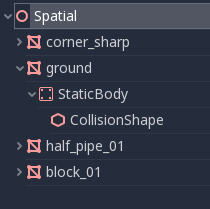
But also other children (areas, sub-nodes, etc.) which will be layed out correctly when placing inside a GridMap. In the worst case, the optimizations under the hood would suffer, but if there're only some "special" 3d-tiles in the meshlib it'd probably work, wouldn't it?
questions I've asked myself while using GridMaps:
Am I the only one who wanted to do similar things like I described above?
If yes, how did you solve the desired functionality?
some ways to reproduce the issue / get the point:
When I use a RigidBody and connect the signal "body_shape_entered"
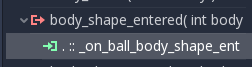
It will indeed receive the signal. The body will then be the GridMap instance.
Also body_shape and body_local will change when colliding with different tiles. But there currently seems not to be any method or way to find out which tile excactly has been collided.

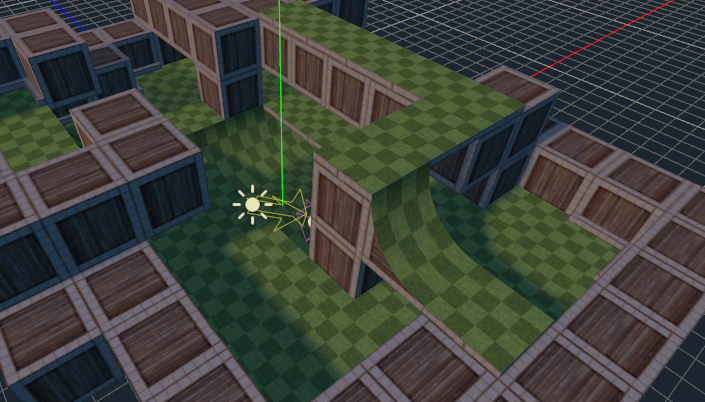
Would be so great to be able to hear a wooden sound when bodies on the map collided with wood, while making a different sound when colliding with grass
Thanks for letting me open the discussion and help improving the engine!
 SlothDevLlama
All 6 comments
A way of making different properties for example wood and grass would be physics properties, but I'm not sure how that integrates with tilemap.
 fire
on 30 Jan 2019
fire
on 30 Jan 2019
Have a vector that points down at the ground, when the ray / shape cast. When the player is touching the ground and there is player movement get the shape's physics material and when it's for instance grass play footsteps? I don't have a prototype for this, but I would try that.
Edited: Physics materials don't have a name property... but I would expect the functionality be there rather than collision layers.
Edited: Physics materials have a name property through resources class.
fire
on 30 Jan 2019
Hey thanks! I've tried for some time now, but with no luck unfortunately :-(
I somehow don't know how to convert the given shape index to the shape or collisionShape.
SlothDevLlama
on 30 Jan 2019
Thanks to fire I was able to take a closer look at the whole GridMap topic and it turned out that the implementation I miss on the GridMaps is a bit more complex than I thought.
I'm looking for someone who might be able to look at the topic together with me and is a bit more experienced in C++ than I am :-D Of course, I wouldn't just watch, but maybe someone would be willing to help me out with my code.
can check for quality / likes or helps me with troubleshooting :-)
A few points that describe the current process of creating a GridMap internally:
- The GridMap looks for each cell whether a so-called octant already exists for it, if not, a new octant and currently a corresponding StaticBody (without any shapes) will be created.
- If a new MeshLib is created per scene, then all Childnodes are looped through and only Nodes of type Mesh are traded. If this Mesh has another SubNode of type StaticBody, its shapes are looped through again and these shapes are stored in the individual MeshLib items.
- This means that any information about the StaticBody is simply discarded. PhysicsMaterial overrides or Physical properties are ignored.
- The GridMap looks at the MeshLib item for the respective cell and adds only the stored shape data to the StaticBody for the current Octant.
- The StaticBody for the Octant has by default a bounce value of 0 and a friction value of 1, a change of the value is currently not planned.
- This means: it doesn't matter how the tiles of a MeshLib are constructed. No matter how much hope the programmer makes.
Advantages that an optimization of GridMaps would bring for all Godot game developers:
- New types of GridMap levels would result! Tiles would be possible that let the player spring when you jump on them! (jelly) or that would let the player slide as you walk over it. (Ice)
- If the GridMap keeps information about the original StaticBody (or only its physical properties), you could draw better conclusions from the collided tiles in case of collisions.
- GridMaps are currently implemented in a very limited way, which prevents a good handling of signals. GridMaps currently only inherit from spatials and have a very limited supply of signals. Any handling cannot be mapped via a player object.
- GridMaps are very slim and aesthetically pleasing compared to levels built up from individual objects and very easy to maintain thanks to the integrated GridMap editor.
- Sometimes RayCasts just aren't enough, especially when it comes to simulations in a GridWorld. Even if you currently casted a ray on the GridMap, you won't get much information about the collision, because there are still gaps in the implementation of GridMaps.
Things that need to be done to give GridMaps better physical properties:
- For each PhysicsMaterial Override, as well as for standard (no Override) an Octant needs a separate StaticBody.
- This StaticBody only needs to be created if no StaticBody has already been created for the material. The advantage: If none of the cells in an Octant has a PhysicsMaterial override, the GridMap behaves exactly as it does now. -> No actions need to be made on existing games
- The MeshLib must either contain information about the StaticBody of the mesh, or about its physical properties.
- So that the GridMap can also profit from the powerful signals, one would still have to implement corresponding methods (body_entered, body_exited, etc.).
Does anyone share the same opinion with me? I think that would be an important and good point to discuss for version 3.2 right now.
SlothDevLlama
on 5 Feb 2019
Hi @TheWhiteLlama i also struggle with the GridMap limitations and i recommend your suggestions.
I'm current prototyping a procedual generated dungeon where each object is procedual generated. I experiment with gridmap and generated meshlib from CSGShapes. It is not nice to add some extra code to circumnavigate the existing limitations. But Godot is a great engine and will be continuously improved, it is gread to have it.
I found a solution to detect the tile are collided within a other object by using this code:
func _ready():
    connect("body_entered", self, "collided")

func collided(body):
    if body is GridMap:
        #print("collided with: ", body)
        var grid = body
        var pos =  self.global_transform.origin - grid.translation
        var gridPos = grid.world_to_map( pos )
        var item = grid.get_cell_item(gridPos.x, gridPos.y, gridPos.z)
        if item != GridMap.INVALID_CELL_ITEM :
            print("gridPos ", gridPos, "item: ", item )
                        # so some logic here
Would good to have
- multi layered gridmap instead of multiple gridmaps
- customised physic materials peer tile
- more signals to controll your scene
- updating the meshlib should be faster (script based meshlib generation)
- CSGShape operations has some clipping bugs and should be fixed
Greatings
Mike
 ghost
on 3 Jan 2020
ghost
on 3 Jan 2020
Feature and improvement proposals for the Godot Engine are now being discussed and reviewed in a dedicated Godot Improvement Proposals (GIP) (godotengine/godot-proposals) issue tracker. The GIP tracker has a detailed issue template designed so that proposals include all the relevant information to start a productive discussion and help the community assess the validity of the proposal for the engine.
The main (godotengine/godot) tracker is now solely dedicated to bug reports and Pull Requests, enabling contributors to have a better focus on bug fixing work. Therefore, we are now closing all older feature proposals on the main issue tracker.
If you are interested in this feature proposal, please open a new proposal on the GIP tracker following the given issue template (after checking that it doesn't exist already). Be sure to reference this closed issue if it includes any relevant discussion (which you are also encouraged to summarize in the new proposal). Thanks in advance!
 Calinou
on 7 Sep 2020
Calinou
on 7 Sep 2020
Related issues
 ndee85
·
3Comments
ndee85
·
3Comments
 gonzo191
·
3Comments
gonzo191
·
3Comments
 Zylann
·
3Comments
Zylann
·
3Comments
 Spooner
·
3Comments
Spooner
·
3Comments
 SleepProgger
·
3Comments
SleepProgger
·
3Comments
Most helpful comment
Hi @TheWhiteLlama i also struggle with the GridMap limitations and i recommend your suggestions.
I'm current prototyping a procedual generated dungeon where each object is procedual generated. I experiment with gridmap and generated meshlib from CSGShapes. It is not nice to add some extra code to circumnavigate the existing limitations. But Godot is a great engine and will be continuously improved, it is gread to have it.
I found a solution to detect the tile are collided within a other object by using this code:
Would good to have
Greatings
Mike