Godot: Run the project for a few seconds and the collision will fail
Godot version:
godot3.0.6or3.1alpha1
OS/device including version:
manjaro 17.1.12 x64
Intel® Core™ i3-2350M CPU @ 2.30GHz × 4
Intel® Sandybridge Mobile
3.8 GiB
Issue description:
Run the project for a few seconds and the collision will fail in godot3.0.6or3.1alpha。If you don't wait and hit it right now,there's no problem with the collision.
Steps to reproduce:
Create a rigid body, wait a few seconds, and control another object with a collision body to hit it. The collision will fail.
Minimal reproduction project:
Test.zip
 haizhou37
All 6 comments
Tested the project, seems like a problem when a KinematicBody gets positioned (via translated) inside a RigidBody which is sleeping. I'm not sure this is a bug.
@haizhou37 You should use move_and_collide or move_and_slide when moving a KinematicBody, because translate does not update it or other physics objects properly (it acts as if the KinematicBody was teleported, not moved).
Additionally, try to put physics related code in _physics_process, not _process (though this did not change the behaviour of the sample project).
Finally, if a RigidBody misbehaves after some time, you can always try to uncheck its "Can Sleep" property, but mind that sleeping is a performance optimization, so it should be disabled with care.
 bojidar-bg
on 28 Oct 2018
bojidar-bg
on 28 Oct 2018
You should use move_and_collide or move_and_slide when moving a KinematicBody, because translate does not update it or other physics objects properly
This is the key
 NewNodeGames
on 28 Oct 2018
NewNodeGames
on 28 Oct 2018
@NewNodeGames That's why I put it first, before the other suggestions.
bojidar-bg
on 28 Oct 2018
Perhaps there should be a warning if someone calls translate on a PhysicsBody.
 aaronfranke
on 29 Oct 2018
aaronfranke
on 29 Oct 2018
Tested the project, seems like a problem when a KinematicBody gets positioned (via translated) inside a RigidBody which is sleeping. I'm not sure this is a bug.
@haizhou37 You should use
move_and_collideormove_and_slidewhen moving a KinematicBody, becausetranslatedoes not update it or other physics objects properly (it acts as if the KinematicBody was teleported, not moved).Additionally, try to put physics related code in
_physics_process, not_process(though this did not change the behaviour of the sample project).Finally, if a RigidBody misbehaves after some time, you can always try to uncheck its "Can Sleep" property, but mind that sleeping is a performance optimization, so it should be disabled with care.
Thank you. You're right. Additionally, if I try to turn off the can sleep, cube won't lose the collision
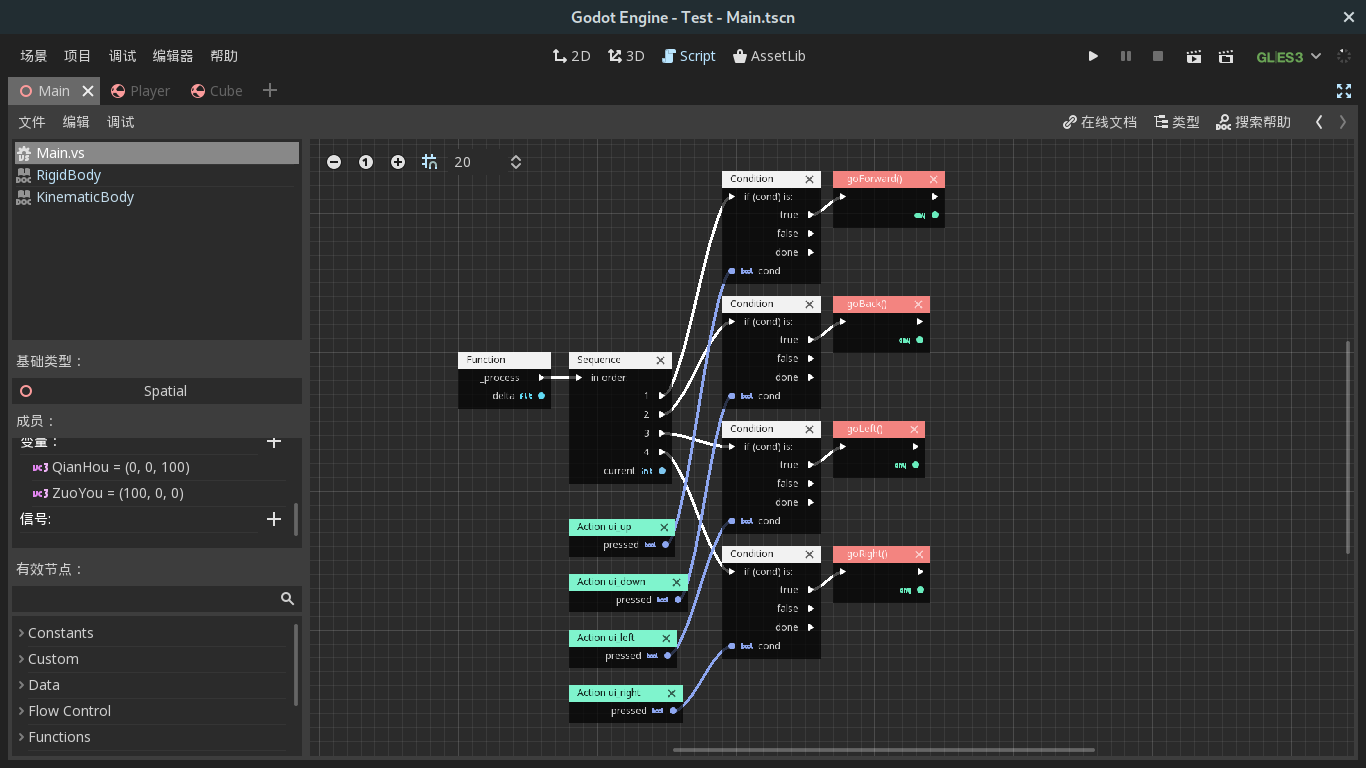
There's also a question outside the theme.In my project, objects need to apply physical force based on the player's keyboard input. According to general development experience, the game logic and input detection are run in _ process, and the force is applied in _ physics_process, so how should this be separated in programming to achieve the effect mentioned at the beginning?
haizhou37
on 29 Oct 2018
Your latest question belongs on the forum, Discord or the Q&A site - this tracker is for actual bugs in Godot itself.
 Zireael07
on 29 Oct 2018
Zireael07
on 29 Oct 2018
Related issues
 kirilledelman
·
3Comments
kirilledelman
·
3Comments
 SleepProgger
·
3Comments
SleepProgger
·
3Comments
 blurymind
·
3Comments
blurymind
·
3Comments
 ducdetronquito
·
3Comments
ducdetronquito
·
3Comments
 rgrams
·
3Comments
rgrams
·
3Comments
Most helpful comment
Tested the project, seems like a problem when a KinematicBody gets positioned (via translated) inside a RigidBody which is sleeping. I'm not sure this is a bug.
@haizhou37 You should use
move_and_collideormove_and_slidewhen moving a KinematicBody, becausetranslatedoes not update it or other physics objects properly (it acts as if the KinematicBody was teleported, not moved).Additionally, try to put physics related code in
_physics_process, not_process(though this did not change the behaviour of the sample project).Finally, if a RigidBody misbehaves after some time, you can always try to uncheck its "Can Sleep" property, but mind that sleeping is a performance optimization, so it should be disabled with care.