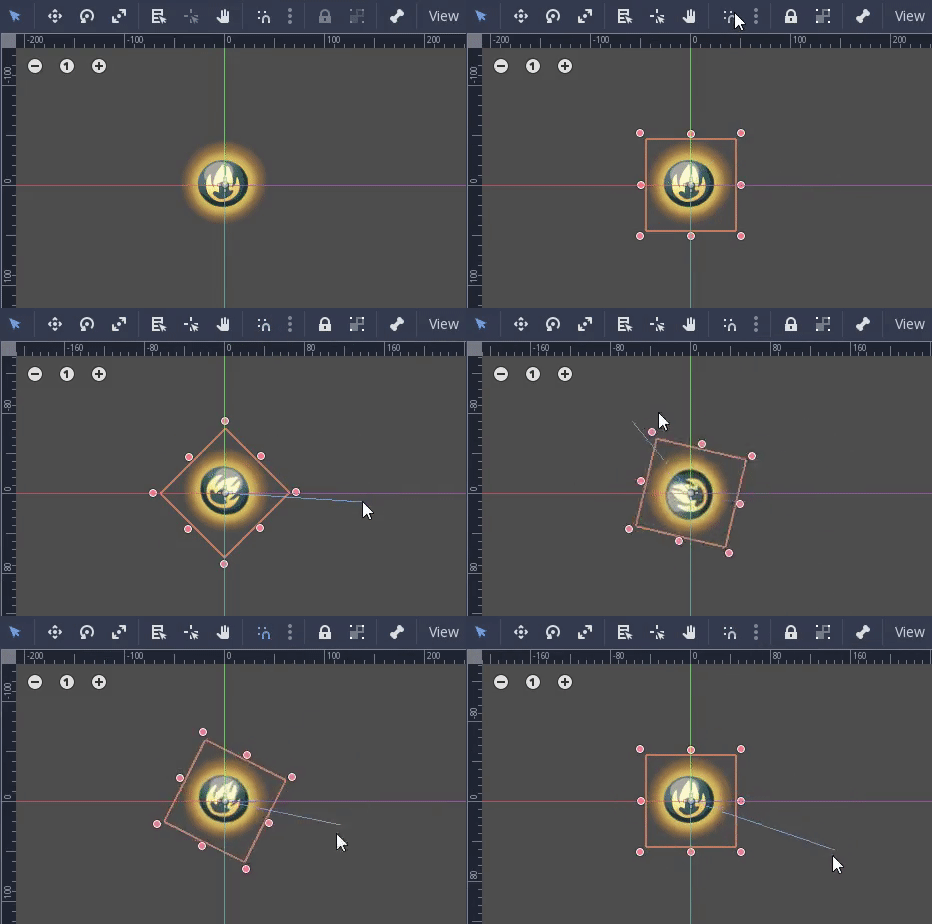
Godot: Rotation snapping is active only when it is turned off.
Win10 64bit - Alpha 3.1 0dbe01483a902c49ecedf4fd36b74353424145a5
@groud Likely some flags flipped up somewhere. But have noticed that rotation snapping only works when both snapping options are disabled.
 avencherus
All 9 comments
You have to release the ctrl key while dragging, it switches the current snapping state
 groud
on 17 Oct 2018
groud
on 17 Oct 2018
Oh thanks. I see. That was unexpected. XD
It is still a little bit confusing, since the behavior flips when the options are changed.
So when the snapping is on, the CTRL drag does no snapping until CTRL is released. There is no immediate indicators that the mode is being changed and won't release until CTRL is released.
I'm not sure how many people have the same habit as me, but yep, I'm holding that CTRL button because I expect bad things will happen if I let go in the middle. XD
Using it now seems like it can be very handy and time saving, but no ideas on how to make it more clear without some sort of universal way of toggling snapping with modifier keys.
Maybe flipping the behavior is still a way to go, and adding tooltip information? That way if one doesn't know or care, they would at least start with the snapping behavior that the options reflect. Then if they let go, they would then discover this alternative mode, or maybe find it the tooltips.
avencherus
on 17 Oct 2018
I think I should simply switch the snapping icon status when control is pressed.
I don't think flipping the behavior is ok, people with complain in any of the two situation.
Using other kind of shortcuts (like blender does with g, s and all) is probably the way to go at some point.
groud
on 17 Oct 2018
Is this still reproducible in the current master branch?
 akien-mga
on 24 Jan 2019
akien-mga
on 24 Jan 2019
Yes.
Currently, when rotation snapping is off, a CTRL drag will initially do snapping rotation, until CTRL is released. Then the non-snapping rotation kicks in.
Then when rotation snapping is on, a CTRL drag will first do a non-snapping rotation, until CTRL is released.
I wouldn't contest the releasing CTRL to toggle functionality itself, that is useful and working. But I do believe the flagging is inverted and catches one off guard.
avencherus
on 24 Jan 2019
I think we should discuss the shortcuts someday, something like blender's scheme would simplify things even if the keys are harder to reach.
groud
on 24 Jan 2019
Why not flip the snap/magnet icon too when control is held? Just a visibility change and it won't even confuse people.
 Anutrix
on 12 Jul 2019
Anutrix
on 12 Jul 2019
Toggling the snap icon with control is easy to do, but I noticed that snap options menu has "Use Rotation Steps" and "Use Scale Snap" options, which work completely independently from the snap button (and scale snapping isn't affected by the standard snap button at all) and the CTRL will always disable them temporarily when they are enabled.
So the new problem is what to do about these options and why they even exist. I assume unifying the snapping to one button (which is now even more confusingly called "Use Smart Snapping", even though it affects rotation) would be the correct solution. Then making the Ctrl toggle this button on pressed/released.
 KoBeWi
on 2 Jan 2020
KoBeWi
on 2 Jan 2020
@KoBeWi I agree, it's confusing. I imagine smart snapping to be something that tries to align with relevant points nearby, and the normal kind would force things to very specific steps in units or degrees.
I don't think they can sensibly combine, the target of smart snapping might be things that aren't snapped to the desired grid.
Does smart snap deal with alignment of rotations?
If they are too be exclusive, then maybe they are provided with a radio button.
avencherus
on 5 Jan 2020
Related issues
 blurymind
·
3Comments
blurymind
·
3Comments
 mefihl
·
3Comments
mefihl
·
3Comments
 RayKoopa
·
3Comments
RayKoopa
·
3Comments
 timoschwarzer
·
3Comments
timoschwarzer
·
3Comments
 Spooner
·
3Comments
Spooner
·
3Comments
Most helpful comment
Why not flip the snap/magnet icon too when control is held? Just a visibility change and it won't even confuse people.