Godot: Particles2D with Emission Shape Points is broken
Godot version:
Versions tested: v3.0.6.stable.official.8314054 and v3.1.alpha.official
OS/device including version:
Up to date Arch Linux, with specs here (note, nvidia graphics driver version is actually 390.87)
Issue description:
Please take a look at https://github.com/godotengine/godot-docs/issues/1819
Emission shape Points and Directed Points depends on a _Point Texture_, which is used to define the spawn points of the particles. But if you drag an image into the _Point Texture_ of your ParticlesMaterial, it doesn't work (a white on transparent png image).
As noted on the issue above, it seems like we need to do an undocumented step and convert the image mask into a .tres file. I could not find any means of doing so, it is either me not being able to figure out the steps to use the emission shape or it is not working as expected.
Steps to reproduce:
Using the images from the Particles Demo, this is what happened in my tests:
Create a new project and add a Particles2D node, and to it assign a new ParticlesMaterial.
Editing the ParticlesMaterial we just added, drag the mask above to the _Point Texture_ field and increase the Point Count.
I expected that the result would be particles being emitted in the form of the mask as in the demo, but what actually happens is that the particles simply spawn from the center of the node as if it was still in the Point emission shape:
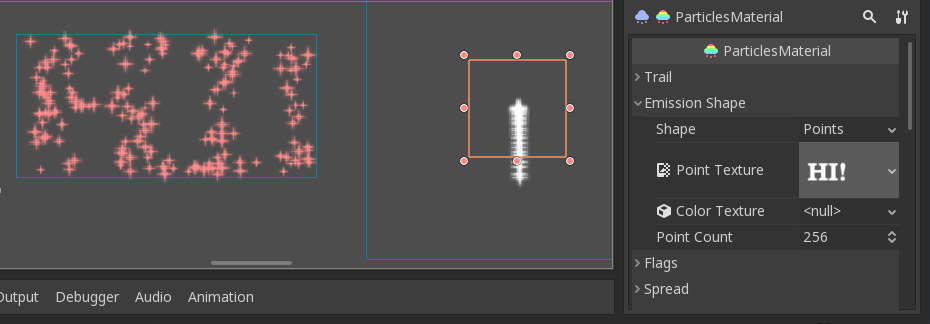
Expected on the left, result on the right, result ParticlesMaterial configuration visible on the right.
Minimal reproduction project:
particles.zip
What am I missing?
Thank you!
 dejaime
All 11 comments
Not sure if this should be in a separate issue but I am getting a similar problem with the ParticlesMaterial but it is inside a 3D Particles node.
In a Spatial scene with a MeshInstance node and a Particles node, if I use the _Create Emission Points from Node_ function, it will create the point image but it will not save the resource in the scene.
I get the following errors upon loading the saved scene:
ERROR: create_from_image: Condition ' p_image.is_null() ' is true.
At: scene/resources/texture.cpp:191
ERROR: texture_get_data: Condition ' !texture->active ' is true. returned: Ref()
At: drivers/gles3/rasterizer_storage_gles3.cpp:1035
ERROR: texture_get_data: Condition ' !texture->active ' is true. returned: Ref()
At: drivers/gles3/rasterizer_storage_gles3.cpp:1035
ERROR: texture_get_data: Condition ' !texture->active ' is true. returned: Ref()
At: drivers/gles3/rasterizer_storage_gles3.cpp:1035
ERROR: texture_get_data: Condition ' !texture->active ' is true. returned: Ref()
At: drivers/gles3/rasterizer_storage_gles3.cpp:1035
ERROR: texture_get_data: Condition ' !texture->active ' is true. returned: Ref()
At: drivers/gles3/rasterizer_storage_gles3.cpp:1035
ERROR: texture_get_data: Condition ' !texture->active ' is true. returned: Ref()
At: drivers/gles3/rasterizer_storage_gles3.cpp:1035
I get the following errors when trying to save the scene:
ERROR: Resource was not pre cached for the resource section, bug?
At: scene/resources/scene_format_text.cpp:1369
ERROR: get_draw_pass_mesh: Index p_pass=1 out of size (draw_passes.size()=1)
At: scene/3d/particles.cpp:201
ERROR: get_draw_pass_mesh: Index p_pass=2 out of size (draw_passes.size()=1)
At: scene/3d/particles.cpp:201
ERROR: get_draw_pass_mesh: Index p_pass=3 out of size (draw_passes.size()=1)
At: scene/3d/particles.cpp:201
The problem can be reproduced in v3.1.alpha.calinou.b17e71b (20181008) and v3.1.alpha2 official.
I do not get any problems using Godot v3.0.6 official or v3.1.dev.calinou.a3f1ee5 (20180716).
After some more testing I believe this is the commit where the issues started: 07a982e614715cab04611aec4631f9053a86bdd6
Both Particles and Particles2D nodes are affected equally. The main problem is the point emission Image resource is failing.
 yanorax
on 4 Nov 2018
yanorax
on 4 Nov 2018
So, I assume until this is fixed, there is no way to use custom shape of Particles2D emitter?
 hedin-hiervard
on 30 Nov 2018
hedin-hiervard
on 30 Nov 2018
Can confirm having this issue with a recent revision (10e9221c49eddc)
 eligt
on 1 Jan 2019
eligt
on 1 Jan 2019
I can also confirm this bug. Emission mask is working inside the editor but when the game is launched, the particle2d node loses the texture and it doesn't spawn particles at correct locations. The workaround for that is to recreate the texture after the game starts like so:
    var img = preload("res://new_image.tres")
    var itex = ImageTexture.new()
    itex.create_from_image(img)
    process_material.set_shader_param("emission_texture_points",itex)
        #when using particle material
        #process_material.emission_point_texture=itex
where the new_image.tres is saved image(not the texture) right after generating the emission mask.
I would suspect that texture isn's saved or image(maybe because of RGF format?)
 szamq
on 17 Jan 2019
szamq
on 17 Jan 2019
I believe the save imagedata fix in 8b231b96e347b677ea4189784c960bc4517b8e6a has resolved the particles emission shape issue. I have tested emission shapes in the 2D and 3D Particles nodes and I get no errors when saving or loading the scene.
You may have to recreate the scene to get it to work correctly. My older scene from last year I tested with was able to save the point texture but running the scene did not load the new emission shape. Creating a new scene from scratch had no issues.
yanorax
on 22 Feb 2019
Thanks, closing as fixed then.
 akien-mga
on 23 Feb 2019
akien-mga
on 23 Feb 2019
Particle2DTest6.zip (Project created from scratch on the tested version)
Can someone else test this? It seems I can still reproduce on _v3.1.stable.mono.official_ .
Just to make sure I am not doing anything wrong, selecting "Points" as the emission shape and using the "Hi!" white on transparent image and setting the # of emission points would work, right? Is there anything else I need to do? It has been a while since I last tried using this.
Did I miss something?
dejaime
on 14 Mar 2019
Thanks to @homer666 on IRC, and his brief explanation on how these should be used:
homer666
when you select your particles2d node, a "Particles" menu will appear at the top. open it then go to "Load Emission Mask" to select the texture you want to use as your emission mask
note that you need a ParticlesMaterial added for this to work
Note that just dragging the image directly from the "FileSystem" tab to the "Point Texture" slot or clicking Load on it and selecting the image does not work.
dejaime
on 16 Mar 2019
I confirm this bug on Godot 3.2.1
Particles2D > Load Emission Mask (on toolbar) > PNG with transparency
Particles2D > ParticlesMaterial > Emission Shape > Shape > Points > Point Texture (broken)
Docs: https://docs.godotengine.org/es/stable/tutorials/2d/particle_systems_2d.html#emission-shapes
 luislodosm
on 29 May 2020
luislodosm
on 29 May 2020
Just a reminder to check this for 4.0 after the implementation of https://github.com/godotengine/godot-proposals/issues/815
 pwab
on 2 Jun 2020
pwab
on 2 Jun 2020
I see a problem with this with custom PNGs primarily in the size generation, it appears. The size value for the texture appears to sometimes be very large and sometimes set to 0. It also doesn't appear to list to the image size value at all, which means that it can't be adjusted or scaled independently of scaling the entire node
 BrianMWest
on 14 Jul 2020
BrianMWest
on 14 Jul 2020
Related issues
 testman42
·
3Comments
testman42
·
3Comments
 kirilledelman
·
3Comments
kirilledelman
·
3Comments
 EdwardAngeles
·
3Comments
EdwardAngeles
·
3Comments
 mefihl
·
3Comments
mefihl
·
3Comments
 n-pigeon
·
3Comments
n-pigeon
·
3Comments