Godot: Godot 3.1 alpha animator doesn't automatically move to a newer frame
Hi, I'm using an animated sprite being animated in the animationplayer node, but everytime I click on Setting up a frame as a keyframe it doesn't automatically move to a newer frame, I'm wondering why Godot devs removed this functionality if it worked like that in 2.1 and 3.0
 ca3games
All 12 comments
I just noticed this yesterday, wasn't sure if I was imagining it, but was trying to keyframe the frames of a spritesheet. It used to advance the frames, so you could click it rapidly to fill the track.
Confirmed it no longer works that way at least as of: aaef640b8c3e7c7c49aae11a1c8c9e606223fefd
It was a nice feature, though it had a bit of a bug to it if I recall. Like it would be off by a frame if you didn't scrub the time back to 0 after the first keyframe.
Hope it returns. X)
 avencherus
on 25 Sep 2018
avencherus
on 25 Sep 2018
Even with the bug it was a lot more user friendly than it is right now in the 3.1.alpha. As an animator, my job became 20 times more tedious because of all the additional clicks I have to do for something that took just one click in 3.0.6 like setting a keyframe for any property. Please oh please don't leave it like that for the release.
 metaphoricalsasquash
on 25 Sep 2018
metaphoricalsasquash
on 25 Sep 2018
Hold your horses guys, it's just a bug...
 akien-mga
on 25 Sep 2018
akien-mga
on 25 Sep 2018
Holding them. XD
avencherus
on 25 Sep 2018
Yay!!
metaphoricalsasquash
on 1 Oct 2018
@metaphoricalsasquash Unless I messed something up. I did a rebuild to check it out, and it doesn't appear to be fully working. The keyframe time advance was fixed, but the frame value increase part wasn't. So it still needs some manual entry of frame numbers.
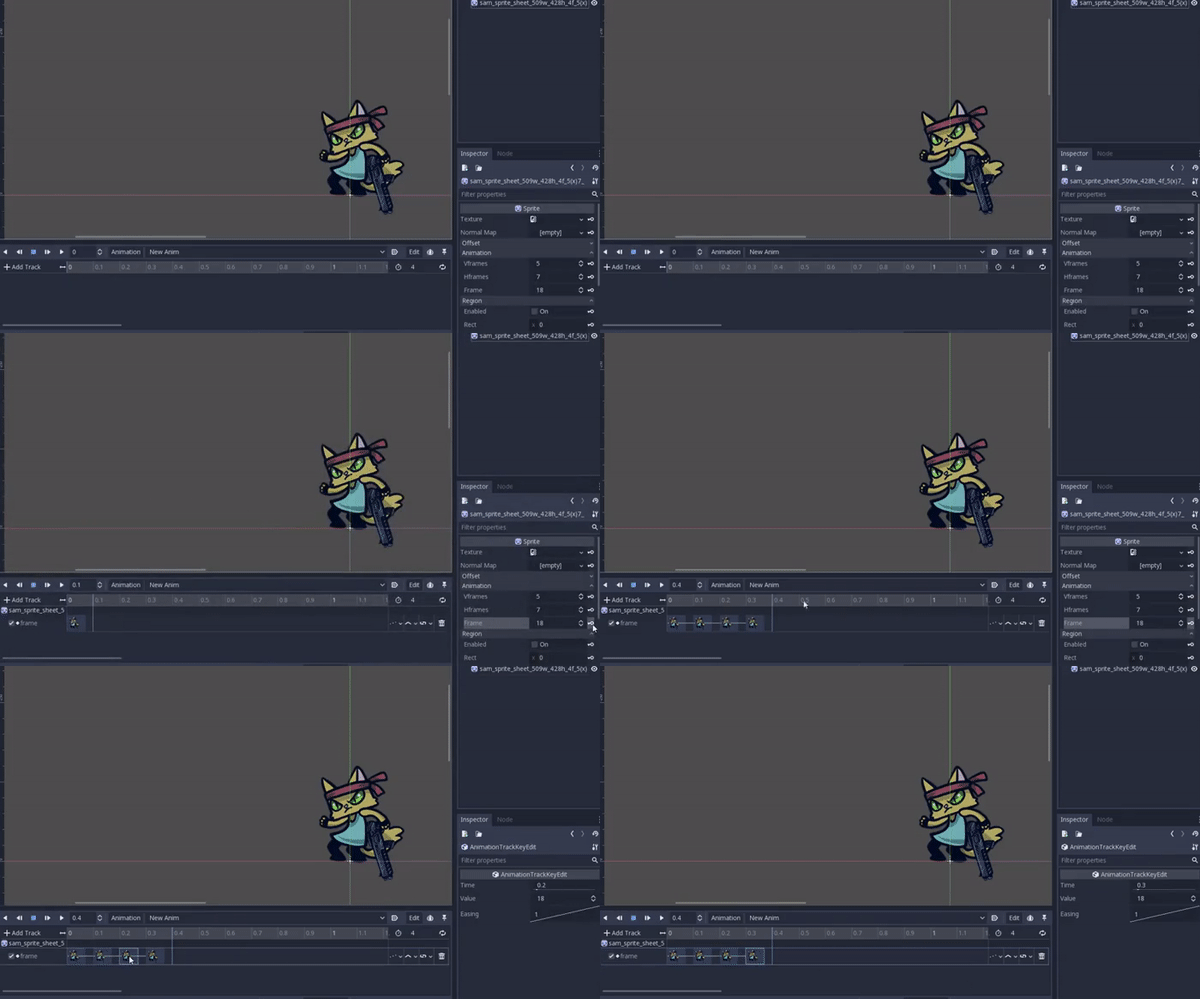
avencherus
on 1 Oct 2018
Reopening as per https://github.com/godotengine/godot/pull/22536#issuecomment-425754216
CC @DualMatrix
akien-mga
on 1 Oct 2018
@avencherus Do you know which properties should behave like that? Is it only the frame property of sprite? Does anyone else know?
 Piet-G
on 1 Oct 2018
Piet-G
on 1 Oct 2018
Good question, wondering the same. I went back to look at 2.1.4, and as far as I know I think it is only Frame properties for Sprite and AnimatedSprite. Also noticed it works this way on It also looks like Sprite3D and AnimatedSprite3D in older versions.
There may be more though, I just haven't worked with them.
The clue at least anything I think that has this keyframe icon with a + symbol on it.
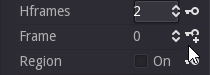
avencherus
on 1 Oct 2018
@avencherus That icon is a great find, gonna try and find out all properties it is used for.
Piet-G
on 1 Oct 2018
Glad it was helpful. I don't know much here, but did see something at least in the 2.1.5 source in the old property_editor.cpp regarding PROPERTY_HINT_SPRITE_FRAME. Might be related, and if so might mean its only for Sprite frame properties.
        if (keying) {

            if (p.hint == PROPERTY_HINT_SPRITE_FRAME) {

                item->add_button(1, get_icon("KeyNext", "EditorIcons"), 5);
            } else {
                item->add_button(1, get_icon("Key", "EditorIcons"), 2);
            }
        }
Related #19942.
 guilhermefelipecgs
on 1 Oct 2018
guilhermefelipecgs
on 1 Oct 2018
Related issues
 SleepProgger
·
3Comments
SleepProgger
·
3Comments
 blurymind
·
3Comments
blurymind
·
3Comments
 rgrams
·
3Comments
rgrams
·
3Comments
 mooseyfaith
·
3Comments
mooseyfaith
·
3Comments
 gonzo191
·
3Comments
gonzo191
·
3Comments
Most helpful comment
Yay!!