Godot version: 3.1 Alpha 1 (and any other versions of 3.1 up to that of 18.09)
MS Windows 7 x64
In a theme editor attached theme for a ScrollBar looks absolutely correct, but not in running project.
1) Running non-themed project
result of
SomeScrollContainer.get_v_scrollbar().rect_size.x
is 12
the same container with theme set returns 32 - what is the reason and background of that change?
2) ScrollBar within ScrollContainer seems to ignore Expand Margin property (in case of VScrollBar it fits fully in the height of non-themed bar but this is not correct behavior having Expand Margin at both top and bottom at 14)
scroll theme.zip
 ykoc
ykoc
All 6 comments
Update (made some experiments)
1) all of mentioned above is happening if i set theme as a custom theme for a project
2) if i set theme to a root node of scene something different happens:
- get_v_scrollbar().rect_size.x returns 14 (this is the size of scroll style item texture )
- Expand margin is not ignored - but areas outside ScrollContainer bounding box are simply clipped
ykoc
on 20 Sep 2018
Is this still reproducible in the current master branch?
 akien-mga
on 23 Jan 2019
akien-mga
on 23 Jan 2019
Is this still reproducible in the current master branch?
Still the same behavior.
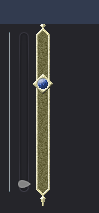
this is what I have in theme editor frame

this is what I have in-game if I set theme to some node (textures scales normally but are clipped)
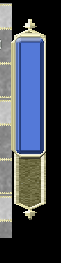
and now I set the same theme as custom theme for full project (textures scales... strangely but now full scrollbar is resized to fit into box taking most of Expand Margins into account - still one or two rightmost pixels of the grabber are clipped)
ykoc
on 23 Jan 2019
To expand on the theming issues, ScrollBar seems to be very picky about the allowed style combinations. The Grabbers can be set with StyleBoxFlat, but then when you try to remove the Scroll property with a StyleBoxEmpty, the Grabber does not render anymore. The Editor still shows it, unless you reload the scene. Running the scene does not show it, however.
What you have to do right now is set them to StyleBoxTexture and actually assign an empty texture image. The code that creates the Editor Theme currently does the same and has an empty texture file for Scroll. It would be great to just support StyleBoxEmpty for it.
For pixel art games with super low resolutions (320x180) there currently does not seem to be a way to change the width of the scrollbars in a ScrollContainer. Even when you set the Grabber to a StyleBoxTexture with 2x2px, it just gets stretched to the default size.
To get 1-2px wide scrollbars in my project, I am currently using a StyleBoxFlat with Draw Center disabled and a Left Border Width set to 1. Doing it that way, the border is always either on the left or right of the actual scrollbar position.
It would be nice to just have a width property in the theming options for ScrollBar.
 georgwacker
on 20 Nov 2019
georgwacker
on 20 Nov 2019
I can confirm this on commit https://github.com/godotengine/godot/commit/e9eea4f3ce5447fca68d60e520f925f2af94217c.
 Calinou
on 6 Dec 2019
Calinou
on 6 Dec 2019
Any complete reproduction project for this? The attached theme doesn't load.
 KoBeWi
on 30 Dec 2019
KoBeWi
on 30 Dec 2019
Related issues
 RebelliousX
·
3Comments
RebelliousX
·
3Comments
 Spooner
·
3Comments
Spooner
·
3Comments
 testman42
·
3Comments
testman42
·
3Comments
 ndee85
·
3Comments
ndee85
·
3Comments
 bojidar-bg
·
3Comments
bojidar-bg
·
3Comments
Most helpful comment
To expand on the theming issues,
ScrollBarseems to be very picky about the allowed style combinations. TheGrabbers can be set withStyleBoxFlat, but then when you try to remove theScrollproperty with aStyleBoxEmpty, theGrabberdoes not render anymore. The Editor still shows it, unless you reload the scene. Running the scene does not show it, however.What you have to do right now is set them to
StyleBoxTextureand actually assign an empty texture image. The code that creates the Editor Theme currently does the same and has an empty texture file forScroll. It would be great to just supportStyleBoxEmptyfor it.For pixel art games with super low resolutions (320x180) there currently does not seem to be a way to change the width of the scrollbars in a
ScrollContainer. Even when you set theGrabberto aStyleBoxTexturewith 2x2px, it just gets stretched to the default size.To get 1-2px wide scrollbars in my project, I am currently using a
StyleBoxFlatwithDraw Centerdisabled and a Left Border Width set to 1. Doing it that way, the border is always either on the left or right of the actual scrollbar position.It would be nice to just have a width property in the theming options for
ScrollBar.