Godot: Bullet: Bumpy RigidBody to static trimesh collisions
Godot version:
2db494267b2924989900e968bdb898d8ab50c8f5
OS/device including version:
Arch Linux (rolling release)
Issue description:
Collisions between basic Bullet primitives and trimesh collision shapes generated from an imported model cause sliding objects to pop into the air whenever they cross triangle boundaries. I would expect the object to slide smoothly over the mesh. Until this is fixed I can't really work on my game any further.

(This GIF shows the puck falling through the floor. I know this is already covered by #20408, but I am experiencing problems beyond that issue's scope)
I tried changing the margin on both the puck and the trimesh, but this only made problems worse.
Steps to reproduce:
Download example project, hold Space for a bit, then release
Minimal reproduction project:
bumpy_trimesh_collision.zip
 cosmicchipsocket
All 38 comments
cc @AndreaCatania
 Chaosus
on 24 Aug 2018
Chaosus
on 24 Aug 2018
Can you try to split all parts, and make a smaller one to avoid precision error?
Also when you have this kind of trimesh shape you have to increase the physics frames from 60 to 240 or so to make it more stable
 AndreaCatania
on 26 Aug 2018
AndreaCatania
on 26 Aug 2018
Splitting all parts will just make the object pop into the air upon crossing the seams, even with primitives like cubes (I've observed this in my own game). I also shouldn't need to increase the physics framerate to resolve this - the physics engine should simply make crossing over the individual triangles smooth. Not to mention, increasing it to 240 doesn't completely solve the issue, it just makes it less severe.
It seems to be an issue with edge filtering. A few pages related to the issue elsewhere:
https://github.com/bulletphysics/bullet3/issues/288
https://pybullet.org/Bullet/phpBB3/viewtopic.php?t=2611
cosmicchipsocket
on 26 Aug 2018
Yes, you need to use the
~~
include "BulletCollision/CollisionDispatch/btInternalEdgeUtility.h"
btTriangleInfoMap* triangleInfoMap = new btTriangleInfoMap();
btGenerateInternalEdgeInfo(trimesh, triangleInfoMap);
gContactAddedCallback = MyContactAddedCallback;//or add it to an existing callback
bool MyContactAddedCallback(btManifoldPoint& cp, const btCollisionObjectWrapper* colObj0Wrap,int partId0,int index0,const btCollisionObjectWrapper* colObj1Wrap,int partId1,int index1)
{
btAdjustInternalEdgeContacts(cp, colObj1Wrap, colObj0Wrap, partId1,index1);
return true;
}
~~
There is a very old demo that show how to use it:
https://github.com/bulletphysics/bullet3/tree/old_demos/Demos/InternalEdgeDemo
 erwincoumans
on 31 Aug 2018
erwincoumans
on 31 Aug 2018
@erwincoumans There is a bug in the btAdjustInternalEdgeContacts.
Here the implementation:
https://github.com/godotengine/godot/pull/21618
The bug is that I use a compound shape and the function take the compound shape and cast it to a trimesh.
AndreaCatania
on 31 Aug 2018
I added a check for the expected mesh type before casting.
https://github.com/bulletphysics/bullet3/pull/1853
The edge utility doesn't deal with btCompoundShape though. Please avoid wrapping a mesh inside a compound shape or consider writing a patch to the internal edge utility to support this case.
erwincoumans
on 31 Aug 2018
I can't avoid use a compound due to Godot requirements, but I can write a patch to support that case
AndreaCatania
on 31 Aug 2018
Why is it a requirement? Do you need a transform or is it required to have multiple shapes? We could add a btTransformShape (better performance as btCompoundShape).
erwincoumans
on 31 Aug 2018
It's required to have multiple shapes, I could use the btTransformShape
when only one shape is used but support compound is necessary anyway
On Fri, Aug 31, 2018, 21:18 erwincoumans notifications@github.com wrote:
Why is it a requirement? Do you need a transform or is it required to have
multiple shapes? We could add a btTransformShape (better performance as
btCompoundShape).—
You are receiving this because you were mentioned.
Reply to this email directly, view it on GitHub
https://github.com/godotengine/godot/issues/21341#issuecomment-417764697,
or mute the thread
https://github.com/notifications/unsubscribe-auth/AH9MR8V9M7g8oxcEsqyA1CBrqJg5QV9iks5uWYvwgaJpZM4WKpud
.
AndreaCatania
on 31 Aug 2018
Some more background, at least from a Godot user perspective:
In Godot, objects are placed within a scene tree. For a physics object, you create a RigidBody or StaticBody (or similar) object. These objects do not contain shapes by themselves. Instead, you add one or more CollisionShape objects as children. These shapes are used together to form the compound shape. This means it's possible to do something like have a trimesh shape and a cube shape be part of the same object. It's not exactly ideal from the perspective of Bullet, but it is something that the user can do.
An easy fix would probably be to show a warning in the tree when a user has multiple CollisionShapes with one being a trimesh shape, since we already show a warning when there are no CollisionShapes. But if the Godot project wants to keep options open, the fix should probably be within Bullet, assuming there are no major performance concerns.
cosmicchipsocket
on 1 Sep 2018
@erwincoumans I've created the function godotContactAddedCallback and added to contact callback
gContactAddedCallback = &godotContactAddedCallback;
This function is called with colObj1Wrap that wrap btTriangleShape and not btScaledBvhTriangleMeshShape or compund as I expected.
When I create a trimesh shape I use btScaledBvhTriangleMeshShape. Do you know why it happens?
AndreaCatania
on 5 Sep 2018
This is expected: during the dispatch, there will be temporary collision shapes generated (btTriangleShape) that get passed to the narrowphase and contact callbacks. You can still access the original collision shape, if you want to do filtering.
The btCollisionObjectWrapper colObj1Wrap->m_shape may point to btTriangleShape,
but the colObj1Wrap->m_collisionObject->getCollisionShape still points to the original shape.
Can you double-check?
erwincoumans
on 6 Sep 2018
oh ok, so can you please confirm that this function is called 1 time (for each step) per body even if it has more then 1 shape? (I want to avoid multiples useless update) Thanks you!
AndreaCatania
on 6 Sep 2018
So after checking better the function I saw that is not possible to fetch compound and send just the single shape from outside, so I changed the Bullet function (You can find it below):
The problem is that the generated hash:int hash = btGetHash(partId0, index0); doesn't refer to any trimesh info and the function stops here: if (!info)
void btAdjustInternalEdgeContacts(btManifoldPoint &cp, const btCollisionObjectWrapper *colObj0Wrap, const btCollisionObjectWrapper *colObj1Wrap, int partId0, int index0, int normalAdjustFlags) {
    if (colObj0Wrap->getCollisionShape()->getShapeType() != TRIANGLE_SHAPE_PROXYTYPE)
        return;

    if (colObj0Wrap->getCollisionObject()->getCollisionShape()->isCompound()) {

        const btCompoundShape *cs = static_cast<const btCompoundShape *>(colObj0Wrap->getCollisionObject()->getCollisionShape());

        for (int i(cs->getNumChildShapes() - 1); 0 <= i; --i) {
            btBvhTriangleMeshShape *trimesh = 0;
            const btCollisionShape *s = cs->getChildShape(i);
            if (s->getShapeType() == SCALED_TRIANGLE_MESH_SHAPE_PROXYTYPE) {

                trimesh = ((btScaledBvhTriangleMeshShape *)colObj0Wrap->getCollisionObject()->getCollisionShape())->getChildShape();
            } else if (s->getShapeType() == TRIANGLE_MESH_SHAPE_PROXYTYPE) {
                trimesh = (btBvhTriangleMeshShape *)colObj0Wrap->getCollisionObject()->getCollisionShape();
            }

            if (trimesh) {
                btCollisionObjectWrapper subWrap(colObj0Wrap->m_parent, trimesh, colObj0Wrap->m_collisionObject, colObj0Wrap->getCollisionObject()->getWorldTransform() * cs->getChildTransform(i), partId0, index0);
                btAdjustInternalEdgeContacts(cp, &subWrap, trimesh, colObj1Wrap, partId0, index0, normalAdjustFlags);
            }
        }
    } else {
        btBvhTriangleMeshShape *trimesh = 0;
        if (colObj0Wrap->getCollisionObject()->getCollisionShape()->getShapeType() == SCALED_TRIANGLE_MESH_SHAPE_PROXYTYPE)
            trimesh = ((btScaledBvhTriangleMeshShape *)colObj0Wrap->getCollisionObject()->getCollisionShape())->getChildShape();
        else
            trimesh = (btBvhTriangleMeshShape *)colObj0Wrap->getCollisionObject()->getCollisionShape();
        btAdjustInternalEdgeContacts(cp, colObj0Wrap, trimesh, colObj1Wrap, partId0, index0, normalAdjustFlags);
    }
}

/// Changes a btManifoldPoint collision normal to the normal from the mesh.
void btAdjustInternalEdgeContacts(btManifoldPoint &cp, const btCollisionObjectWrapper *colObj0Wrap, btBvhTriangleMeshShape *trimesh, const btCollisionObjectWrapper *colObj1Wrap, int partId0, int index0, int normalAdjustFlags) {

    if (!trimesh)
        return;

    btTriangleInfoMap *triangleInfoMapPtr = (btTriangleInfoMap *)trimesh->getTriangleInfoMap();
    if (!triangleInfoMapPtr)
        return;

    int hash = btGetHash(partId0, index0);

    btTriangleInfo *info = triangleInfoMapPtr->find(hash);
    if (!info)
        return;
The function is called for each contact point separately, to correct its normal.
I don't have much time to look into this. I would suggest to be more subtle about the use of btCompoundShape, and allow single collision shapes in Godot to directly use certain collision shapes that are NOT wrapped in btCompoundShape. Then only those shapes (bt(Scaled/Bvh)TriangleMeshShape) that are not wrapped support the internal edge utility, others don't. So once you combined multiple collision shapes into a compound, you loose some features (until if/when we fix this).
It is a bad choice to always force shapes to be wrapped in a btCompoundShape, even for a single collision shape that doesn't have any transform offset etc.
erwincoumans
on 6 Sep 2018
Ok I can optimize that case
AndreaCatania
on 6 Sep 2018
Optimized following the advice of erwin, and also implemented the use of function: btAdjustInternalEdgeContacts
but doesn't solve the problem #21808
AndreaCatania
on 6 Sep 2018
would be interesting test it inside PyBullet... can you please give me the blender file of this shape?
AndreaCatania
on 6 Sep 2018
Did you generate the internal edge information?
Do you have the trimesh as an .obj file? If so, it is easy to reproduce inside PyBullet. We use the internal edge utility as option in PyBullet.
On Thu, 6 Sep 2018 at 09:51, Andrea Catania notifications@github.com
wrote:
would be interesting test it inside PyBullet...
—
You are receiving this because you were mentioned.
Reply to this email directly, view it on GitHub
https://github.com/godotengine/godot/issues/21341#issuecomment-419164834,
or mute the thread
https://github.com/notifications/unsubscribe-auth/AAsR3Lbt8Hr2Em_Fj5o-EupJcGouSnayks5uYVKlgaJpZM4WKpud
.
erwincoumans
on 6 Sep 2018
Yes I do it. Could be due by the fact that I use btTriangleMesh to generate btBvhTriangleMeshShape?
@cosmicchipsocket Do you have the blender file of this trimesh shape?
AndreaCatania
on 6 Sep 2018
@erwincoumans I know that you don't have time to support us but I really don't know why this happen..
Also another issue: #21409 say that this bug appeared after the margin pull request was merged.
Do you know if margin could introduce this behaviour? also increasing timestep from 60 to 120 make the problem completely disappear.
AndreaCatania
on 8 Sep 2018
I've checked if the problem was introduced by #e5bfa98d0fa6a1acb1d385534c51b8006ef64142, but that PR just increased that problem...
Is like that the primitive shape is not able to correctly depenetrate the trimesh surface.
AndreaCatania
on 8 Sep 2018
Change margin of trimesh shape to 0 seems to reduce drastically this problem, but I'm wandering if the normal (so the order of vertices in the triangle) is a significant information for bullet...
Could be that the margin is applied toward the triangle face direction?
Should I use margin in ConcaveShape?
AndreaCatania
on 8 Sep 2018
I was hoping that #21808 would fix the issue but now it seems to have gotten worse. Nine times out of ten I can't even make it to the half-pipe without being flung off to the side.
cosmicchipsocket
on 11 Sep 2018
Here's the Blender file
cosmicchipsocket
on 11 Sep 2018
This fix your issue: #22759
I've added inside the project settings this parameter "smooth_trimesh_collision" when you check it the concave collision become as expected.
Let me know and thanks you for your report!
AndreaCatania
on 5 Oct 2018
That's awesome @AndreaCatania - when would we want smooth_trimesh_collision to be set to false?
 abrenneke
on 5 Oct 2018
abrenneke
on 5 Oct 2018
When you don't need to walk on a trimesh, or if you don't have any problem walking on it with that parameter set to false.
AndreaCatania
on 5 Oct 2018
It's not 100% solved but much improved. Half-pipe feels right but the puck still catches on a couple triangle edges in the first part. Setting physics FPS to 120 mostly eliminates these issues.
cosmicchipsocket
on 7 Oct 2018
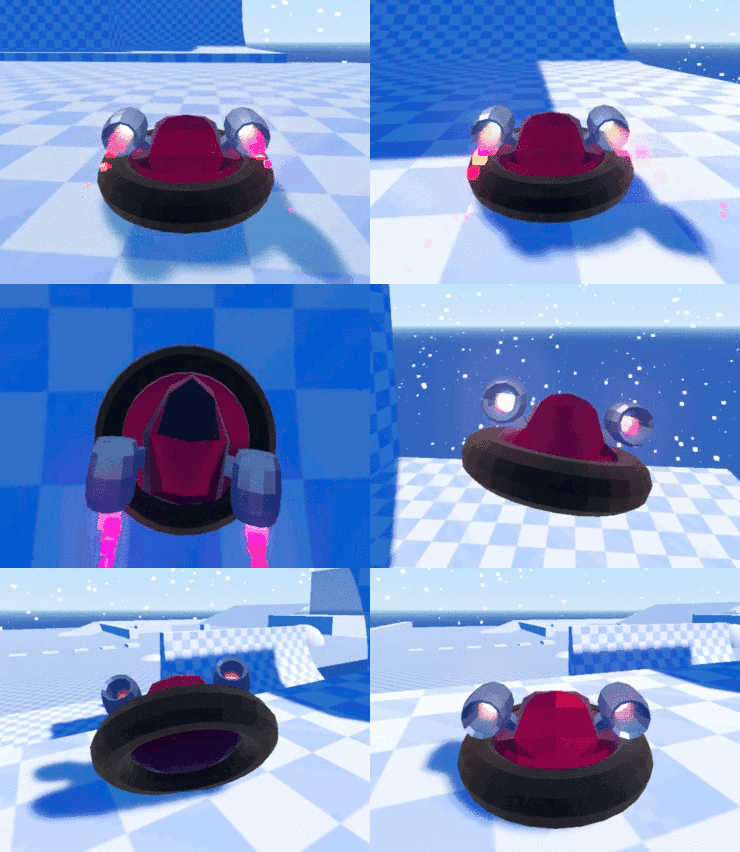
Wanted to share this clip. Thank you for your hard work improving the physics.
cosmicchipsocket
on 7 Oct 2018
I'm glad to see this clip, and also thanks you 😁
On Sun, Oct 7, 2018, 19:35 Cosmic Chip Socket notifications@github.com
wrote:
Wanted to share this clip. Thank you for your hard work improving the
physics.[image: quarterpipecropped]
https://user-images.githubusercontent.com/34800072/46584795-cca14a80-ca35-11e8-9651-dad6a69f4938.gif—
You are receiving this because you were mentioned.
Reply to this email directly, view it on GitHub
https://github.com/godotengine/godot/issues/21341#issuecomment-427671402,
or mute the thread
https://github.com/notifications/unsubscribe-auth/AH9MR5hYimDrTdF7khhjPWEapjHGRaooks5uijt3gaJpZM4WKpud
.
AndreaCatania
on 7 Oct 2018
Can we document physics/3d/smooth_trimesh_collision? Someone asked about it on my repo, it's nowhere to be found in docs and I have no idea what it is.
 Zylann
on 24 Jul 2020
Zylann
on 24 Jul 2020
Imagine a triangle mesh with two big triangles. Your object (a box) is on a triangle - sliding toward the other triangle. When it touch the edge of the other triangle it generates a normal that doesn't follows the surface (0,1,0) but follows the edge direction (0.5, 0.5, 0).normalize() making the object jump a little bit.
The physics/3d/smooth_trimesh_collision make sure to fix the collision normal in that case.
Note that, to fully use this feature, also the trimeshshape COM must be 0,0,0.
AndreaCatania
on 27 Jul 2020
I think I am running into the same problem here, in 3.2.stable from Ubuntu 20.04.
I have enabled physics/3d/smooth_trimesh_collision but I still hit an invisible bump at the join between 2 triangles: https://www.youtube.com/watch?v=NzZOowfcAAw
 jes
on 27 Jul 2020
jes
on 27 Jul 2020
@Zylann
Can we document
physics/3d/smooth_trimesh_collision? Someone asked about it on my repo, it's nowhere to be found in docs and I have no idea what it is.
AndreaCatania
on 19 Sep 2020
I think I am running into the same problem here, in 3.2.stable from Ubuntu 20.04.
I have enabled
physics/3d/smooth_trimesh_collisionbut I still hit an invisible bump at the join between 2 triangles: https://www.youtube.com/watch?v=NzZOowfcAAw
If that still the case, try to open a new issue with a sample project.
AndreaCatania
on 19 Sep 2020
@Zylann
Can we document
physics/3d/smooth_trimesh_collision? Someone asked about it on my repo, it's nowhere to be found in docs and I have no idea what it is.
Very nice! Where do I find the page tutorials/physics/collision_shapes_3d.rst in the online documentation?
 meigel
on 19 Sep 2020
meigel
on 19 Sep 2020
Very nice! Where do I find the page
tutorials/physics/collision_shapes_3d.rstin the online documentation?
That Pull Request has not been merged yet, so it's not yet in the online documentation.
 Paavs-Git
on 19 Sep 2020
Paavs-Git
on 19 Sep 2020
Related issues
 blurymind
·
3Comments
blurymind
·
3Comments
 timoschwarzer
·
3Comments
timoschwarzer
·
3Comments
 bojidar-bg
·
3Comments
bojidar-bg
·
3Comments
 ducdetronquito
·
3Comments
ducdetronquito
·
3Comments
 Spooner
·
3Comments
Spooner
·
3Comments
Most helpful comment
Wanted to share this clip. Thank you for your hard work improving the physics.