Godot: [C#] Separate Solution folder from assets folder
Hi, currently everything is mixed, it looks messed up
Could it be possible to separate both ?
MySolutionName:
   MyGameProject/
              MyGameProject.csproj
              MyScript.cs
   GodotRes/
Or a way to specify where to create the project
This way is more clean and more C# idiomatic
 RUSshy
All 4 comments
Since godot is heavily script base you might have to start working around a new folder schema. Currently how I'm organizing my projects
- App/ (Scripts, and normal source as sub folders to keep the namespace
Project.App) - Assets/
- Assets/Sound
- Assets/Fonts
- Bin/ (Exports)
- Data/ (json, etc...)
- Scenes/
- Scenes/Objects (Scene Objects)
- Scenes/UI (Scene UI)
- Packages/ (Nuget)
- Project.sln
- Project.csproj
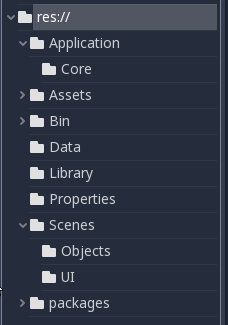
BIt more organized, hope that helps. As for your other question is there a way to define a separate solution folder for scripts. Not sure if possible with c#.
 exts
on 5 Jul 2018
exts
on 5 Jul 2018
It doesn't help because if my stack in in entire C# i want to reuse stuff
Let's say i make an online game with server, database, rest api
     MyServer
     MyDB
     MyAPI
     Shared
I want also my game project to be part of the solution, and not have stuff messed up everywhere, it is not clean
What you try to do is to clone Unity, wich is bad for that kind of workflow
Adding an option to choose where to put the project should be there
It won't hurt or change your project, it's optional
RUSshy
on 5 Jul 2018
I want also my game project to be part of the solution, and not have stuff messed up everywhere, it is not clean
Elaborate on "not have stuff messed up everywhere", I'm not against the idea of having options, but you need to be a bit more descriptive.
exts
on 5 Jul 2018
This would be nice to have so that the project can be managed under the same solution as other related projects outside of Godot.
For example, I have the following setup:
Solution:
    Game
    Client
    Shared
Where Game is a project contained in its own directory for server side game logic, Client is the Godot project contained in its own directory and Shared is a .NET standard library contained in its own directory with classes shared between them.
Currently, I can work around this issue, but it is just a bit irksome that I can not:
Run the Godot project without its own generated solution file inside of the Godot project directory.
Click on a script in Godot and have it open in Visual Studio 2019 under the solution I would like it to open under.
Removing the generated solution file in the project directory seems to cause the build process issues with finding the code files. I am also running into an issue where the project file is regenerated and it removes all of the references to my NuGet packages. Not sure if that is related.
Maybe we could specify the solution in the project settings?
 rsoulard
on 8 Oct 2020
rsoulard
on 8 Oct 2020
Related issues
 EdwardAngeles
·
3Comments
EdwardAngeles
·
3Comments
 bojidar-bg
·
3Comments
bojidar-bg
·
3Comments
 ducdetronquito
·
3Comments
ducdetronquito
·
3Comments
 nunodonato
·
3Comments
nunodonato
·
3Comments
 testman42
·
3Comments
testman42
·
3Comments