Godot: C# 3.0.3-stable signals not always triggering with exported binaries
Godot version:
3.0.3 Stable
OS/device including version:
Windows 10, Linux (Ubuntu 18) and OSX (macOS Sierra 10.12.6 - friend tested)
Issue description:
Problem is when you export a C# project, signals sometimes will not trigger. When I say sometimes I mean the debug version locally works flawlessly. On other pc's the debug has issue where my WeaponDischarged signal doesn't trigger. Release version on other pc's it'll work once or twice then fail to trigger the signals after trying to restart the game again.
I could've sworn this issue was fixed, but it seems like it's back
ERROR: emit_signal: Can't emit non-existing signal "WeaponDischarged".
    At: core/object.cpp:1139.
Steps to reproduce:
- Create a game with signal usage.
- Export game
- Watch console spit out errors about signal
Minimal reproduction project:
SpaceShooter.zip
https://github.com/exts/godotsharp-shooter
Binaries: https://g4mr.itch.io/testing-godot
(Controls: WASD and SPACE, space to shoot)
 exts
exts
All 11 comments
CC @neikeq. Setting milestone 3.1 for now until we identify if it's reproducible in the master branch or a 3.0-only issue.
 akien-mga
on 14 Jun 2018
akien-mga
on 14 Jun 2018
I could reproduce this using the last commit 4da621603eaf4b85dbaacb64a010ec2e62574ec5 from master using this example:
public class TestClass : Node
{
    [Signal]
    delegate void TestSignal(string message);

    public override void _Ready()
    {
        EmitSignal("TestSignal", "Hello World!");
    }
}
public class ReceiveSignal : Label
{
    public override void _Ready()
    {
        GetParent().Connect("TestSignal", this, "PrintMessage");
    }

    void PrintMessage(string message)
    {
        GD.Print(message);
        SetText(message);
    }
}
Although 7 out of 10 tries it will just "work", sometimes the signal will not connect giving me this error:
ERROR: In Object of type 'Node': Attempt to connect nonexistent signal 'TestSignal' to method 'Label.PrintMessage'
At: core\object.cpp:1404
ERROR: Can't emit non-existing signal "TestSignal".
At: core\object.cpp:1139
Inside the editor everything works just fine, I could only reproduce this when exporting the project using both debug and release templates
 ghost
on 14 Jun 2018
ghost
on 14 Jun 2018
Hi everyone,
Can also confirm the bug using master from 5c5aafa
Working in editor, errors when exported (debug or release)
But from the OP's example project, I modified the GameScene script from
```C#
// connect the ship signal to a method inside our game scene, this would allow us to spawn bullets
// into the scene after we press spacebar. Allowing us to keep our code as separated as possible. Also
// allowing us to have bullets interact with other things like enemies in our case.
_ship = (Ship) GetNode("GameCanvas/Ship");
_ship.Connect("WeaponDischarged", this, "SpawnBullet");
to
```C#
// connect the ship signal to a method inside our game scene, this would allow us to spawn bullets
// into the scene after we press spacebar. Allowing us to keep our code as separated as possible. Also
// allowing us to have bullets interact with other things like enemies in our case.
_ship = (Ship) GetNode("GameCanvas/Ship");
_ship.AddUserSignal("WeaponDischarged");  // <<< add signal at setup
_ship.Connect("WeaponDischarged", this, "SpawnBullet");
and removed the signal declaration in Ship.cs
```C#
public class Ship : Area2D
{
//[Signal]
//public delegate void WeaponDischarged();
and it is working as it should, even exported in release.

I'm just having problems with the IsActionJustPressed in Ship.cs that seem to not be triggered, so I replaced it with
```C#
    Input.IsKeyPressed((int) KeyList.Space)
for the tests.
 malbach
on 20 Jun 2018
malbach
on 20 Jun 2018
CC @paulloz
akien-mga
on 20 Jun 2018
Thanks for the ping 😀, I don't have enough free time these days to check issues without being notified 😅.
I'll check this tomorrow.
 paulloz
on 20 Jun 2018
paulloz
on 20 Jun 2018
Oh this is interesting @malbach. Updated my code, removed all signal annotations and just called AddUserSignal and my linux build works normally now O_o.
_ship = (Ship) GetNode("GameCanvas/Ship");
_ship.AddUserSignal("WeaponDischarged");
_ship.Connect("WeaponDischarged", this, "SpawnBullet");
var enemy = (Enemy) _enemyObject.Instance();
enemy.Position = new Vector2(_formations.XPosition, _formations.Positions[spawn]);
enemy.AddUserSignal("Destroyed");
enemy.Connect("Destroyed", this, "EnemyDestroyed");
Even emitting values to the signal works. cc @paulloz
I uploaded a linux build here https://g4mr.itch.io/testing-godot called linux64-6202018.zip
I'm just having problems with the IsActionJustPressed in Ship.cs that seem to not be triggered, so I replaced it with
If you're using master build and not 3.0.X it's because the input maps changed from 3.1 to 3.0 and vice versa. So if you tested the source then tried to go back to 3.0 it won't work because you have to manually fix the input maps syntax.
check under [input] to see if you see { "deadzone": 0.5, "events": [] } on any of your input maps, take the content under "events" and assign it directly to your input map eg.: ui_accept=[ Object() ] or your input maps won't be read.
As posted on reddit.
exts
on 20 Jun 2018
FWIW, this is probably related to exports not being a tools build. There's probably some code not getting ran to handle delegate signals in those.
 PJB3005
on 28 Jun 2018
PJB3005
on 28 Jun 2018
@paulloz I think I figured out the issue, but unsure how to fix it. void CSharpLanguage::reload_assemblies_if_needed method is tied to the tools ifdef which is the main code that updates the signals map which is then loaded from godot via void CSharpScript::get_script_signal_list right? If someone can figure out how to sort that then hypothetically it should work outside of the editor.
Maybe @neikeq could take a look since I know you're very busy with personal life stuff. My C++ is pretty dated.
exts
on 30 Jun 2018
Edit: Working on a PR
So I did test one last time just to confirm my findings.
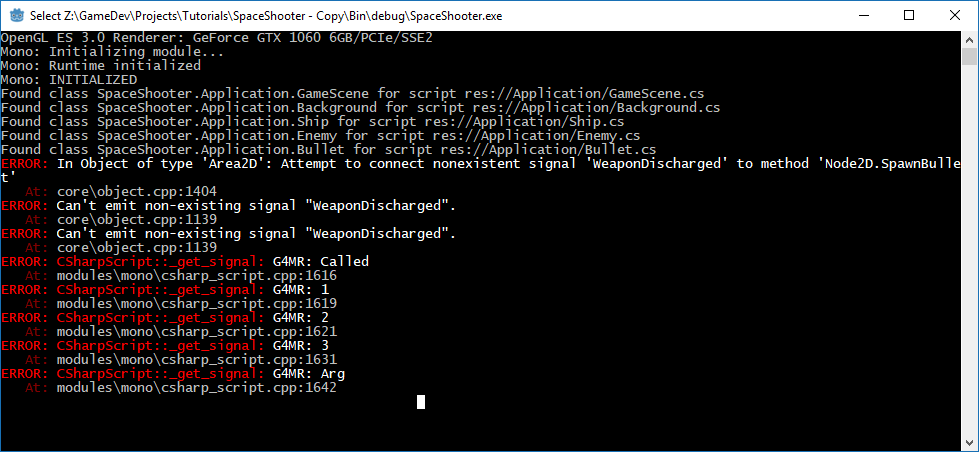
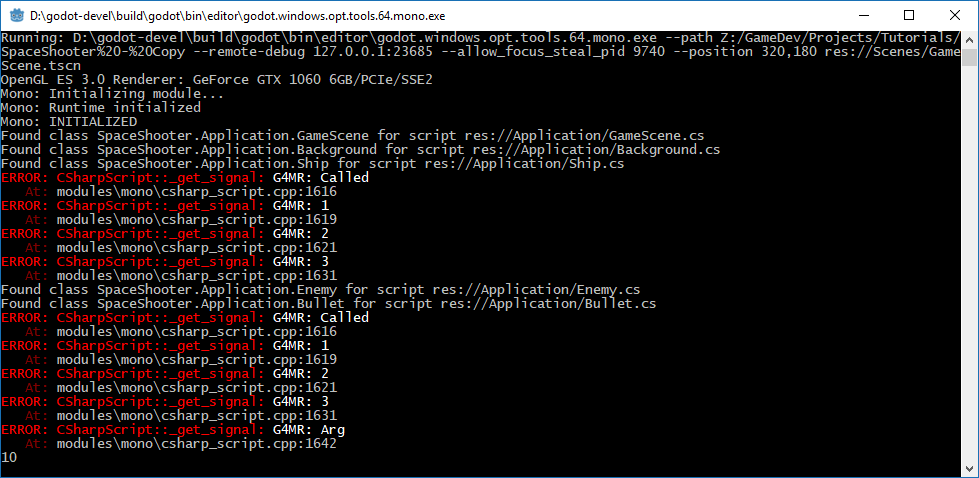
I basically just updated the _get_signal to post a few ERR_PRINTS just to see me stepping into each if statement here (no idea how to debug the editor/export templates) and when I built the editor off of 8bf5b502223d48ee1b7b88ab8613be7bacbb63d2 (since more recent commits were bugged) the editor showed me that's how the signals are being called.
Well in the debug export template, only the instanced signal annotation was loaded via ScriptInstance *CSharpScript::instance_create(Object *p_this) which makes sense and the ship annotation not being loaded also make sense because it's only called in the reload assemblies if needed method so outside of the editor at runtime that code never gets executed. Hope that helps.
Here's a screenshot of the editor when I ran the test.
Edit: Working on a PR
exts
on 30 Jun 2018
This can be closed @neikeq
I made some linux builds that work :) https://g4mr.itch.io/godot-export-test and my windows 10 build work as well with that PR change.
exts
on 2 Jul 2018
Can't be closed before the PR is merged :)
akien-mga
on 2 Jul 2018
Related issues
 adolson
·
87Comments
adolson
·
87Comments
 diiiiiiiii
·
87Comments
diiiiiiiii
·
87Comments
 Calinou
·
219Comments
akien-mga
·
366Comments
Calinou
·
219Comments
akien-mga
·
366Comments
 blurymind
·
192Comments
blurymind
·
192Comments
Most helpful comment
I could reproduce this using the last commit 4da621603eaf4b85dbaacb64a010ec2e62574ec5 from master using this example:
Although 7 out of 10 tries it will just "work", sometimes the signal will not connect giving me this error:
Inside the editor everything works just fine, I could only reproduce this when exporting the project using both debug and release templates