Godot: Keeping a control centered in it's parent is a hassle
Godot version:
3.1 master branch
Issue description:
With the complex anchors/margins/size/position/pivot system in Godot 3.x you would think that it would be easy to set a control to be centered in its parent and keep it that way.
However if that control has to have its size changed, then the only way to keep it centered is to write additional code to 'recenter' it each time its size changes.
This also applies to designing a UI in the editor. CenterContainers don't seem to re-center the item for you when the size changes, only when the minsize changes. I don't really understand why.
What I think should be done is that when a control's size changes, it should look at the current Anchor settings and respect them. For example if the anchors corresponds to 'Top Left' then the width should increase to the right. If the anchors correspond to 'Top Right' then the width should increase to the left. If it corresponds to 'Center' then width should increase to the left and right equally Etc. It should be done like this when you're dragging to resize, when you edit the size in the inspector and when the control's size is changed in code.
See below for gif of trying to keep a control centered
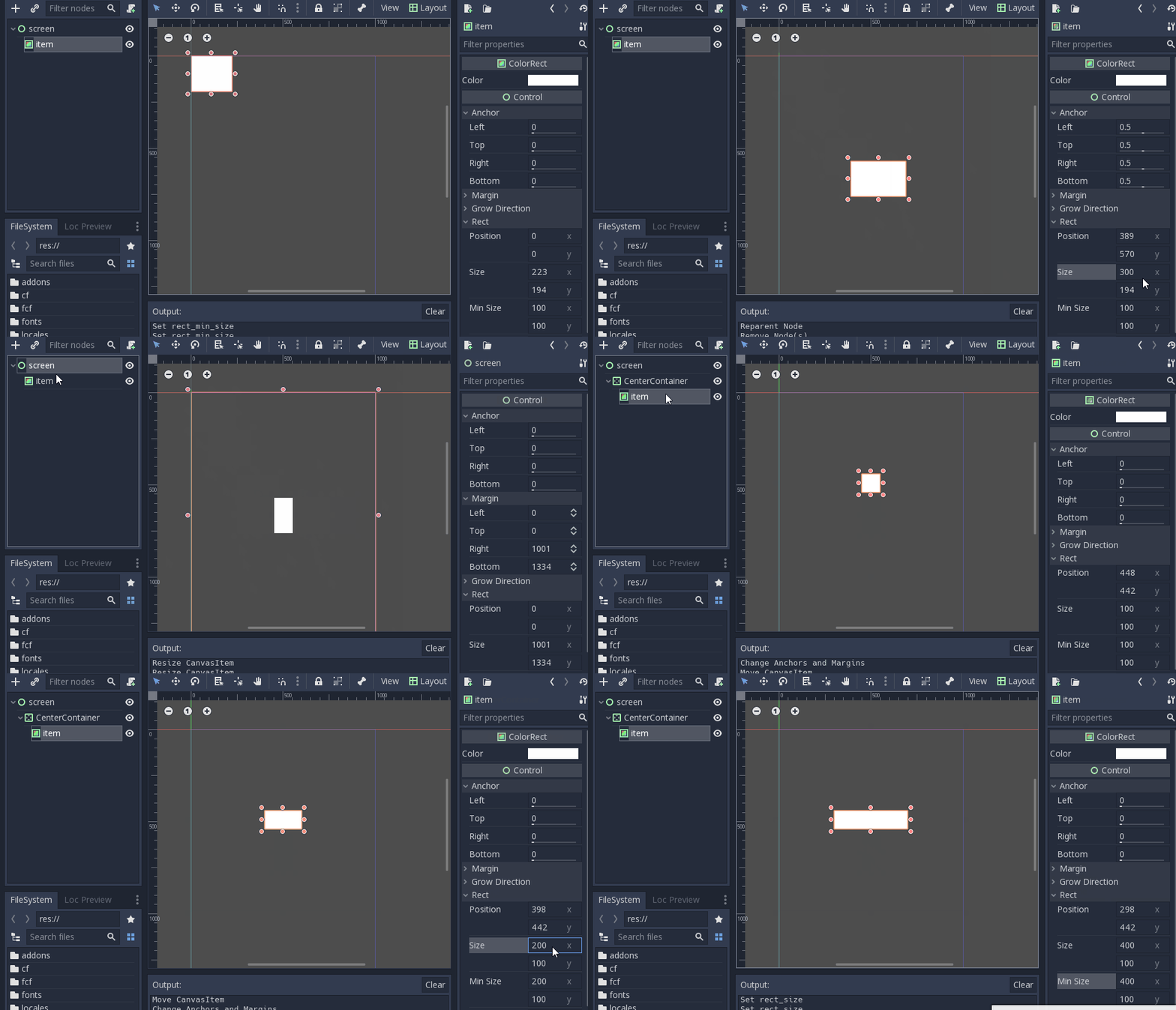
Even during ui design, this is a bit irritating as when you adjust something's size you have to keep 'recentering' it.
In some ways in HTML/CSS it is actually easier to position things than this.
 chanon
All 5 comments
They are several points your question:
- I kind of agree that changing a node's size should use the anchor position to grow the node in the appropriate direction. I might look into it.
- The anchors and margins have no meaning when child of a container. I think I will disable editing nodes that are child of a container. Only the minimum size is taken into account in such case.
- we cannot change the editor behaviour regarding resizing a node. You should be able to grow a node in both direction (thus kept centered) if you press the ALT key while dragging.
 groud
on 2 Jun 2018
groud
on 2 Jun 2018
I tried implementing this in the pull request above and it works pretty nicely, except drag-resize ui needs to be adjusted.
chanon
on 2 Jun 2018
Shouldn't this be handled by the Grow Direction settings?
 bojidar-bg
on 3 Jun 2018
bojidar-bg
on 3 Jun 2018
I did try using Grow Direction but it doesn't seem to have any effect. I think Grow Direction is used only when it is in a container? Here the controls are mostly not in a container. I have no idea how Grow Direction works BTW.
I feel there are so many properties that one has to learn in 3.x's positioning/container system and it is all pretty confusing and unlike any other system I've seen. But I guess it is what it is and I just have to get used to it.
It just feels hard to get it to do what you want.
Anyways, set_size as currently implemented in master does not look at Grow Direction. It always adds size to right and bottom. My pull request above adds size to left/right/top/bottom in the correct ratio according to the anchor settings.
chanon
on 3 Jun 2018
 mitchcurtis
on 28 Apr 2019
mitchcurtis
on 28 Apr 2019
Related issues
 SleepProgger
·
3Comments
SleepProgger
·
3Comments
 blurymind
·
3Comments
blurymind
·
3Comments
 Spooner
·
3Comments
Spooner
·
3Comments
 ducdetronquito
·
3Comments
ducdetronquito
·
3Comments
 EdwardAngeles
·
3Comments
EdwardAngeles
·
3Comments
Most helpful comment
I did try using Grow Direction but it doesn't seem to have any effect. I think Grow Direction is used only when it is in a container? Here the controls are mostly not in a container. I have no idea how Grow Direction works BTW.
I feel there are so many properties that one has to learn in 3.x's positioning/container system and it is all pretty confusing and unlike any other system I've seen. But I guess it is what it is and I just have to get used to it.
It just feels hard to get it to do what you want.
Anyways,
set_sizeas currently implemented in master does not look at Grow Direction. It always adds size to right and bottom. My pull request above adds size to left/right/top/bottom in the correct ratio according to the anchor settings.