Godot: Filmic tone mapping does not work correctly
Godot 3.0.2
Windows 10, GTX 1070
I have compared Filmic with Blender and the tone mapping in Godot with an HDRI map and Godot is not correct, the result is almost the same as the Linear tone mapping. I have used it in a new project with all the default settings (so the panorama is in HDR).
Here are the two software with Filmic, at the left it's Blender with the correct tone mapping:

You can download the .HDR map to test it here: https://hdrihaven.com/hdri/?c=skies&h=kiara_1_dawn
 Linko-3D
All 8 comments
~The main (but not the only) problem is that you can't set the whitepoint high enough because Godot is limiting the value to a maximum of 16.0 - which in this implementation is definitely not enough to soften the highlights (it basically looks like there's no tonemapping).~ edit: see my next comment
Tonemapping and Bloom in general is implemented pretty badly in my opinion. None of the Tonemapping operators provides a high enough whitepoint, the ACES operator plain out ignores it and the implementations of all of them inside the shaders look very copy-pasty.
Bloom is also blended in a way that doesn't make a lot of sense to me. Internally it uses HDR but it's blended after the tonemapping with other blending modes like "soft light", loosing all the benefit from HDR and taking away the "physically based" aspect.
I once changed those things in a test and got results that I much preferred:
built-in filmic tonemapper vs custom ACES tonemapper w/ better bloom
I might create an issue collecting and addressing those problems but I'm having trouble getting it all together without requiring to change large parts about the shader.
 CptPotato
on 23 May 2018
CptPotato
on 23 May 2018
so... #20096 fixed this issue? or is there something to be done? cc @CptPotato
 volzhs
on 12 Jul 2018
volzhs
on 12 Jul 2018
20096 fixes a related issue. Revisiting this one, I think my initial thought was wrong (about the whitepoint being too low).
It seems like the overexposure is caused by the way glow is blended with the image and it's unrelated to the whitepoint value (if you turn off glow it looks a lot more like you'd expect). So I guess this is more of an issue with the blending modes.
I thought about adding one or two new blending modes that are physically based and would not have this problem but these are not part of the PR mentioned above.
CptPotato
on 12 Jul 2018
Thanks for the explanation. :smiley:
volzhs
on 12 Jul 2018
I'm experiencing this same issue.
Godot 3.1.1 and 3.2.dev.custom_build.df17cf0
Windows 7/64
Intel HD 4400
Glow is off.
Project: 3D materials demo with items hidden, rotate to look at the sun.
On the right of the image below are all four tone mapping modes in Godot. The HDR is a little underexposed, so the last one is Filmic w/ exposure at 2. The sky is blown out in all.
On the left is blender showing the default oversaturated and blown out mode, filmic mode, and filmic w/ light strength at 2. The latter two being what I would hope to see in Godot. Is there a setting I need to turn on or off?
Color representation looks fine in Godot (though the sky might be a little oversaturated - not shown here), but the tone mapping does not look fine. Instead of tonemapping, it is clipping.
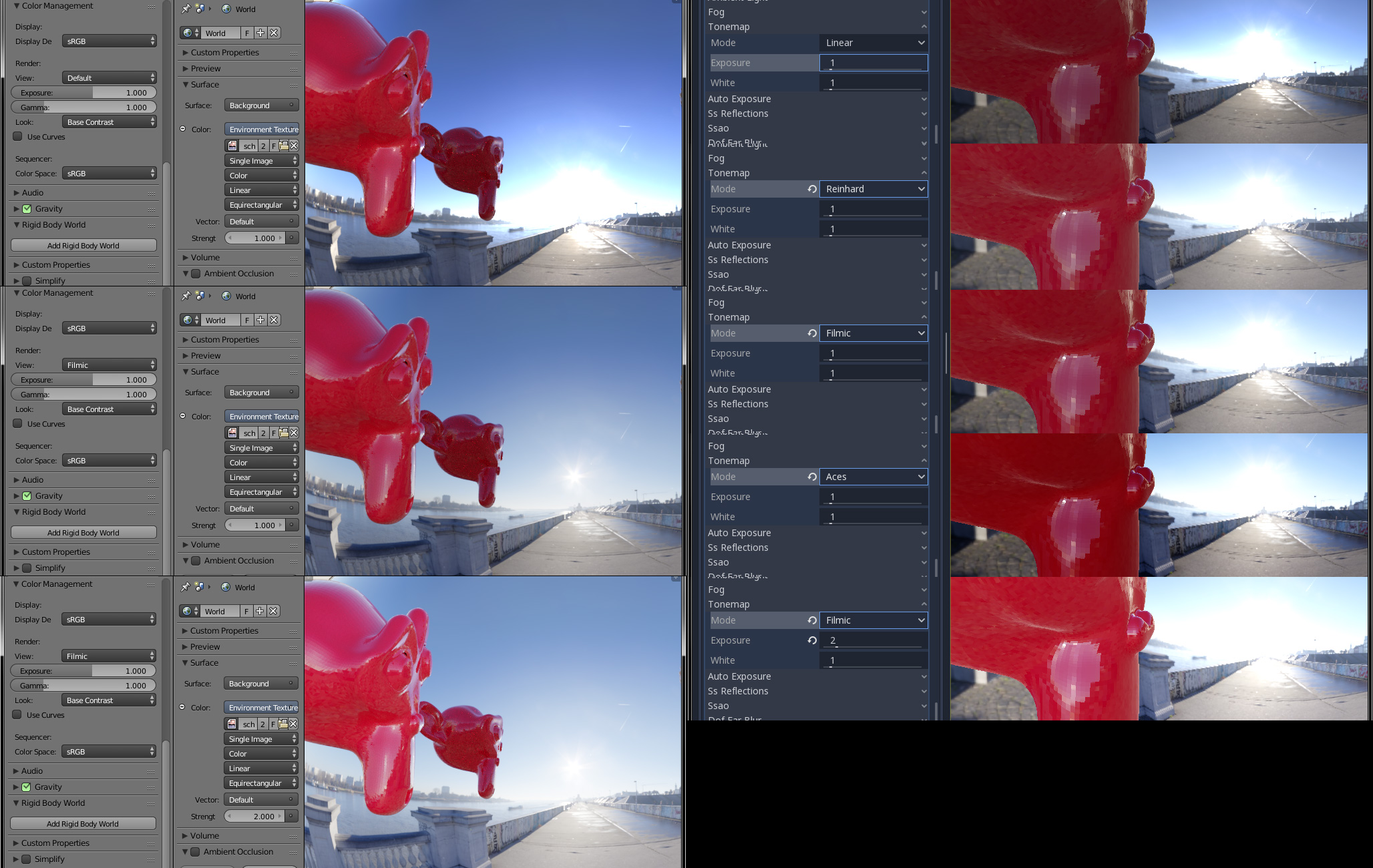
Edit: Clarification
 tinmanjuggernaut
on 29 May 2019
tinmanjuggernaut
on 29 May 2019
Increase the white value, that should do the trick.
CptPotato
on 29 May 2019
Indeed it does. I bumped it up and got the expected results. Thank you sir!
tinmanjuggernaut
on 29 May 2019
The maximum white value should be detected automatically like other engines do.
Linko-3D
on 10 Jun 2019
Related issues
 ducdetronquito
·
3Comments
ducdetronquito
·
3Comments
 SleepProgger
·
3Comments
SleepProgger
·
3Comments
 Zylann
·
3Comments
Zylann
·
3Comments
 mooseyfaith
·
3Comments
mooseyfaith
·
3Comments
 ndee85
·
3Comments
ndee85
·
3Comments
Most helpful comment
~The main (but not the only) problem is that you can't set the whitepoint high enough because Godot is limiting the value to a maximum of 16.0 - which in this implementation is definitely not enough to soften the highlights (it basically looks like there's no tonemapping).~ edit: see my next comment
Tonemapping and Bloom in general is implemented pretty badly in my opinion. None of the Tonemapping operators provides a high enough whitepoint, the ACES operator plain out ignores it and the implementations of all of them inside the shaders look very copy-pasty.
Bloom is also blended in a way that doesn't make a lot of sense to me. Internally it uses HDR but it's blended after the tonemapping with other blending modes like "soft light", loosing all the benefit from HDR and taking away the "physically based" aspect.
I once changed those things in a test and got results that I much preferred:
built-in filmic tonemapper vs custom ACES tonemapper w/ better bloom
I might create an issue collecting and addressing those problems but I'm having trouble getting it all together without requiring to change large parts about the shader.