Godot: ViewportTexture is unusuable inside shaders
Godot version:
3.0.2
OS/device including version:
Ubuntu 17.04 gpu: nvidiaGTX1060
Issue description:
I want to render some parts of ViewportTexture on TextureRect control with shaders.
Unfortunately it seems texture fetched from viewport is unusuable with shaders for some reason (its rendering as black)
Here is my setup:
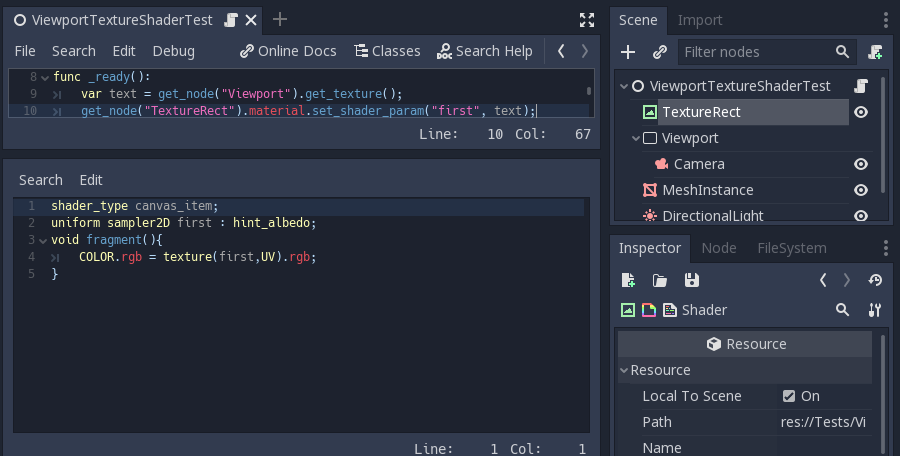
I will be really grateful for any help.
Steps to reproduce:
- Create new scene with
Nodetype and 'World' name as root - Add
TextureRect, loadtextureproperty (godot icon might be used) and selectexpandoption - Add
Viewportnode to 'World', set it's size to match window size - Add
Cameranode toViewport - Add some 3d elements to 'World' node so camera will have something to render
- Create new shader material in
TextureRectand attach this shader:
shader_type canvas_item;
uniform sampler2D first : hint_albedo;
void fragment(){
    COLOR.rgb = texture(first,UV).rgb;
}
- Create new script in World and attach this code:
func _ready():
    var text = get_node("Viewport").get_texture();
    get_node("TextureRect").material.set_shader_param("first", text);
- Run the scene and observe black background
Minimal reproduction project:
ViewportShaderTest.zip
 kubecz3k
All 14 comments
https://github.com/godotengine/godot/issues/7998 might be somehow related, but it's worth to mention that I haven't found any way to use ViewPort texture informations inside shaders (local to scene is not working)
kubecz3k
on 17 Mar 2018
On step 6 you provide some shader code, but one of the lines has an incomplete hint_? Is that intentional?
 LikeLakers2
on 18 Mar 2018
LikeLakers2
on 18 Mar 2018
Have you tried comparing with the demo projects like 2d_in_3d and gui in 3d
that use viewports? So far they have worked fine for me but i’m nowhere
near a computer right now to test.
On Sun, 18 Mar 2018 at 3:47 pm, LikeLakers2 notifications@github.com
wrote:
On step 6 you provide some shader code, but one of the lines has an
incomplete hint_? Is that intentional?—
You are receiving this because you are subscribed to this thread.
Reply to this email directly, view it on GitHub
https://github.com/godotengine/godot/issues/17593#issuecomment-373972796,
or mute the thread
https://github.com/notifications/unsubscribe-auth/AB2vaTnMKp64ucBW5bPpNcJMRwCOgzjQks5tfebigaJpZM4Su-KK
.>
Kindest regards,
Bastiaan Olij
https://www.facebook.com/bastiaan.olij
https://twitter.com/mux213
https://www.youtube.com/channel/UCrbLJYzJjDf2p-vJC011lYw
https://github.com/BastiaanOlij
 BastiaanOlij
on 18 Mar 2018
BastiaanOlij
on 18 Mar 2018
@LikeLakers2 Good catch, but it seems it's copy paste error (in sample project it's good). I will correct the first post.
@BastiaanOlij I know those demos, but none of them is using ViewportTexture inside the shader... Also I have already implemented split screen with the use of the ViewPorts and it's working fine. Unfortunately that kind of 'manual' split screen is not working well in my game and I decided that I need to implement 'dynamic split screen' (https://youtu.be/gejkcv8jtI0?t=1m27s). I even already have some of proof concept shader that works for 'normal' ordinary textures...
kubecz3k
on 18 Mar 2018
Ah I know the split screen effect, it's pretty cool.
I have no idea why the viewport texture isn't working, it's worked for me in the past but can't get your sample code to work. I'll have to play around with it some more... I was wondering if the 2D stuff was also getting rendered to the viewport blanking it out or something...
BastiaanOlij
on 18 Mar 2018
To be clear, using get_node("Viewport").get_texture(); outside the shader is working for me.. (I was able to use that texture inside _draw method of control node (that's how I implemented first version of the split screen). The problem occurs when I try to use this data inside the shader.
kubecz3k
on 18 Mar 2018
I did some testing and it seems that assigning a ViewportTexture (for the viewport you want to render) to the TextureRect in the inspector fixes the issue. My guess is that ViewportTexture ensures the viewport is rendered, otherwise the viewport has no reason to do so.
 JFonS
on 19 Mar 2018
JFonS
on 19 Mar 2018
@JFonS any chance for a sample project with this workaround? I was able to render successfully the Viewport in the editor this way, but after running the program I still have black screen...
kubecz3k
on 19 Mar 2018
@JFonS Oh, actually that was a good hint, the process is little more complicated but I think I have indeed found a workaround with your hint. I will give more details when I test this better. Thank you!
kubecz3k
on 19 Mar 2018
I just opened your sample project and assigned a ViewportTexture to the TextureRect, nothing special.
JFonS
on 19 Mar 2018
@JFonS yes you are right, it seems that Viewport node does not render texture if it's not sure that this texture is visible on the screen.
In my case when I want to have 2 viewport textures in one shader I need to create additional 'artificial' sprites with texture property set as ViewportTexture that are linked to two different ViewPort nodes, and then I also need to ensure that those sprites are rendered on the screen.
I think the engine in such case should also check if texture of given ViewPort is connected as a parameter to any shader material and if this material is rendered or not.
kubecz3k
on 19 Mar 2018
You need to set the viewport update mode to Always if not it won't update and will be black.
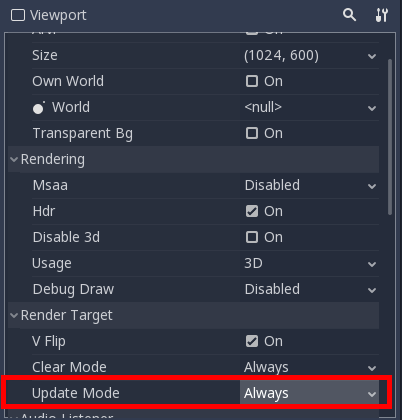
there's no need to add the texture via code, using a ViewportTexture in the first uniform parameter works too as long as you set the Local to scene in both the shader and the ViewportTexture
 mrcdk
on 19 Mar 2018
mrcdk
on 19 Mar 2018
@mrcdk Oh so awesome. Thank you a lot for this hint!
I will close this issue and open new one that will be more to the point: https://github.com/godotengine/godot/issues/17651
kubecz3k
on 20 Mar 2018
Once again, great thanks to all the people that were involved in this issue. I love you guys :heart:
kubecz3k
on 20 Mar 2018
Related issues
 diiiiiiiii
·
87Comments
diiiiiiiii
·
87Comments
 Angluca
·
100Comments
Angluca
·
100Comments
 nunodonato
·
143Comments
nunodonato
·
143Comments
 Calinou
·
219Comments
Calinou
·
219Comments
 nicklunt
·
107Comments
nicklunt
·
107Comments
Most helpful comment
@JFonS yes you are right, it seems that Viewport node does not render texture if it's not sure that this texture is visible on the screen.
In my case when I want to have 2 viewport textures in one shader I need to create additional 'artificial' sprites with
textureproperty set asViewportTexturethat are linked to two different ViewPort nodes, and then I also need to ensure that those sprites are rendered on the screen.I think the engine in such case should also check if texture of given ViewPort is connected as a parameter to any shader material and if this material is rendered or not.