Godot: TileMap editor "Delete" shortcut not working
Godot version:
3.0
OS/device including version:
Windows 10
Issue description:
Whenever I attempt the CTRL-D or CTRL-B tilemap hotkeys they fail.
In the case of CTRL-D, the tilemap node is duplicated.
Steps to reproduce:
Open tilemap, attempt to select or duplicate tiles via hotkeys.
 ElfEars
All 23 comments
Same issue here. My world building time has decreased several times because of this. 🙁
 wingedadventurer
on 11 Mar 2018
wingedadventurer
on 11 Mar 2018
Same issue, apparently only the "Pick Tile" hotkey works.
 JohnPablok
on 1 Apr 2018
JohnPablok
on 1 Apr 2018
@akien-mga This issue was already fixed on master branch. Tested with 9ad180029876a53747df577d8925a055f6b9687e
 guilhermefelipecgs
on 3 Apr 2018
guilhermefelipecgs
on 3 Apr 2018
Thanks - is it still reproducible in 3.0.2?
 akien-mga
on 3 Apr 2018
akien-mga
on 3 Apr 2018
Yes, in 3.0.2 the hotkeys doesn't work yet.
guilhermefelipecgs
on 3 Apr 2018
Like @guilhermefelipecgs said, it's fixed in the latest master branch. 🙂
Another problem though, when using T A S (Transpose, Mirror X, Mirror Y) shortcuts in tilemap, those 4 "Rotate X degrees" icons don't change. They change normally when you click with mouse.
wingedadventurer
on 4 Apr 2018
Another problem though, when using T A S (Transpose, Mirror X, Mirror Y) shortcuts in tilemap, those 4 "Rotate X degrees" icons don't change. They change normally when you click with mouse.
Could you open another issue for that?
akien-mga
on 4 Apr 2018
@akien-mga done.
wingedadventurer
on 4 Apr 2018
Another issue that might be related to this is that there seems to be no way to get out of tilemap editing mode. Pressing Q, W, E seems to put you in the respective modes(slect, move, rotate) and the cursor changes, but when you click and drag you just paint tiles. This happens on 3.0.2 and 3.0.3-rc2 at least.
Let me know if you want me to open a separate issue for this.
Also, the G key is assigned to the paint bucket but also to show grid. Show grid seems to be the action being performed on key press.
Same goes for the Delete key. If you select some tiles and press Delete you get a popup to delete the selected node(the tilemap) rather than deleting the selected tiles. This also happens when you select a node, then some file in the file manager and press delete, which has caused me to delete nodes by mistake quite a few times.
I think there's a general issue with shortcuts assigned to more than one action that depend on context to work properly.
 noidexe
on 18 May 2018
noidexe
on 18 May 2018
Is there an alternative to select, duplicate and move multiple tiles till this gets fixed?
 Omiminpo
on 9 Jun 2018
Omiminpo
on 9 Jun 2018
@Omiminpo there is a "Tilemap" drop-down menu in the right part of the top bar when you have a tilemap selected. It has those options.
noidexe
on 9 Jun 2018
@Omiminpo
not sure how to duplicate a selection. but if you do ctrl+b, and then select your tiles then do ctrl+x, then ctrl+z, you can duplicate. sneaky!
just found this out on accident lolz
 ghost
on 11 Sep 2018
ghost
on 11 Sep 2018
Still a problem in 3.0.6 even after changing the hot keys from Control+B and Control+D to Alt+B and Alt+D.
 Dodgetgo
on 29 Oct 2018
Dodgetgo
on 29 Oct 2018
After looking around, seems like this is caused by #12505. Maybe the canvas_item_editor changes should be cherrypicked?
 bojidar-bg
on 4 Dec 2018
bojidar-bg
on 4 Dec 2018
CC @groud
akien-mga
on 4 Dec 2018
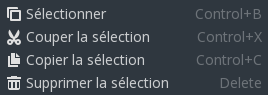
Please someone correct me if I'm wrong but those shortcuts are working on master right now (db33b03f4910431f859454260e5828a9f306216f). I worked with tilemap shortcuts a few months ago in #21272 and I believe it was in the same state as it is currently.
The thing is, it's really convoluted: for them to work the Select tool needs to be active (understand: you need to hit Ctrl+B one time), and as I was saying in #21123 there's no way in the current UI to know what is the active tool (and the default tool is not at all Select)...
One more thing, since the aforementioned PR the shortcuts for Copy and Cut have been moved from Ctrl-D and Ctrl-M to Ctrl-C and Ctrl-X.
 paulloz
on 7 Jan 2019
paulloz
on 7 Jan 2019
I just tried it and it seems to be working fine now.
noidexe
on 7 Jan 2019
Ahem. It is fixed on _master_, but still present in _3.0.x_. That's why it is open.
bojidar-bg
on 7 Jan 2019
bojidar: of course.
I just thought it was a good place to bring up a related UI issue and note that (as 3.1 should be coming shortly) the shortcuts listed in the issue have been changed.
paulloz
on 7 Jan 2019
Does not work in 3.2 alpha 3 either.
Strangely when you select a bunch of tiles then press CTRL-C you can't paste them unless you press and hold CTRL-C when you want to. @akien-mga
 AtomaFajrovulpo
on 31 Oct 2019
AtomaFajrovulpo
on 31 Oct 2019
Still exists on 3.2.1
 Beliriel
on 20 Mar 2020
Beliriel
on 20 Mar 2020
@Beliriel Some TileMap editor default shortcuts were changed in 3.2.1, see https://github.com/godotengine/godot/pull/36054. Press I to pick a tile and M to make a rectangle selection.
 Calinou
on 20 Mar 2020
Calinou
on 20 Mar 2020
I want to delete Tiles from Tilesets/Tilemaps. Delete doesn't work.
Beliriel
on 21 Mar 2020
Related issues
 EdwardAngeles
·
3Comments
EdwardAngeles
·
3Comments
 mefihl
·
3Comments
mefihl
·
3Comments
 ivanskodje
·
3Comments
ivanskodje
·
3Comments
 blurymind
·
3Comments
blurymind
·
3Comments
 RebelliousX
·
3Comments
RebelliousX
·
3Comments
Most helpful comment
Same issue here. My world building time has decreased several times because of this. 🙁