Godot: Collision shape transformation bug
Godot version:
Godot 3.0 RC2 winx64
OS/device including version:
Issue description:
I was like coding my first game using tutorial series by KidsCanCode. In third part of the series there was a moment at 7:35 where we were transforming collision shape 2D to fit the players scale (https://www.youtube.com/watch?v=zWAmbgqOWkI). I was doing all exactly the same way, except transforming it not by the right horisontal button, but with the top (vertical) one. And the collision shape just disappeared. Then(without using CTRL + Z) I tried to reshape it with the right button, it appeared back but looked very strange and smashed.
Steps to reproduce:
Just make everything as in first three parts of KidsCanCode tutorial and when you get to the moment I mentioned before, try to rescale collision shape with the upper button, not right one.
Minimal reproduction project:
 MrSaberhagen
All 10 comments
Just popping in to note to anyone reading this issue: This tutorial from KidsCanCode is more or less the Your First Game tutorial of the Godot docs, so you don't need to follow the video tutorial.
EDIT: https://github.com/kidscancode/Godot3_dodge Turns out KCC put the project on GitHub. Open Player.tscn and try making the CollisionShape smaller using the top circle. It'll disappear suddenly once it gets small enough. Then grab the right handle and start making that smaller, and eventually it will look smashed and very weird, as the original poster said. (Go slowly when making it smaller from the right handle -- it's a bit hard to notice!)
 LikeLakers2
on 26 Jan 2018
LikeLakers2
on 26 Jan 2018
I'm also noticing that the console spams this upon the polygon disappearing:
ERROR: Bad Polygon!
   At: servers\visual\visual_server_canvas.cpp:675
with it being spammed once more every time the size of the polygon is changed via the handles.
LikeLakers2
on 26 Jan 2018
I can confirm that either.
I feel odd when using that for the first time, not sure what it's missing suddenly.
It happens to me when I'm trying the First Game Tutorial by the Godot Engine Documentation
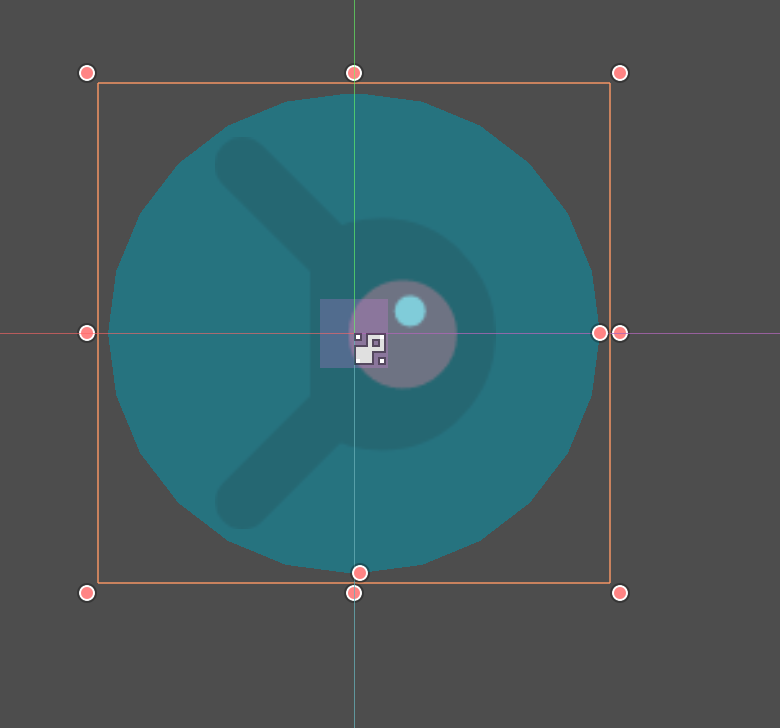
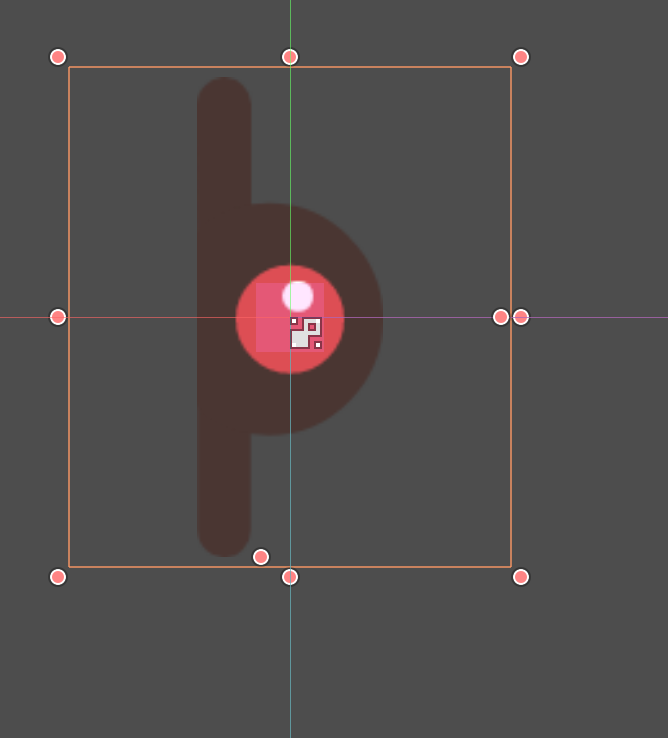
@LikeLakers2 made a good point on the console output. Whenever I adjust the collisionShape close to a 'Circle' shape, it throws the bad polygon message. (Since I'm using a CapsuleShape2D, I assume that's the logic behind, that it can't be a circle)
hence posting my finding above here,
 divineforge
on 3 Feb 2018
divineforge
on 3 Feb 2018
Tested in master, it still disappears.
 Piet-G
on 15 Sep 2018
Piet-G
on 15 Sep 2018
Had the same issue just now when trying the First Game tutorial on the Godot website.
 jonathan-alvaro
on 31 Oct 2018
jonathan-alvaro
on 31 Oct 2018
The issue persist. Anyone know how to work around it?
 marco-vito
on 18 Jun 2019
marco-vito
on 18 Jun 2019
I've found the same issue, and bypassed it by changing the rotation of the shape. Someone on Discord (thank you, WiggleWizard) sugested there should be an issue trying to set the walls to be smaller than the arcs.
marco-vito
on 18 Jun 2019
Found the reason, when you drag it down, the capsule shape's height will be a negative value, then will cause it can't be painted.
 raphael10241024
on 21 Jun 2019
raphael10241024
on 21 Jun 2019
Same here, once the height goes below 0 the issue occurs - limit it so that it can't go below 0?
 epuscasu
on 23 Jun 2019
epuscasu
on 23 Jun 2019
Fixed by #38617
 KoBeWi
on 10 Jul 2020
KoBeWi
on 10 Jul 2020
Related issues
 Spooner
·
3Comments
Spooner
·
3Comments
 mefihl
·
3Comments
mefihl
·
3Comments
 Zylann
·
3Comments
Zylann
·
3Comments
 blurymind
·
3Comments
blurymind
·
3Comments
 kirilledelman
·
3Comments
kirilledelman
·
3Comments
Most helpful comment
I'm also noticing that the console spams this upon the polygon disappearing:
with it being spammed once more every time the size of the polygon is changed via the handles.