Godot: Ogg Vorbis stream not signalling finished
Godot V3.0 RC1
Windows 10
Ogg Vorbis audio stream not signalling finished.
Steps to reproduce:
Add an audio stream, assign finished to a function. Play a sound, finished never gets call, the original sound starts playing again
Since this was a converted project from 2.1.4, I reassigned the "finished" signal, however it never gets called, even with a breakpoint set.
Minimal reproduction project:
oggstreamrc1.zip
 imekon
All 25 comments
did you try disabling loop?
On Sat, Jan 20, 2018 at 1:09 PM, Pete Goodwin notifications@github.com
wrote:
Godot V3.0 RC1
Windows 10
Ogg Vorbis audio stream not signalling finished.
Steps to reproduce:
Add an audio stream, assign finished to a function. Play a sound, finished
never gets call, the original sound starts playing againSince this was a converted project from 2.1.4, I reassigned the "finished"
signal, however it never gets called, even with a breakpoint set.Minimal reproduction project:
oggstreamrc1.zip
https://github.com/godotengine/godot/files/1648965/oggstreamrc1.zip—
You are receiving this because you are subscribed to this thread.
Reply to this email directly, view it on GitHub
https://github.com/godotengine/godot/issues/15895, or mute the thread
https://github.com/notifications/unsubscribe-auth/AF-Z2xXlW49Y4nO0kea3d7ZUKVQqPsXWks5tMg_UgaJpZM4RlfNL
.
 reduz
on 20 Jan 2018
reduz
on 20 Jan 2018
To be more specific: .ogg files in Godot 3 are automatically assigned to loop. .wav files are not. You have to select the .ogg file in the FileSystem dock, and from the Import dock uncheck the Loop box then click re-import.
 Sslaxx
on 20 Jan 2018
Sslaxx
on 20 Jan 2018
Where's loop? I don't see it on AudioStreamPlayer
imekon
on 20 Jan 2018
You won't. It's controlled from the Import dock.
Here's a couple of pics to show a bit about what I said:
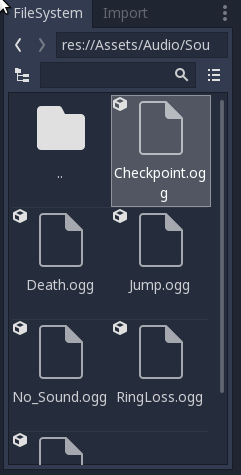
First, select the file you need from the FileSystem dock.
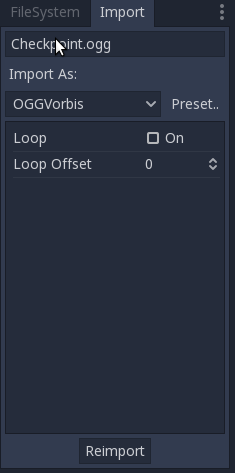
Second, go to Import, uncheck "Loop" and then click on Re-import.
Sslaxx
on 20 Jan 2018
That's a bit hard to find. I found the import window on the same panel as Scene in my setup.
imekon
on 20 Jan 2018
OK turning looping off had no effect. It doesn't generate a finished event and replays the original stream. No breakpoint is fired, and the "next" print message doesn't appear.
imekon
on 20 Jan 2018
In Godot 3, pretty much all non-native file formats are imported. You tweak
the settings in the import panel.
On Sat, Jan 20, 2018 at 2:12 PM, Pete Goodwin notifications@github.com
wrote:
That's a bit hard to find. I found the import window on the same panel as
Scene in my setup.—
You are receiving this because you commented.
Reply to this email directly, view it on GitHub
https://github.com/godotengine/godot/issues/15895#issuecomment-359186508,
or mute the thread
https://github.com/notifications/unsubscribe-auth/AF-Z2429C_HRiNDT7IL3uW5PdQCDUUflks5tMh6EgaJpZM4RlfNL
.
reduz
on 20 Jan 2018
Ah, never noticed that before.
imekon
on 20 Jan 2018
OK, just noticed. I can't turn looping off on import. The checkbox turns off, I move away from the Ogg file, go back, its back on again.
imekon
on 20 Jan 2018
Click on the button that says "Reimport".
Sslaxx
on 20 Jan 2018
Or do this in code:
onready var introStream = load("res://music/the ethereal night intro.ogg")
onready var loopStream = load("res://music/the ethereal night loop.ogg")

func _ready():
    introStream.loop = false
    loopStream.loop = false
It does generate the finished signal once (woohoo) but stops completely after that. Trying reimport.
imekon
on 20 Jan 2018
maybe, it's better to integrate import setting in file system dock... somehow
 volzhs
on 20 Jan 2018
volzhs
on 20 Jan 2018
It's still broken. Doesn't matter if I reimport or use the .loop syntax above. It now enters the finished callback ONCE then never again. The stream stops. I tried connect again in the callback, no effect.
extends PanelContainer

onready var introStream = load("res://music/the ethereal night intro.ogg")
onready var loopStream = load("res://music/the ethereal night loop.ogg")
onready var streamPlayer = $AudioStreamPlayer
onready var statusLabel = $Panel/StatusLabel

var count = 0

# func _ready():
#    introStream.loop = false
#    loopStream.loop = false

func _on_AudioStreamPlayerFinished():
    count += 1
    streamPlayer.stream = loopStream
    streamPlayer.play()
    statusLabel.text = "loop " + str(count)
    # connect("finished", streamPlayer, "_on_AudioStreamPlayerFinished")

func _on_PlayButtonPressed():
    streamPlayer.stream = introStream
    streamPlayer.play()
    statusLabel.text = "intro"
I've attached an updated version of the project, I recreated it from scratch in case it was related to exporting from 2.1.4
It plays the intro stream, then plays the loop stream, then stops. I could set the loop stream to looping I suppose, but what happens if I reuse this stream for different music, I wonder? Do I get the "finished" callback once then never again?
imekon
on 20 Jan 2018
I tried setting "the ethereal night loop.ogg" to looping, and that works, it keeps on playing, looping the second piece of music.
Stopping the stream and restarting works also. However, can't stream more than two pieces of music, the second piece must be set to looping and you only get the "finished" callback once after calling play. This sounds broken to me. What happens if I have three pieces of music I want to stream one after another?
imekon
on 20 Jan 2018
The problem is not changing streams. The problem here is calling play method inside the finished callback. I stripped down your attached project to this script (and using a two second ogg vorbis to speed up testing) which also fails to do multiple finished signals:
func _on_AudioStreamPlayerFinished():
    count += 1
    streamPlayer.play()
    statusLabel.text = "loop " + str(count)

func _on_PlayButtonPressed():
    count = 0
    streamPlayer.stream = introStream
    streamPlayer.play()
    statusLabel.text = "intro"
The problem here is the signal is rose when the stream finish and calls set_processing_internal(false) AFTER streamPlayer.play() is called (which calls set_processing_internal(true)). So, the result here is the processing_internal final value being false, and not emiting signals anymore.
A possible workaround in your code is replace streamPlayer.play() by streamPlayer.call_deferred("play"). I tested that and it works fine.
I don't know if this is a bug or we must only be careful using calls inside callbacks.
 robfram
on 20 Jan 2018
robfram
on 20 Jan 2018
That seems wrong to me, I'd expect to be able to play the sound again from within the signal callback, That would be one of its main uses. Would changing it so that set_processing_internal is set before the callback cause any issues?
Within a Finished() callback I'd expect streamPlayer.is_playing() to be false, but from what you said @robfram I'm guessing that's not the case? If so, I'd definitely call it a bug.
 Zephilinox
on 20 Jan 2018
Zephilinox
on 20 Jan 2018
It works though. It's not the same as V2.1.4 but that should work with call_deferred too, I assume?
If this is how you guys expect it to work, there needs to be documentation saying, "don't use play inside the finished handler, it may not work".
imekon
on 20 Jan 2018
@Zephilinox As I had tested briefly with this case, inside the callback streamPlayer.is_playing() returns false, but the processing_internal variable is set to true; when streamPlayer.play() is called, then the active variable will be set to true, and processing_internal too. But at some point, as the event ends its processing, the processing_internal is set to false.
@imekon @Zephilinox I don't know which is the expected behaviour, that's why I pointed the inner problem, a possible workaround, and I'm waiting for anyone with more experience to throw some light here. As far as it behaves right now, I agree with you both. It's a bug or lack of documentation.
Perhaps if the stream is active at the end of the callback, the processing_internal must be set to true, at it means the stream has been set to play again inside the callback function.
robfram
on 20 Jan 2018
i think the way the callback is emitted could probably be changed to allow
to call play() from within the callback
On Sat, Jan 20, 2018 at 5:44 PM, robfram notifications@github.com wrote:
@Zephilinox https://github.com/zephilinox As I had tested briefly with
this case, inside the callback streamPlayer.is_playing() returns false, but
the processing_internal variable is set to true; when streamPlayer.play()
is called, then the active variable will be set to true, and
processing_internal too. But at some point, as the event ends its
processing, the processing_internal is set to false.@imekon https://github.com/imekon @Zephilinox
https://github.com/zephilinox I don't know which is the expected
behaviour, that's why I pointed the inner problem, a possible workaround,
and I'm waiting for anyone with more experience to throw some light here.
As far as it behaves right now, I agree with you both. It's a bug or lack
of documentation.Perhaps if the stream is active at the end of the callback, the
processing_internal must be set to true, at it means the stream has been
set to play again inside the callback function.—
You are receiving this because you commented.
Reply to this email directly, view it on GitHub
https://github.com/godotengine/godot/issues/15895#issuecomment-359200744,
or mute the thread
https://github.com/notifications/unsubscribe-auth/AF-Z28GvPfZHf82ZqsA5E-BgUVzLZvOaks5tMlASgaJpZM4RlfNL
.
reduz
on 20 Jan 2018
Is that how 2.1.4 worked? Well... that's how it appeared to work, I called play and the stream played the next piece of music.
imekon
on 20 Jan 2018
I sent a PR #15910 to change the order of emit_signal and set_process_internal. The actual code sent first the signal, process all the callbacks, and then set process internal to false. I changed it to set process internal to false and then emit the signal and process all the callbacks.
if (!active || (setseek < 0 && !stream_playback->is_playing())) {
    active = false;
-   emit_signal("finished");
    set_process_internal(false);
+   emit_signal("finished");
 }
I don't know if this can have any collateral effect, as the callbacks will be executed with process internal set to false. If this could be a problem, I think we could do it differently, using the active status to change the set process internal using the orignal order this way:
if (!active || (setseek < 0 && !stream_playback->is_playing())) {
    active = false;
    emit_signal("finished");
    set_process_internal(active);
 }
 HummusSamurai
on 1 Feb 2018
HummusSamurai
on 1 Feb 2018
To be more specific: .ogg files in Godot 3 are automatically assigned to loop. .wav files are not.
Why?
 aaronfranke
on 16 Jan 2019
aaronfranke
on 16 Jan 2019
You won't. It's controlled from the Import dock.
Here's a couple of pics to show a bit about what I said:
First, select the file you need from the FileSystem dock.
Second, go to Import, uncheck "Loop" and then click on Re-import.
Thanks!
 robodraif
on 22 Mar 2020
robodraif
on 22 Mar 2020
Related issues
 testman42
·
3Comments
testman42
·
3Comments
 mooseyfaith
·
3Comments
mooseyfaith
·
3Comments
 timoschwarzer
·
3Comments
timoschwarzer
·
3Comments
 ivanskodje
·
3Comments
ivanskodje
·
3Comments
 kirilledelman
·
3Comments
kirilledelman
·
3Comments
Most helpful comment
You won't. It's controlled from the Import dock.
Here's a couple of pics to show a bit about what I said:

First, select the file you need from the FileSystem dock.
Second, go to Import, uncheck "Loop" and then click on Re-import.