Godot: Kinematic character slows down at certain areas
Godot version:
3.0 RC1
OS/device including version:
Arch Linux, Linux Mint
Issue description:
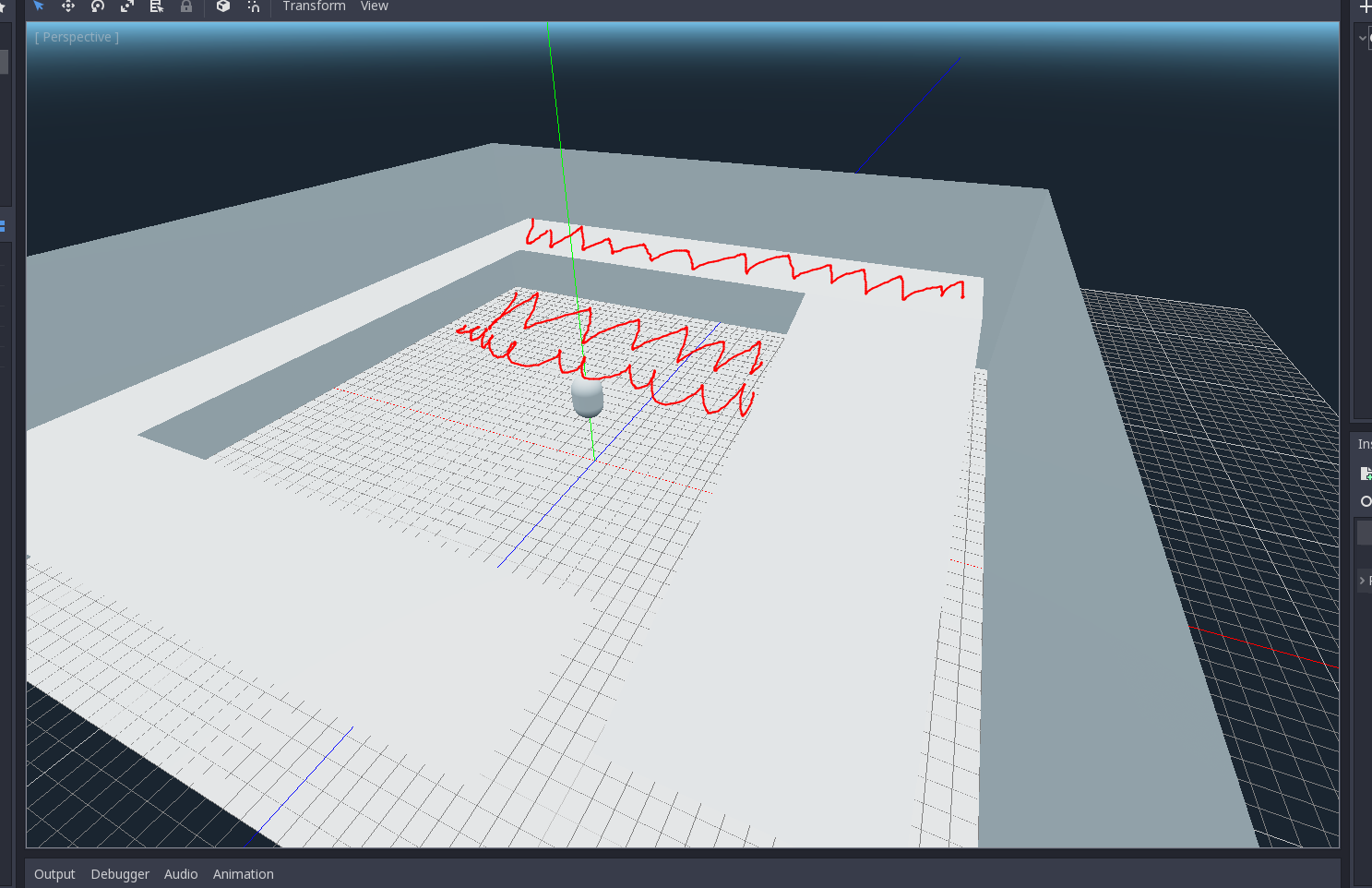
Kinematic character with move_and_slide() slows down at certain areas. Walking at marked areas reduces speed ~2 times. Tested on 2 machines with Linux, but on Windows it works well.
Steps to reproduce:
Try attached example
Minimal reproduction project:
test_kinematic_character.zip
 crym0nster
All 23 comments
Was also getting this, had me boggled because I was blaming my code which was for the most part simple, at least the movement was.
Can't confirm if a windows machine runs my project and since it's a larger private one I'm not into sharing but I could make a small example later today, as to what gives me this error
 jedStevens
on 15 Jan 2018
jedStevens
on 15 Jan 2018
Is this happening only with bullet physics?
 AndreaCatania
on 15 Jan 2018
AndreaCatania
on 15 Jan 2018
In transit atm, but I have not tried godot physics to compare. I will later
today.
On Jan 15, 2018 8:27 AM, "Andrea Catania" notifications@github.com wrote:
Is this happening only with bullet physics?
—
You are receiving this because you commented.
Reply to this email directly, view it on GitHub
https://github.com/godotengine/godot/issues/15740#issuecomment-357682598,
or mute the thread
https://github.com/notifications/unsubscribe-auth/AGNSGQ7ctBfgd1U4fImc9Yn6i78hLgNpks5tK1JNgaJpZM4ReRXZ
.
jedStevens
on 15 Jan 2018
I tested this with godot physics. and it stucks at a corner and couldn't move at all
 volzhs
on 15 Jan 2018
volzhs
on 15 Jan 2018
Is it possible that the problem is the mesh itself, I'll check it soon
AndreaCatania
on 15 Jan 2018
Potentially, I am using an auto generated mesh.
I'll use a blender made one next. What is best practices for a mesh for
this? Tris / Quads
On Jan 15, 2018 8:32 AM, "Andrea Catania" notifications@github.com wrote:
Is it possible that the problem is the mesh itself, I'll check it soon
—
You are receiving this because you commented.
Reply to this email directly, view it on GitHub
https://github.com/godotengine/godot/issues/15740#issuecomment-357683777,
or mute the thread
https://github.com/notifications/unsubscribe-auth/AGNSGTsyeOe5a86jgpwHzv5035vqpbZhks5tK1N_gaJpZM4ReRXZ
.
jedStevens
on 15 Jan 2018
I also got stuck in a corner with GodotPhysics. There was an error:
ERROR: _initialize_and_check_api_hashes: Mono: Core API hash mismatch!
At: modules/mono/mono_gd/gd_mono.cpp:259.
crym0nster
on 15 Jan 2018
You must use mesh composed by triangles, also the best shape type to use is a convex shape instead of a concave one since the solver is more lightweight.
However the concave shape should work perfectly then let me know if it doesn't.
AndreaCatania
on 15 Jan 2018
I triangulated mesh in Blender and it stopped slowing down on the ramp(the top thing marked red on screenshot), but on the floor - still slowing down. Also on Windows it runs without any problems at all
crym0nster
on 15 Jan 2018
And I tried converting mesh to convex collision shape(selected mesh and on toolbox "create convex static body") - it just created a box enclosing room, but no internal geometry
update: I separated floor from the room and created convex shape for it - now can walk normally on the floor
crym0nster
on 15 Jan 2018
It's possible for you to send here the blender file?
AndreaCatania
on 15 Jan 2018
I can provide my files around noon (Toronto time)
On Jan 15, 2018 9:25 AM, "Andrea Catania" notifications@github.com wrote:
It's possible for you to send here the blender file?
—
You are receiving this because you commented.
Reply to this email directly, view it on GitHub
https://github.com/godotengine/godot/issues/15740#issuecomment-357696678,
or mute the thread
https://github.com/notifications/unsubscribe-auth/AGNSGcyWFK-knbESQthVM-bhCvEMi94_ks5tK1_DgaJpZM4ReRXZ
.
jedStevens
on 15 Jan 2018
blend.zip
the first file is original room - just planes. second - with solidify and triangulate and splitted into several objects
crym0nster
on 15 Jan 2018
@crym0nster
Walking at marked areas reduces speed ~2 times.
Do you mean that the FPS drops or do you mean the body velocity slows?
I can't reproduce it on my machines, neither linux nor windows
AndreaCatania
on 15 Jan 2018
Velocity. I have seen that NPC (also kinematic character) slows down at these areas.
crym0nster
on 15 Jan 2018
@crym0nster can you make a video please?
AndreaCatania
on 15 Jan 2018
yes, I'll try
crym0nster
on 15 Jan 2018
https://www.youtube.com/watch?v=eQ6PhVPDL3g&feature=youtu.be sorry for quality. these numbers - current velocity. normally it should be 35, but it goes to 18 on horizontal plane for some reason
crym0nster
on 15 Jan 2018
Ok thanks you i let you know
AndreaCatania
on 15 Jan 2018
I was able to reproduce it, in order to fix it you should increase the safe margin from 0.001 to 0.005 in the kinematic body.
AndreaCatania
on 15 Jan 2018
Thanks, it works. So was it a bug or not? Because I tried it on Windows and there was no problem with default setting
crym0nster
on 15 Jan 2018
The problem was floating point precision, for this reason the margin is customizable
AndreaCatania
on 15 Jan 2018
Remember to close the issue if it's solved, and thanks you for the report
AndreaCatania
on 15 Jan 2018
Related issues
 bojidar-bg
·
3Comments
bojidar-bg
·
3Comments
 timoschwarzer
·
3Comments
timoschwarzer
·
3Comments
 gonzo191
·
3Comments
gonzo191
·
3Comments
 rgrams
·
3Comments
rgrams
·
3Comments
 nunodonato
·
3Comments
nunodonato
·
3Comments